Selling digital goods on Lavky.com is an effective way to earn passive income for designers, illustrators, and masterclass creators. The marketplace from Western Bid provides a complete technical infrastructure for uploading files, securely storing them, and automatic delivery to the buyer immediately after payment is confirmed. You do not need to manually send emails — the system will do everything for you 24/7.
If you sell a digital product, you can also do this freely on the Lavky marketplace! Create a listing, upload the file, set the number of downloads, and that’s it—you can sell it.
As a reminder, the Western Bid trading agency works with sellers and suppliers of digital goods at standard rates, but the terms of working with such clients differ from the terms of working with suppliers and sellers of physical goods.
Requirements for a digital product on Lavky.com
- The word “Digital” must be used in the product title
- Delivery methods are not required for digital products
- The word “Digital” must be used in the product description
- Files must be uploaded for the digital product
- The seller sets the number of downloads available to the buyer
- The system sends the buyer an email with a download link
- The buyer downloads the digital files via the link in the email
- The client must be the author-manufacturer of the digital product. Your works must be original and such that do not violate copyright laws.
- Please note that you must not include in the title, tags, or description of the listing the words HELP, DONATE, DONATION, CHARITY, SUPPORT – payment for such listings will be refunded.
- Settlements of funds for transactions received for digital goods are not available earlier than 3 days after the funds are credited. If the price of the digital product is over $100, settlement is possible after 15 days from the moment of crediting.
- Complaints filed by buyers to PayPal and Stripe are unequivocally resolved in favor of the buyer. When processing a payment refund through the Stripe system, the fee of this payment system is not refunded (regardless of the term – even if the payment and the refund are made on the same day).
- Western Bid reserves the right to impose stricter rules for working with a specific digital product seller or to completely terminate the service for a digital product seller client if it determines that the risk of working with such a seller exceeds the risk level defined by the Western Bid agency.
According to these requirements, you should configure your product.
Algorithm for filling out the digital product card on Lavky.com
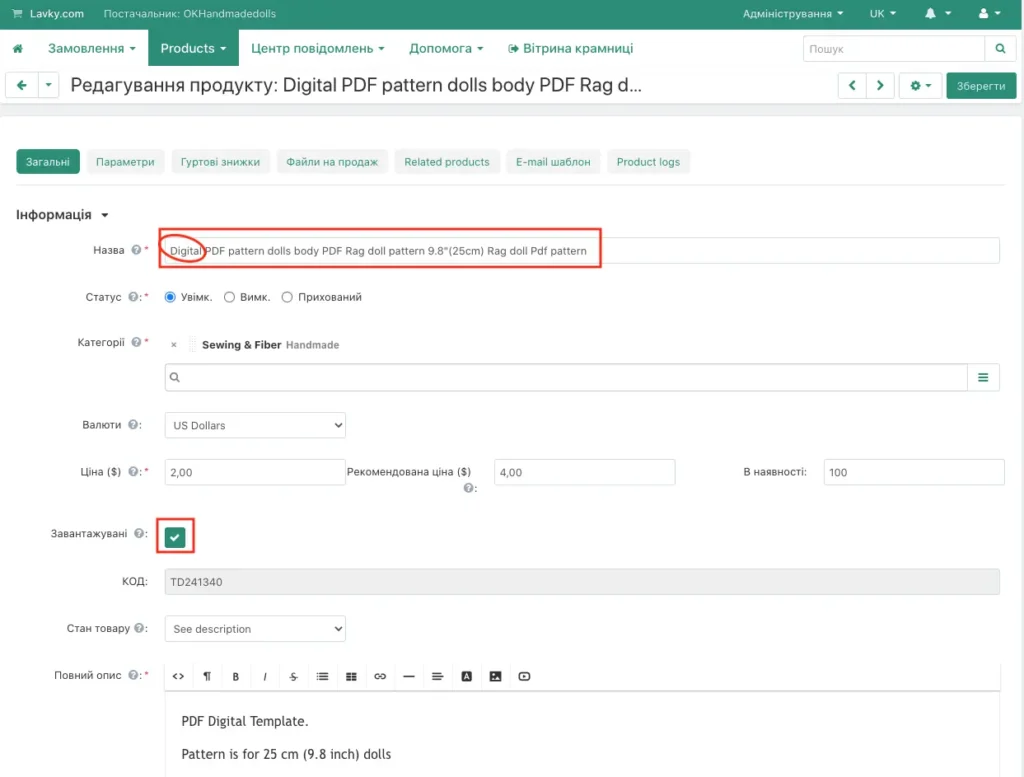
It is also necessary to tick the “Digital product” checkbox, and then postal shipping will not be calculated.
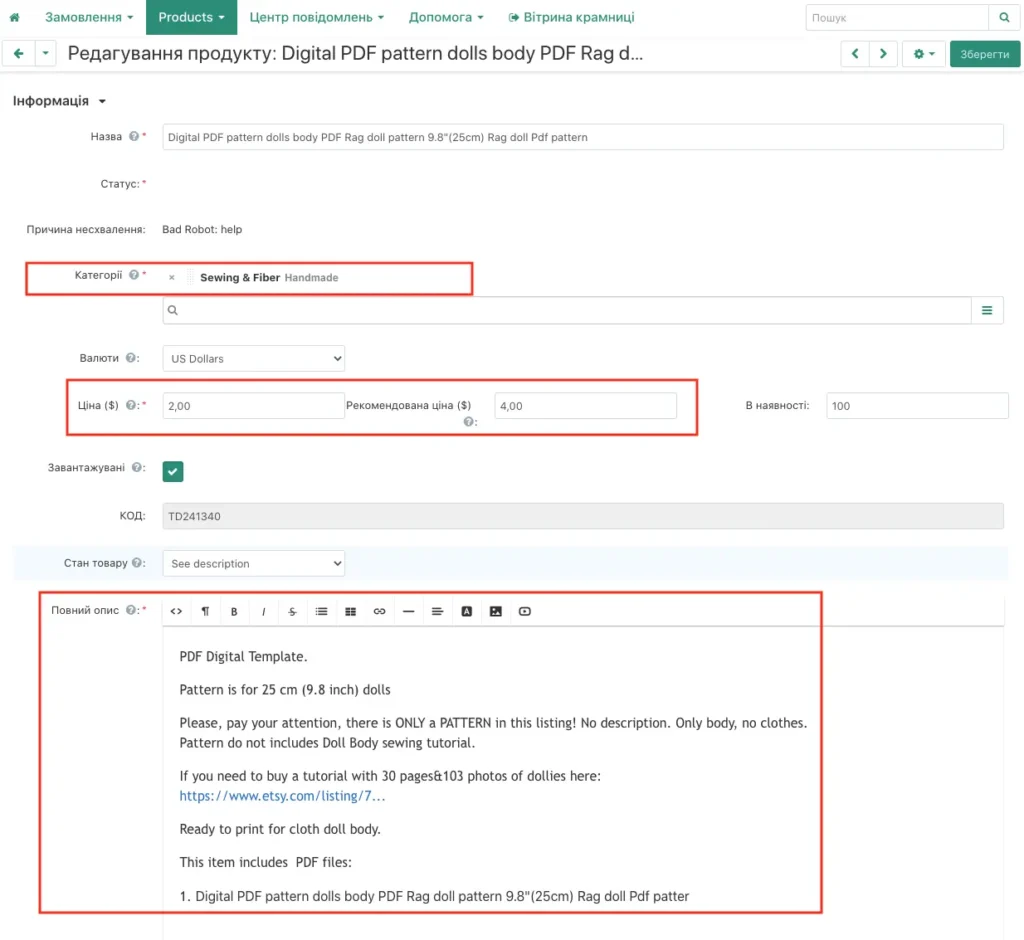
As you can see, the digital product does not have a section related to the shipping cost. We fill in the fields for the digital product: category, price, description. We add search keywords – tags.
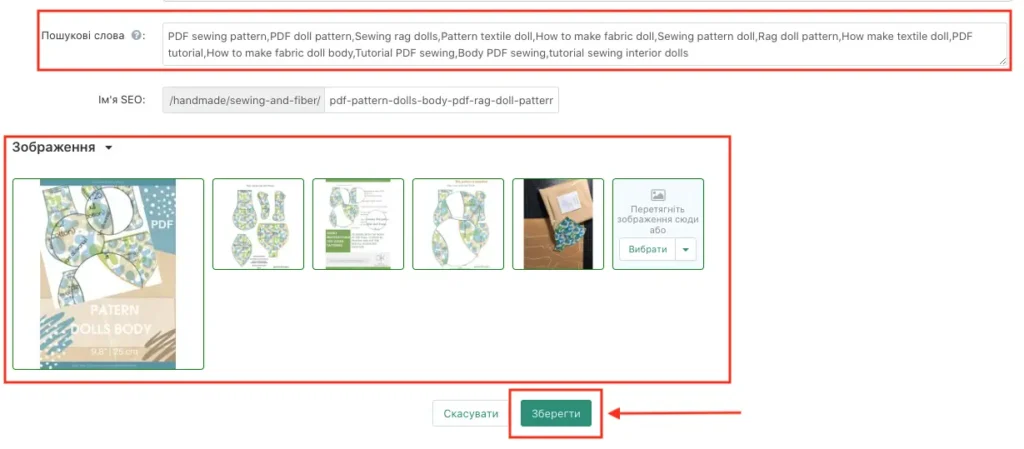
We upload images and click the “Save” button:
Since the product was created as a “Digital Product”, it has a tab “Files for sale”, where the digital files should be uploaded.
We proceed to upload files. You can upload files by creating lists, but if you have many files, you can distribute them into folders (first create the folders and then add files to them):
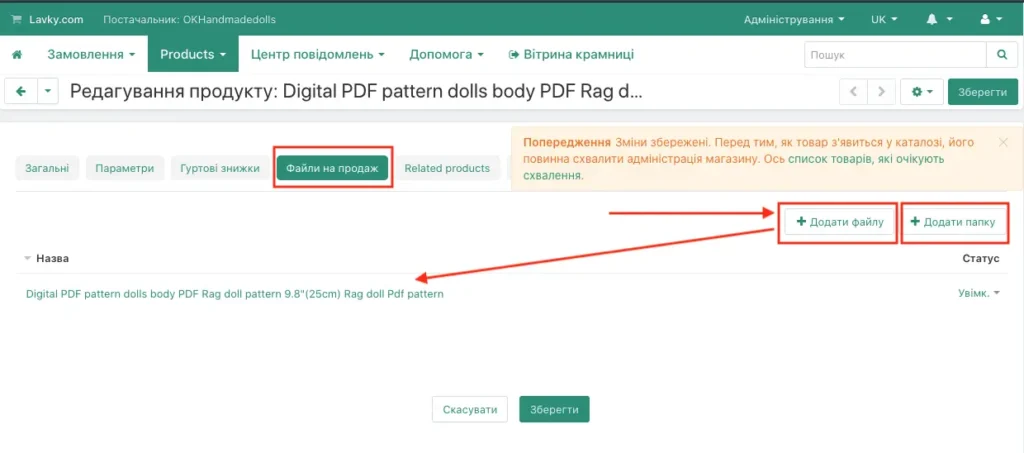
Now attach the files, assigning them to the appropriate folder. We recommend giving the files a full name; this will be convenient for both your records and for the buyer:
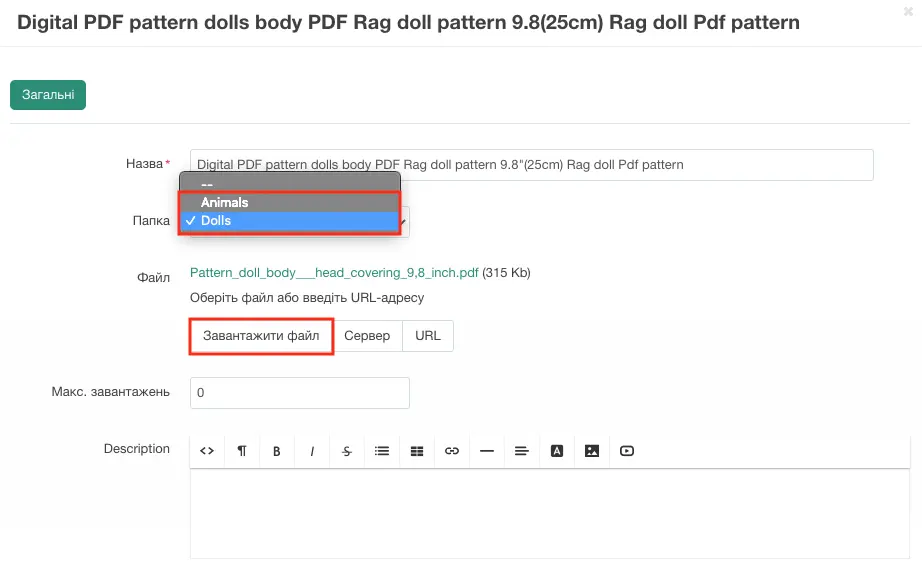
The seller can always edit or delete both the files and the folders themselves. If you close all folders, using the triangle near “Name”, the Gear menu will apply to the folder itself, which can also be deleted or edited. If you delete the folder, all the files that were in this folder will also be deleted.
Also you can edit the file and set the maximum number of downloads (for example, 2 times):
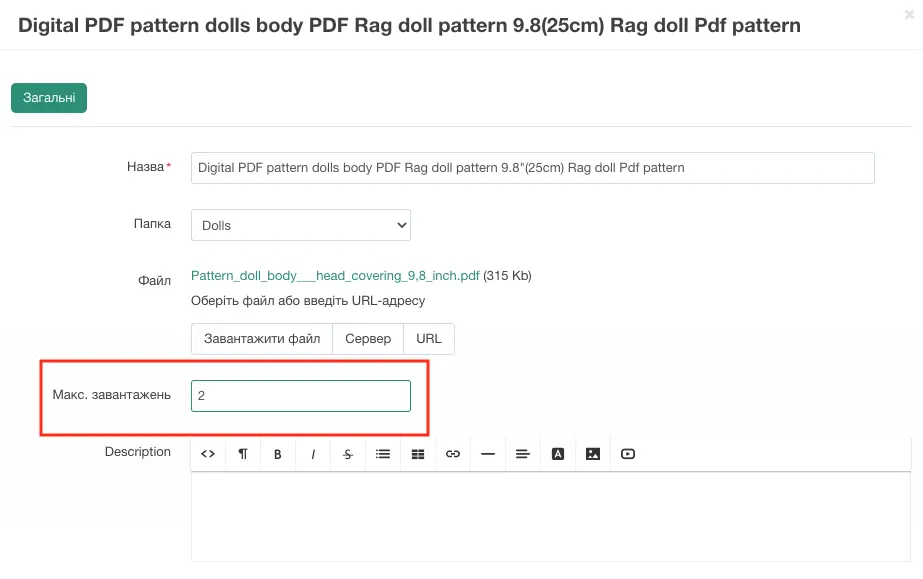
At this stage the digital file has been created and it will be in the status “Enabled”.
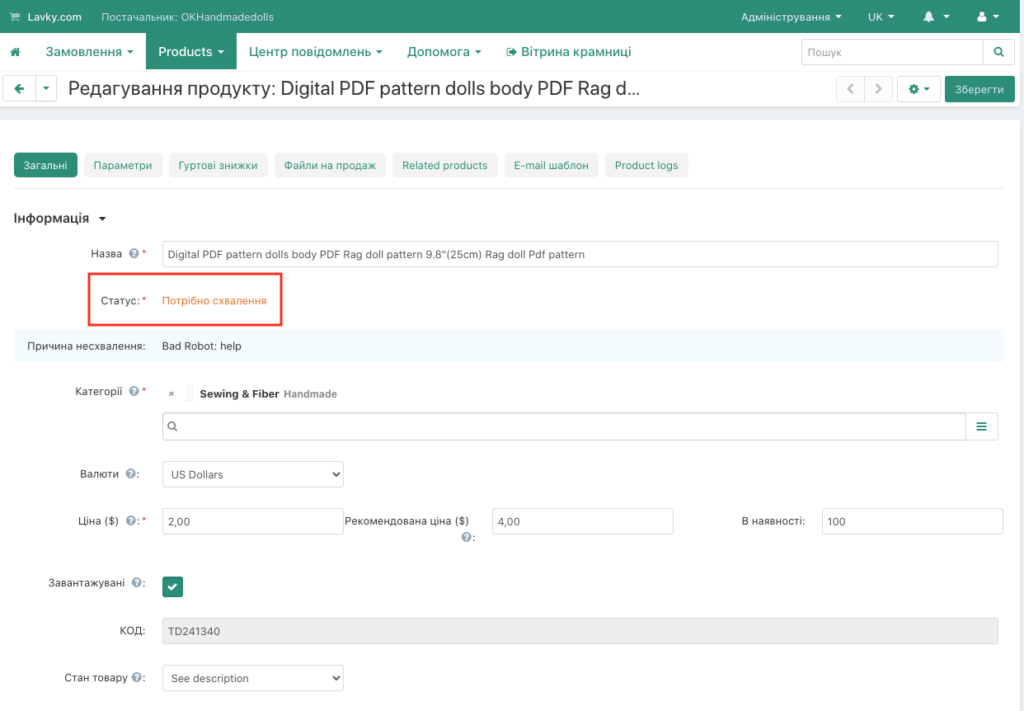
If you upload the file for the first time, it may be queued for review, or if the text contains data prohibited for publication, the file will be sent for moderation. After the review and approval you can sell it.
The system sends an email to the customer after the order has been successfully paid.
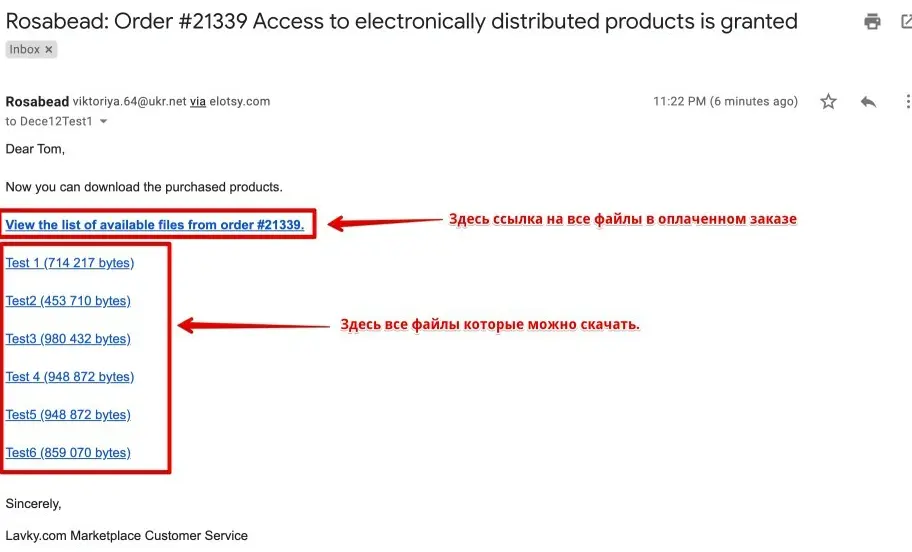
The email that every customer receives after purchasing a digital product is automatically sent by the system with the subject: “Supplier’s store name: Order number, access to electronically distributable goods is provided.”
Inside this email there will be a link to the digital file that the customer needs to download to their computer. Here’s what a standard email looks like:
Comparison: digital goods and physical goods on Lavky
| Parameter | Digital product (Digital) | Physical product (Physical) |
|---|---|---|
| Delivery | Instant and automatic – an email to the buyer’s email address | Requires delivery by a courier/postal service |
| Logistics costs | Free | Depends on weight and country |
| Scalability | Unlimited (one file for everyone) | Limited by stock levels |
| Returns (Refunds) | Usually non-refundable | Possible within 14-30 days |
Also a list of useful links related to our free Lavky marketplace:
– How to register on the Lavky marketplace?
– How to add additional stores to your Lavky account?
– How to import items from EBAY to Lavky?
– How to import items from ETSY to Lavky?
– How to add multiple shipping methods on Lavky?
– Lavky products in Google search
– How to make discounts on Lavky.com
– Using Lavky instead of a direct payment link?
– When and how are payments from Lsvky credited?
– I go to Lavky, but I don’t see my listings. What’s the reason?
– How to list a product on the Lavky marketplace?
Frequently Asked Questions About Digital Goods
Are there any file size limits?
What is the commission for selling digital goods?
How does a buyer receive the file?
Immediately after payment, the buyer sees a “Download” button in their Lavky account, and also receives an order confirmation email with a direct link.
Can I sell the same file on Etsy and Lavky?
Yes, you can diversify sales. The main thing is to make sure that the product description is up to date everywhere and matches the file version.
