Integration of Western Bid with KeyCRM allows you to arrange international shipping directly from the order card in KeyCRM, automatically obtain a tracking number, and store shipping costs in the order.
For KeyCRM users, there is an integration with the Western Bid system that allows not only transmitting information about transactions (instruction for connecting KeyCRM to the Western Bid system), but also creating international shipments directly in the CRM.
Thanks to this integration, sellers can create shipments for orders without switching to the Western Bid personal account. The shipment is created directly in the order window in KeyCRM, and all necessary data automatically synchronizes between the systems. In your Western Bid account you only need to pay for the created shipments.
The integration supports:
- creating shipments from Ukraine by any available Western Bid delivery method;
- creating shipments from Western Bid’s fulfillment center in the USA;
- automatic retrieval of tracking numbers;
- transferring shipping costs to the CRM order;
- receiving information about payments from your site, received through Western Bid, and the PayPal and Western Bid fees.
This significantly simplifies the work of e-commerce sellers who operate through Etsy, Shopify, Amazon, eBay, or their own online stores and combine sales across multiple marketplaces, managing orders from the CRM system. The integration enables you to manage sales and take advantage of cost-effective shipping in a single CRM interface.
To learn more about the different types of delivery, you can use the following links:
– UPS Express and UPS Ground Shipping
– Nova Poshta International Shipping
– Delivery from Ukraine to Europe via DPD
– Consolidation Direct Delivery
– Consolidation Optimum Delivery
Also useful links for working with your shipments:
What shipments can be created through the integration?
The integration supports two main delivery scenarios.
Delivery from Ukraine
You can arrange international shipments from Ukraine using available Western Bid delivery services, such as:
- UPS
- FedEx
- Nova Poshta International Delivery
- Nova Poshta Global
- DPD (Europe)
- Western Bid consolidation shipping methods: Consolidation Plus and Consolidation Optimum
All available shipping methods have special favorable rates for Western Bid customers and discounts reach up to 75%.
2. Shipment from Western Bid's fulfillment center in the USA
If your goods are stored at the Western Bid fulfilment centre in the USA, the integration allows you to create shipments to the customer directly from the CRM.
In this case:
- The shipment request is created directly in KeyCRM;
- Directly in CPM you choose the shipping method for the USA;
- The request is automatically transmitted to the Western Bid system;
- The warehouse in the USA prepares and dispatches the shipment to the customer;
- Payment for the shipment is automatically processed from the Western Bid account.
How to connect Western Bid to KeyCRM
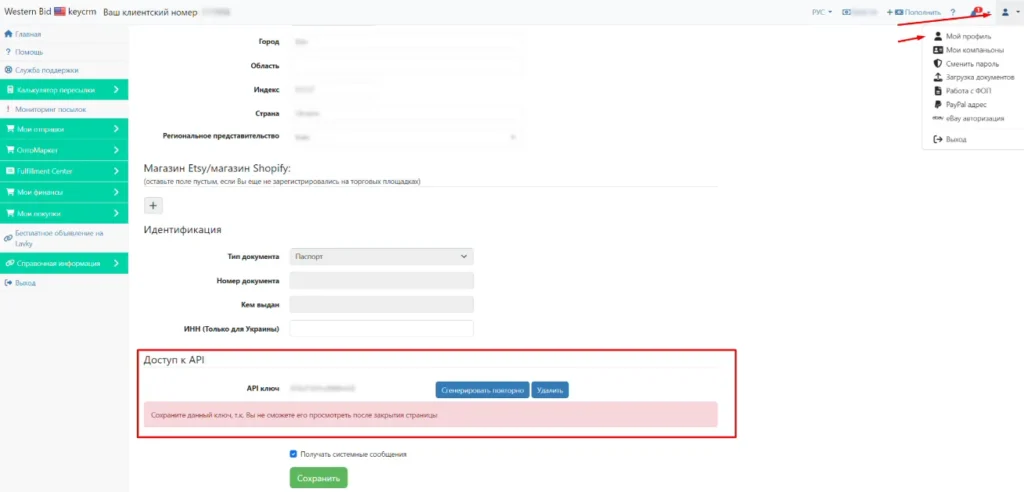
To begin, you need to generate an API key in your Western Bid account.
Log in to your Western Bid profile, select “My Profile”, scroll down to the bottom of the page and generate the key, which you need to specify in KeyCRM when the integration is connected:
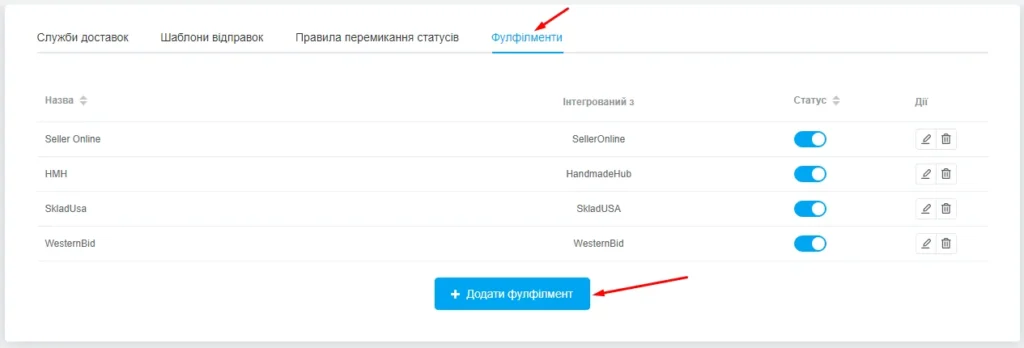
In KeyCRM we go to «Settings»→ «Deliveries» → «Fulfilments» and click «+ Add fulfilment». Please note that in the KeyCRM system the Western Bid delivery aggregator is located in the “Fulfilment” section. And from this area you will be able to arrange both deliveries from Ukraine and deliveries from Western Bid Fulfilment in the USA.
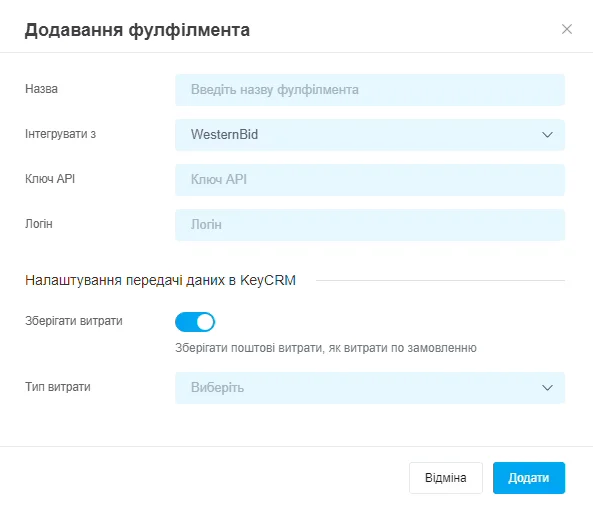
Fill in the following fields:
– Name: which is convenient and clear for you to identify which service is connected;
– Integrate with: select from the list Western Bid;
– API Key: paste the Western Bid API key that you generated earlier;
– Login: the login used to sign in to the Western Bid account;
– Save costs: allows you to save shipping costs as costs for the order. After activation you need to select the type of costs with which they will be stored;
– After filling in, click the «Add» button. Western Bid is connected.
How to create an international shipment with Western Bid from Ukraine to KeyCRM
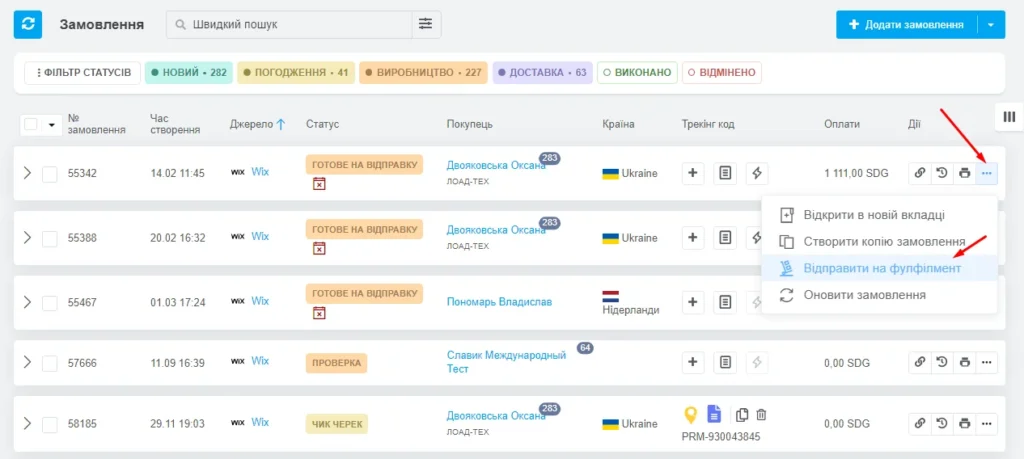
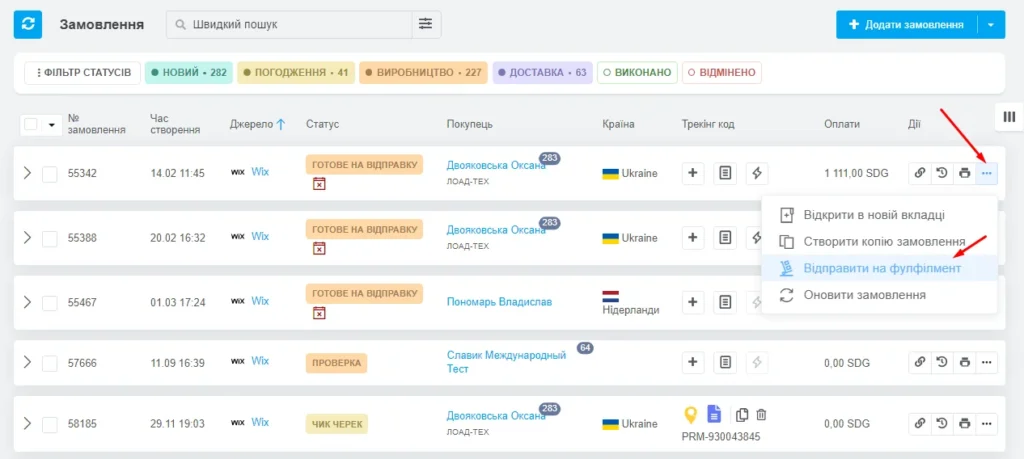
To create a shipment of a parcel from Ukraine using any available Western Bid method with special pricing, click the three dots next to the desired order and select “Send to Fulfillment”.
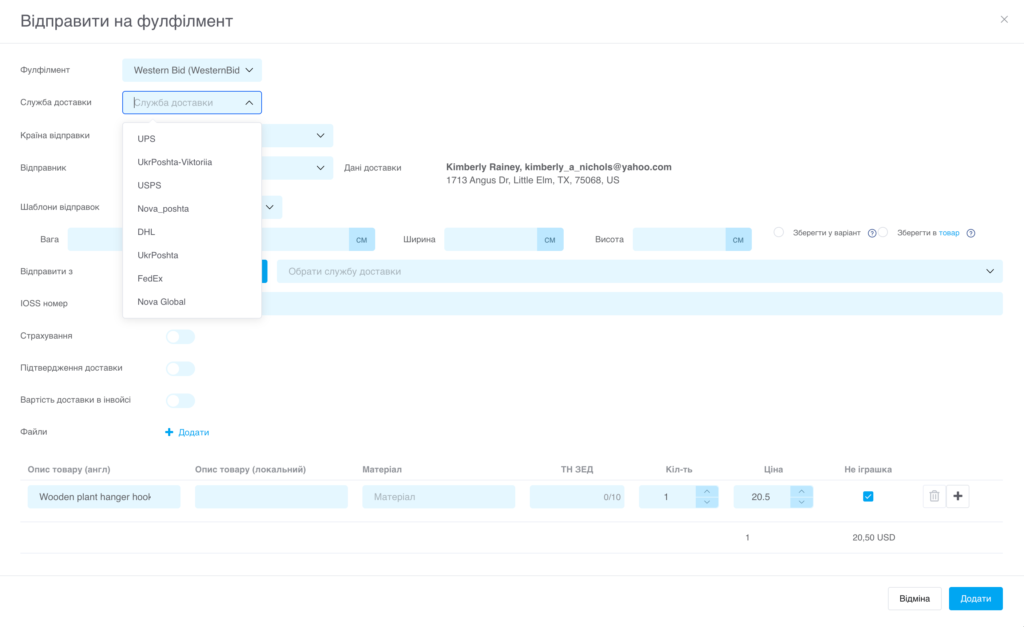
1. In the form, select from the drop-down list of the “Fulfillment” field the name you specified when adding Western Bid. From the “Delivery Service” list you can select any item.
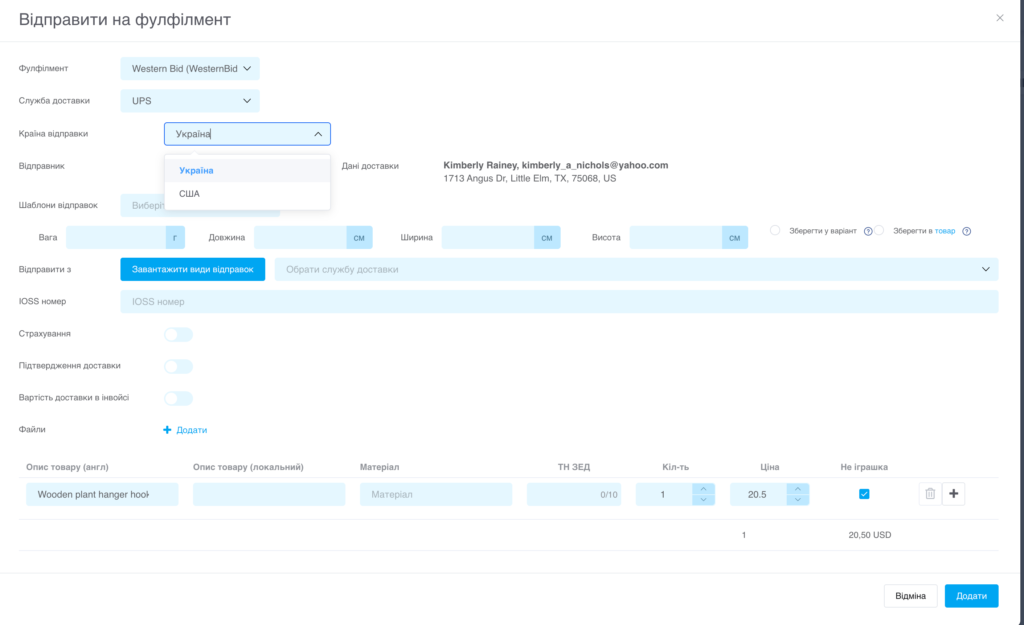
2. After that, we select the shipping country – Ukraine. And the sender’s name and address, which will be auto-filled from your Western Bid account.
3. Next you can choose the shipment data from your shipping templates created in KeyCRM, or manually enter the dimensions and weight of the shipment.
4. And proceed to selecting the shipping method in the field “Ship from”. To do this, click ‘Load shipping methods’. In the dropdown here you will have access to all possible shipping methods for this order, taking into account the recipient’s country and the dimensions and weight of the shipment.
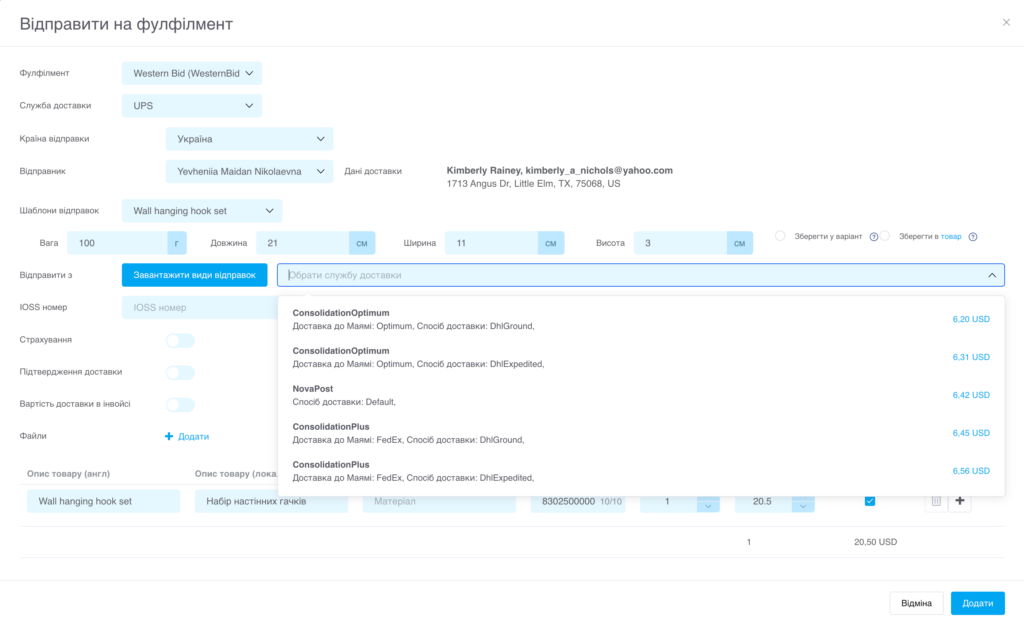
5. You can specify the IOSS number;
6. If needed, there is a toggle for Insurance, Delivery Confirmation, and Delivery Cost on the invoice (for Consolidation Plus shipments only the ‘Insurance’ option is available, which amounts to 1%);
7. If needed, supplement the information about the goods in the order (item description, HS code, quantity, price, and the ‘not a toy’ note).
8. Click the ‘Add’ button when everything is filled in.
After clicking the ‘Add’ button, a tracking number and costs from Western Bid will appear in the order if you have activated them in the settings.
Payment for the created shipment is automatically deducted from your Western Bid account. You can also print the shipping documents for your parcel from your Western Bid account. If you have enabled the function to add the tracking number, it will appear in your order when the shipment is created.
How to create a shipment from the Western Bid Fulfillment Center in the USA via KeyCRM
If you store your goods at the Western Bid Fulfillment Center in the USA, you can also create a request to have them shipped directly from your keyCRM account.
To do this, next to your order click the three dots and select the option “Ship to Fulfillment”.
1. In the form, select from the dropdown list the name you specified when adding Western Bid for the ‘Fulfillment’ field. From the ‘Delivery Service’ list you can choose any item.
2. For the shipping country, select the United States. And the sender’s name and address, which will autofill from your Western Bid account.
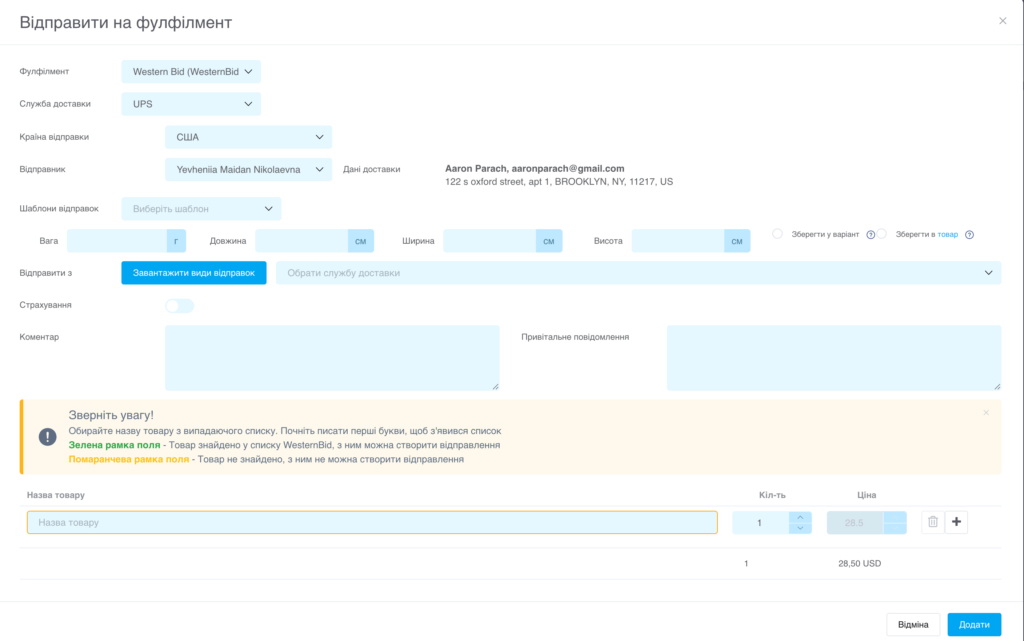
3. Next, you can select the shipments from your shipping templates, created in keyCRM, or manually enter the dimensions and weight of the parcel yourself. Please note that if you are sending your goods packaged, enter the dimensions of your packaging. However, if you choose the Western Bid Fulfillment packaging option, you need to enter the corresponding dimensions. You can choose the delivery method for your shipments and Fulfillment packaging at the Western Bid Fulfillment Center calculator.
4. Go to the delivery method selection in the field “Ship from”. To do this, click “Load shipping methods”. In the dropdown here you will have access to all possible shipping methods from our Fulfillment Center with discounts for our customers.
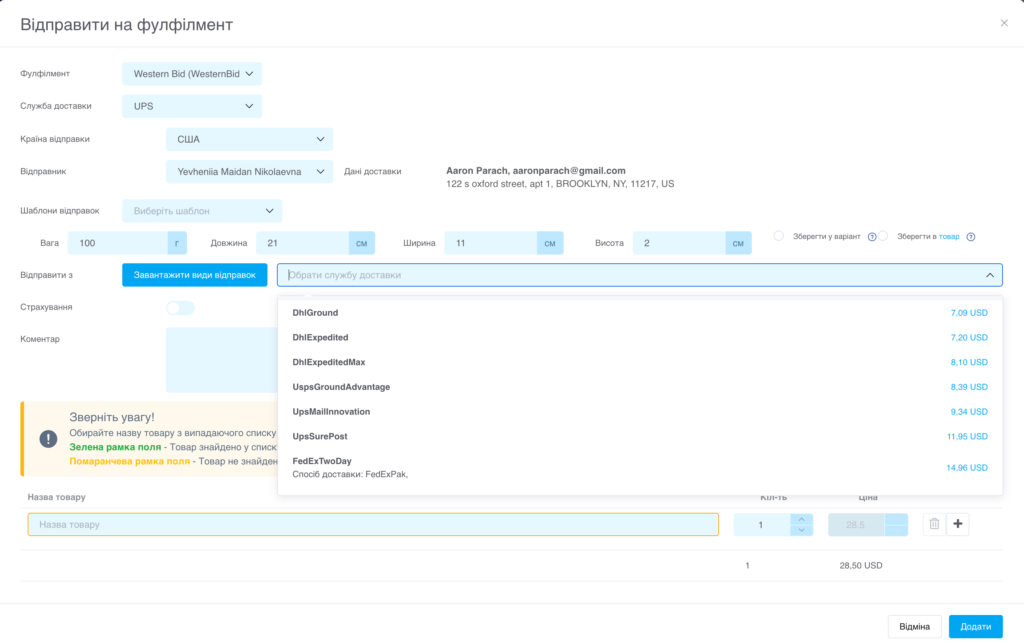
5. If necessary, select the insurance option and write a comment for the Fulfillment Center staff.
6. To select a product, start typing the product name or its number as they appear in the product batches added for fulfillment in the USA. Choose the required product from the dropdown list.
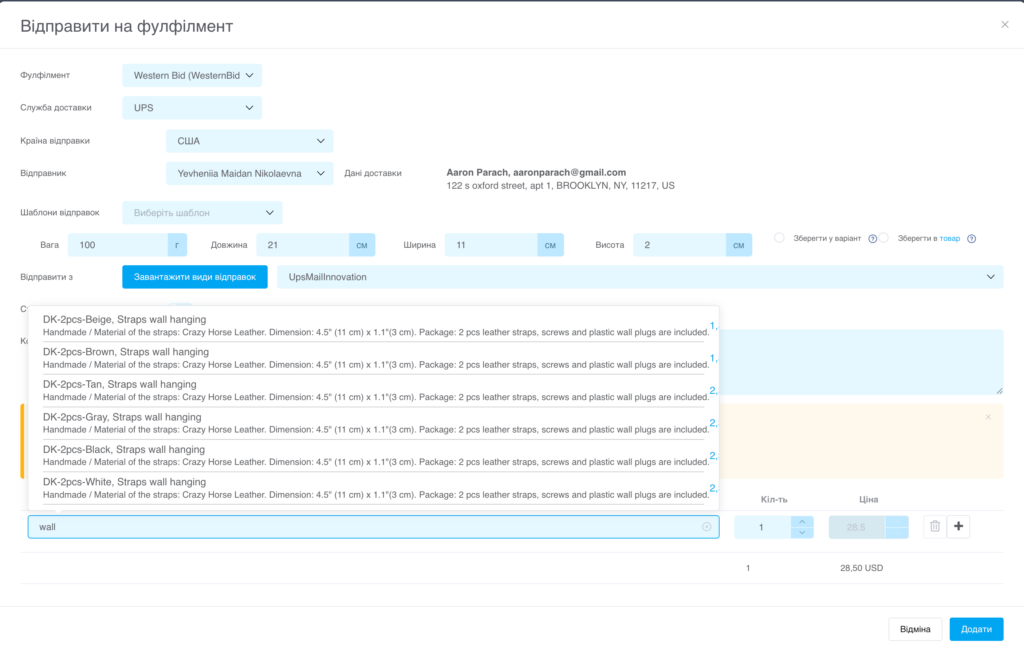
7. Click the “Add” button. At this moment, a shipment request from the Western Bid Fulfillment Center will be created, and you will also be able to see it in your Western Bid account. Fulfillment Center staff will receive your request and create the shipment, after which the payment will be charged to your Western Bid account.
Frequently Asked Questions about Western Bid delivery in KeyCRM
What shipments can be processed through KeyCRM?
Through KeyCRM you can arrange all major types of delivery for Western Bid.
Why enable 'Save costs' in fulfillment settings?
The option allows you to automatically add delivery costs as a separate expense type in the order, to easily analyze the cost of goods sold and financial performance.
Do I need to configure anything in Fulfillment Western Bid for Consolidation Plus?
If you are using Western Bid fulfillment for storing goods, inventory management and shipments from the Miami warehouse, you need to do it directly in the Western Bid dashboard, and not in KeyCRM.
Can templates be used for parcel dimensions?
Yes, in KeyCRM you can create shipment templates to quickly fill in the standard dimensions and weights of parcels when arranging delivery through Western Bid.
Are Western Bid payments and fees transmitted to KeyCRM?
Yes, you can separately enable the Western Bid payments integration in KeyCRM to receive a list of payments and fees for PayPal and Western Bid in the KeyCRM ‘Finance’ module.
