On this page you will learn how to cancel the shipping label yourself in your Western Bid Personal Account to avoid mistaken shipments and unnecessary costs.
You can learn more about the different types of delivery at the following links:
– UPS Express and UPS Ground delivery
– About FedEx delivery
– Nova Global Delivery
– Nova Poshta International Delivery
– Delivery to Europe from Ukraine via DPD
– Consolidation Plus Delivery
– Consolidation Direct Delivery
– Consolidation Optimum Delivery
Also useful links for working with your shipments:
– Delivery cost calculator
– Western Bid parcel tracking
– Parcel packing rules
– Attachments for shipment
– Delivery processing through Western Bid in KeyCRM
How to remove a label in the Personal Cabinet
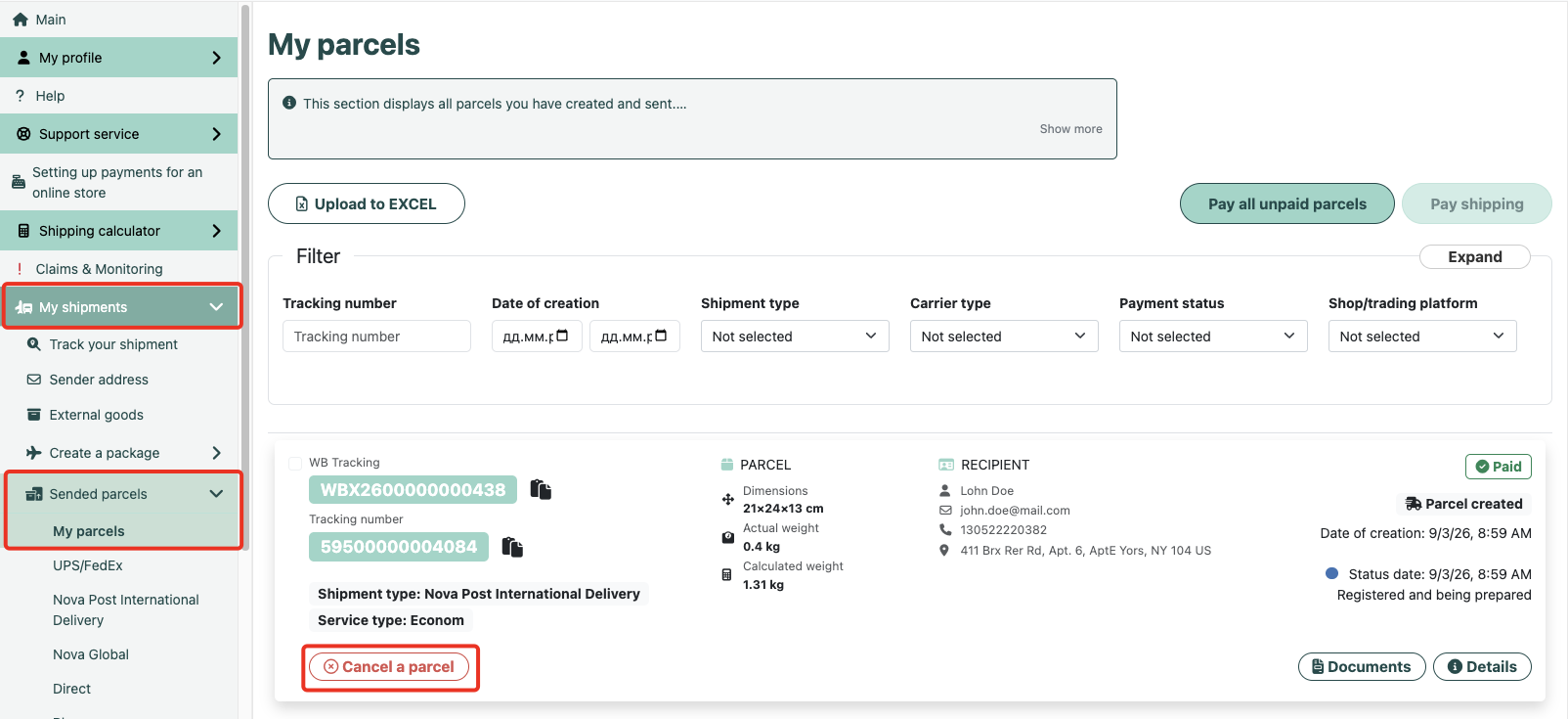
In your Personal Account, there is now the option to independently cancel labels in the My parcels section.
- In the menu, open “My shipments” and then “My parcels”.
- Choose the required label and click the “Cancel a parcel” button.
Please note the possible expiration period of the labels!
- The FedEx and Nova Global waybills are valid for 10 days from the time of creation.
- The Nova Global waybills are valid for 10 days from the time of creation.
- Waybills created by other shipping methods are valid for 20 days from the time of creation.
If you have not shipped the parcel within this period, you need to cancel it and create a new shipment. Otherwise, the parcel will not be accepted by the postal services.
Cancellation of the waybill in My Account is possible within 28 days from creation if not used, i.e., if the waybill is 24 days old – it is no longer valid, but it can still be canceled manually.
The FedEx waybill(s) are valid for 10 days from creation. The possible window to cancel a FedEx parcel is 10 days from parcel creation. If during this time the parcel is not accepted at our sorting center in Kyiv and tracking has not started, the label will be automatically canceled. In this case, the funds used for its use will be returned to your account.
When canceling Direct consolidation, you can cancel only the entire consolidation; you cannot cancel individual parcels from it.
Please note! USPS waybills cannot be canceled if they were created more than 28 days ago.
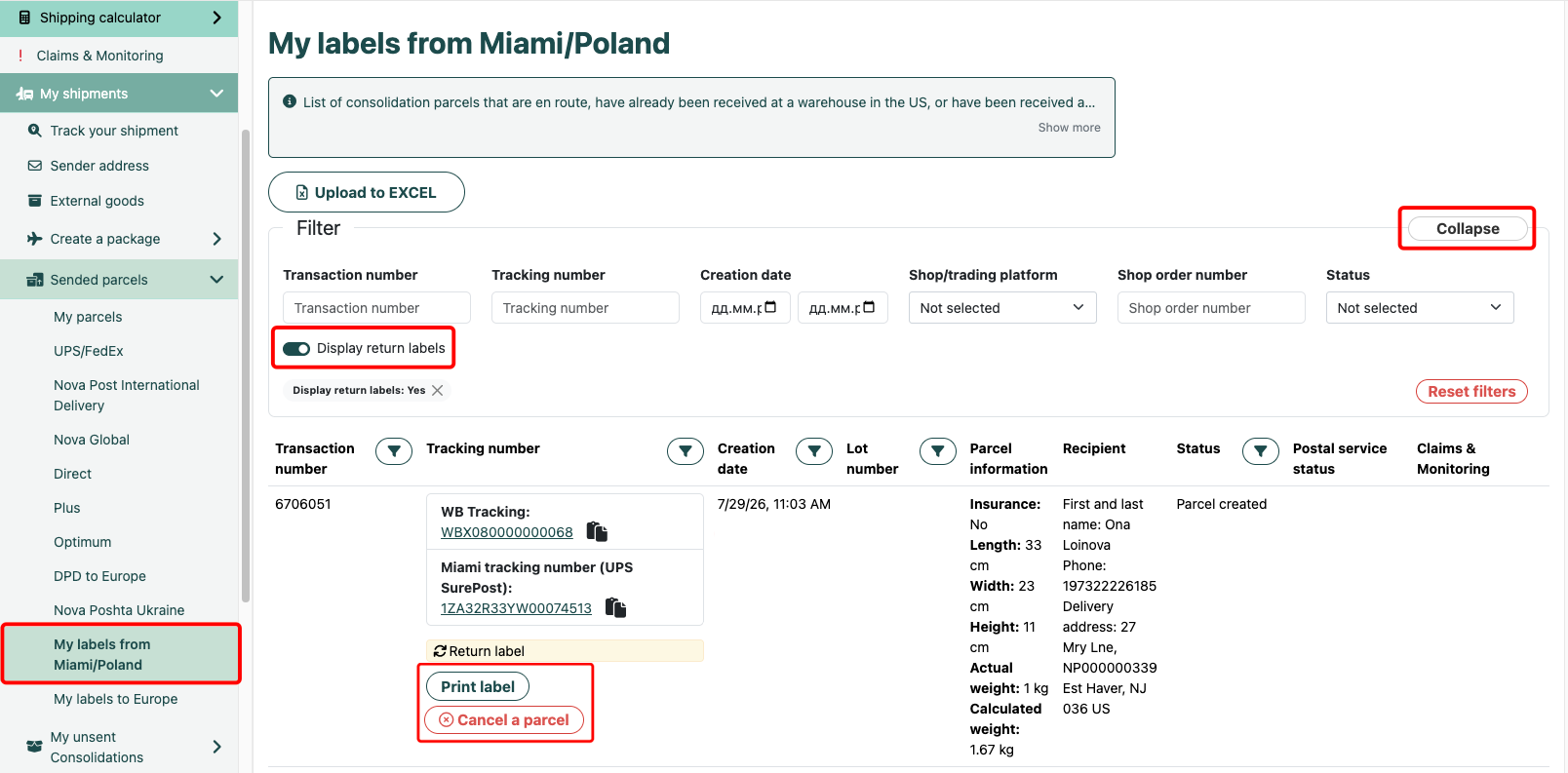
If you created a return label, it can also be canceled within 14 days from creation. For this you need to:
- on the left in the menu, go to the item “My labels from Miami/Poland”;
- expand the filter and at the top left turn on “Display return labels”;
- click the red button “Cancel a parcel”, next to the label you want to cancel.
Label validity periods and cancellation options
| Label type / service | Waybill validity period | Cancellation window | Notes |
|---|---|---|---|
| Standard waybills (UPS, USPS, etc.) | 20 days from creation | Up to 28 days from creation if the label has not been used | After the 20th day the waybill is no longer valid, but it can still be canceled in the Personal Account. |
| FedEx | 10 days from creation | 10 days from creation | If the shipment has not been accepted at the sorting center in Kyiv, the label is automatically canceled, and funds are returned to the account. |
| Nova Poshta International Delivery | 20 days from creation | 20 days from creation | If the shipment has not been dispatched, the label is automatically canceled, and funds are returned to the account. |
| Nova Global | 10 days from creation | 10 days from creation | If the shipment has not been dispatched, the label is automatically canceled, and funds are returned to the account. |
| Direct Consolidation | According to consolidation terms | Until the consolidation is dispatched | Cancellation is possible only for the entire consolidation; individual shipments within it cannot be canceled. |
| USPS Waybills | Standard USPS validity period | Up to 28 days from creation | If the waybill is more than 28 days old, cancellation is no longer possible. |
| Return labels | Depends on the carrier | Up to 14 days from creation | Go to ‘My labels from Miami/Poland’, enable ‘Display return labels’, and click ‘Cancel a parcel’. |
Important: if you did not manage to dispatch the parcel within the validity period of the waybill, it needs to be canceled and a new one created. Otherwise the postal services may not accept the shipment.
Frequently Asked Questions about Removing Labels
When do you need to cancel the label?
When do you need to cancel the label?
The label should be canceled if you did not ship the package within the validity period of the waybill, you found an error in the address, dimensions, or delivery method, the customer canceled the order or changed the address, and also when you accidentally created a duplicate label.
What are the consequences of sending with an overdue delivery note?
What are the consequences of sending with an overdue delivery note?
If you try to send a shipment with a waybill whose validity period has expired, postal services may refuse to accept the shipment, or such a parcel may not be properly processed in the tracking system. Therefore, if the validity period of the waybill has expired, it is better to cancel it and create a new shipment.
Are refunds issued after the label is canceled?
Are refunds issued after the label is canceled?
For most services, when a label is successfully canceled, funds are returned to your account in the Western Bid system. For example, for FedEx, when an unused label is automatically canceled after the expiration of its validity, the payment for it is returned to your account.
Why can't I see the 'Cancel a parcel' button?
Why can't I see the 'Cancel a parcel' button?
If the ‘Cancel a parcel’ button for a specific label is missing, it usually means that the cancellation window has already passed or the label has been used. Check the issue date of the waybill and the type of delivery service. If necessary, contact support, providing the waybill number.
How to cancel a return label from «My labels from Miami/Poland»?
How to cancel a return label from «My labels from Miami/Poland»?
In the left menu, go to the ‘My labels from Miami/Poland’ section, at the top enable the ‘Display return labels’ option, find the required return label and click the red ‘Cancel a parcel’ button. This can be done within 14 days from the creation of the label.
