
To verify your registration with Western Bid, you need to upload colour photos or scans of your passport, a document proving your address, IPN (RNOKPP) and a signed agreement with Western Bid in the “Document Uploads” section.
Who should prepare documents in advance
- New sellers who have just registered with Western Bid and have not yet undergone account verification.
- Shopify store owners and other CMS users who need to enable payment acceptance through Western Bid.
- Users who have changed their surname, address or other registration details and need to update their documents again.
How to add documents
Documents must be submitted before the first withdrawal of funds and the processing of the first shipment.
For store owners on Shopify or other CMS platforms, documents must be submitted to connect your site to the payment processing system after your application has been approved.
Also the ‘External Goods’ service is available only to customers who have a verified profile.
Please note, we do not work with customers from Crimea and ORDLO.
In 2021, mandatory requirements for document formats were introduced. We accept only color photos or scans of documents and do NOT accept black-and-white copies, screenshots. The photo must show all corners of the document. Please take photos or scans of documents neatly – without extraneous objects and fingers in the frame. Watermarks on photos of documents are allowed, but they must not obscure information and the photos presented on the document.
Attention to already registered users: if the appearance of your documents does not meet the above-mentioned requirements, you need to upload them again in the required format. In some cases, for withdrawing funds, we may ask you to upload updated photos of the documents before the deadline.
To start withdrawing funds from the Western Bid system, you need to verify your personal account, and for this you need to scan or photograph, and then upload the following documents:
- Color photo (scan) of the internal passport (pages 1 and 2) or ID card. It is important that all corners of the document are visible. If you are over 45 years old, you also need a photo of the third page of the passport with the photo.
- A document confirming the place of residence (or the stamp about registration of residence in the passport). If you do not live at the registered address, provide any document with your name and residence address. For this, any official document with the name, surname, and address that match those in your profile will do. For example:
– bank statement / credit card statement,
– utility bill,
– tax invoice,
– another statement / certificate issued by government authorities.
Again, we emphasize: the address provided during registration with Western Bid must match the address on the documents provided, regardless of whether you currently reside at this address or not.
- An English-language filled-out and signed User Agreement.
- For residents of Ukraine you need to send a photo / scan of a document confirming your Taxpayer Identification Number (previously – ID code or IPN). This could be a paper certificate of its assignment, a citizen ID card (provided the TIN is on the back) or a passport page in booklet form where the TIN is entered.
In the “Additional document” section you need to upload an additional document if it is required. For example, a document about a change of surname. If such a document does not exist, nothing needs to be uploaded in this section.
Documents must be uploaded before processing the first withdrawal request, and also if registration data changes – they must be updated.
There must be one copy of documents per person.
Your profile can also add companions. In this case you will be able to withdraw money to your companions’ bank details. How to add companions read in the article.
How to upload documents for account verification?
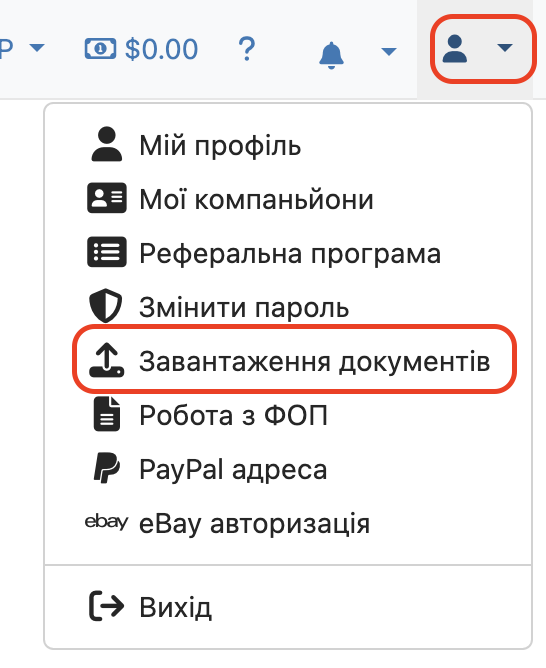
1. In your account, at the top right, click the user icon.
2. Click on the “Document Uploads” menu item
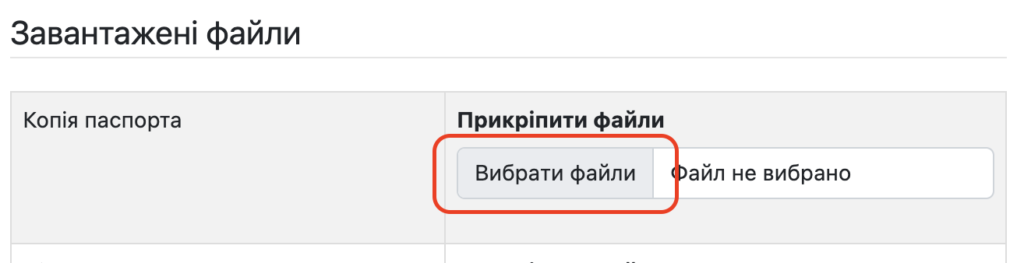
3. On the page that opened, to upload a copy of the passport, click “Choose files” and select a photo of the document (pages 1 and 2).
4. After you have selected the document file, click “Download”
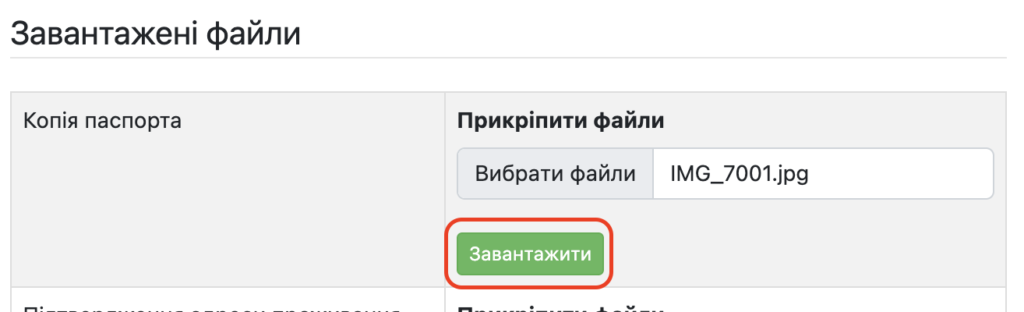
5. To upload the document proving your address, you need to repeat the same steps as for uploading a copy of the passport. In the “Proof of address” section, select a photo of the document, and click “Upload”.
6. You also need to download the user agreement. To do this, click on the “Agreement” item. In a new browser window, a copy with the fields filled in according to your account information will open. Please download the copy by clicking “Save”. Or print it immediately by clicking “Print”.

7. At the bottom of the user agreement, place your signature and the actual date of signing in the appropriate places. Take a photo of the document and upload it to your account by clicking “Choose files” and “Upload”.

8. Also upload the document about РНОКПП (ІПН), by selecting the document and clicking “Upload”.
What documents do you need to prepare
- Passport or ID card (photo page or both sides of the ID) — a color photo or scan showing the corners of the document.
- Proof of address (if required): a utility bill, residence registration, etc.
- Document showing a name change (marriage/divorce certificate), if the surname in the passport differs from other documents.
- Document for the TIN (Tax Identification Number) — a color photo or scan.
- Signed user agreement (agreement with Western Bid), uploaded and re-uploaded with a signature and date.
Quality and format requirements for documents
| Requirement | Explanation |
|---|---|
| Only color photos or scans | We do not accept black-and-white copies and screenshots. |
| Document corners must be visible | The document must be fully in the frame, with no edges cropped. |
| No extraneous objects or fingers | The photo should not contain anything unnecessary that interferes with reading the data. |
| Watermarks allowed | The watermark must not obscure text or photos on the document. |
Frequently asked questions about registration documents
When should documents be sent?
When should documents be sent?
Documents must be uploaded before the first withdrawal of funds and before the processing of the first shipment, as well as when changing registration data.
Does Western Bid accept a black-and-white scan of a passport?
Does Western Bid accept a black-and-white scan of a passport?
No, we only accept color photos or scans of documents; screenshots and black-and-white copies are not suitable.
What should I do if I have already uploaded documents earlier?
What should I do if I have already uploaded documents earlier?
If the previous documents do not meet the new requirements (no corners, black-and-white scan, etc.), they need to be re-uploaded in the correct format.
Does Western Bid work with clients from Crimea and the Donetsk and Luhansk regions?
Does Western Bid work with clients from Crimea and the Donetsk and Luhansk regions?
No, Western Bid does not work with clients from Crimea and the occupied territories of Donetsk and Luhansk.