In this article you will learn how to resolve the most common problem, namely why, when you log in to your store on the Lavky marketplace, you do not see your product.
Also a list of useful links related to our free Lavky marketplace:
– How to register at the Lavky marketplace?
– How to add additional stores to your Lavky account?
– How to import items from EBAY to Lavky?
– How to import items from ETSY to Lavky?
– How to add multiple shipping methods on Lavky?
– Lavky products in Google search
– How to publish a digital product on Lavky?
– How to create discounts on Lavky.com
– Using Lavky instead of a direct payment link?
– When and how are payments from Lavky credited?
– How to list a product on the Lavky marketplace?
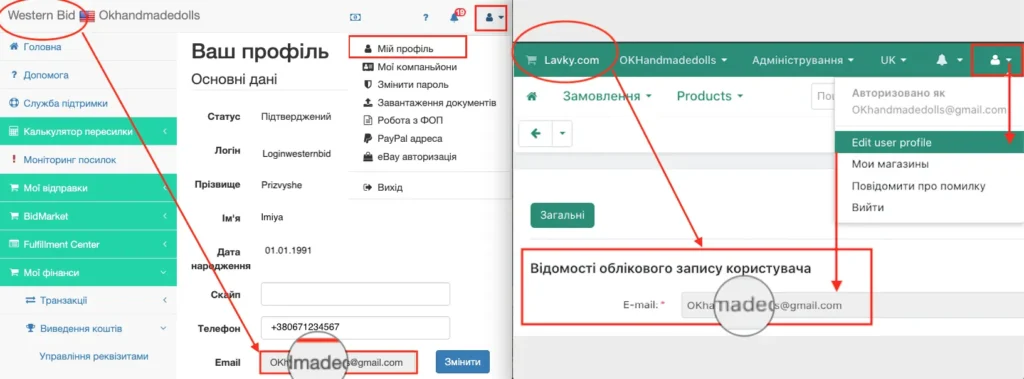
If you accessed LAVKY from the Western Bid Personal Account and did not see your lots or payments, this means there is an error in integrating your account with LAVKY, and another Lavky.com account was created for you. This happened because you changed your email address in the Western Bid registration data or on the Lavky site.The integration will be restored when your email address in the Western Bid registration data matches the email address specified in the Lavky registration data.
You can change the email address in the Western Bid registration data in the top-right corner of the Personal Account menu. Enter your email address in the ‘My profile’ section. On LAVKY, in the top-right corner, by clicking the user icon, from the dropdown select ‘Edit user profile’ and enter the address in the field for the user account information.
Frequently Asked Questions about the Unavailability of Lots on Lavky
Why can't I see my lots on Lavky when I log in via Western Bid?
Why can't I see my lots on Lavky when I log in via Western Bid?
The most common reason — different email addresses in the registration data for Western Bid and in your Lavky.com account. In that case, the system creates for you a separate Lavky account, where your existing listings are not present.
What will happen if I change my e-mail on Western Bid or on Lavky?
What will happen if I change my e-mail on Western Bid or on Lavky?
If you change the e-mail in only one of the services, the integration breaks, and the new address is treated as a different user. This can lead to the creation of a new ’empty’ account on Lavky.
How to correctly change your email so you don't lose the lots?
How to correctly change your email so you don't lose the lots?
First, choose one primary email address and set it identically in both your Western Bid Personal Cabinet and in your Lavky profile in the “Edit user profile” section.
What should I do if, after changing the e-mail, the lots still do not appear?
What should I do if, after changing the e-mail, the lots still do not appear?
Check that the addresses saved in both profiles are correct and try to log in to Lavky again, specifically from your Western Bid Personal Account. If the problem persists, contact customer support.
