Invoice for shipment to Europe

Marketplaces
February 20, 2026
4 Minutes

Content

To create shipments with UPS, FedEx and DPD to EU countries, in the Western Bid system, you need to upload the attachment file that is the invoice for your order on the marketplace.

Who this instruction is for

  • For sellers who ship parcels to the EU via UPS, FedEx or DPD from the Western Bid account.
  • For users of Etsy, eBay and Lavky.com who want to correctly prepare an invoice for customs.
  • For those who have already encountered or want to avoid issues with double taxation in EU countries

This file must be downloaded to avoid double taxation and to simplify the customs clearance procedure. If at customs there is a question about the origin of the goods or the payment of the tax, the file immediately displays:

  • order description;
  • the value of the goods;
  • paid or unpaid tax (VAT).

‍You can learn more about the different types of delivery at the following links:

– UPS Express and UPS Ground Delivery

– FedEx delivery

– Nova Poshta delivery

– Delivery to Europe from Ukraine via DPD

– Consolidation Plus delivery

– Consolidation Direct delivery

‍Also useful links for working with your shipments:

– Delivery cost calculator

– Tracking Western Bid parcels

– Parcel packing rules

– How to cancel a label yourself?

– Shipping via Western Bid in KeyCRM

– Recommendations for successful customs clearance and delivery of cargo to EU countries

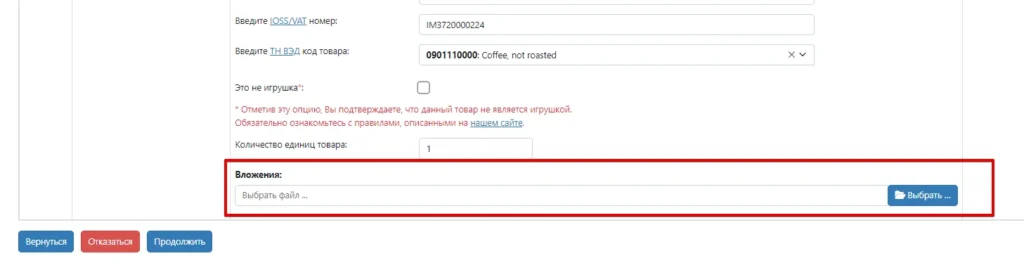
‍To download the file, when creating the shipment, in the corresponding field “Attachment”, click the blue button “Browse” and select the appropriate invoice.

A screenshot of a shipping form in Russian for international delivery. The interface includes fields for entering an IOSS/VAT number (filled with "IM3720000224"), a HS Code for the product (selected as "0901110000: Coffee, not roasted"), and a checkbox confirming the item is not a toy. A red box highlights the "Attachments" section with a "Select file" button, and navigation buttons like "Return," "Decline," and "Continue" are at the bottom.
Stage of processing an international shipment

How to download an invoice from your Etsy account

1. Go to your Etsy account and open the “Orders & Shipping” menu item.

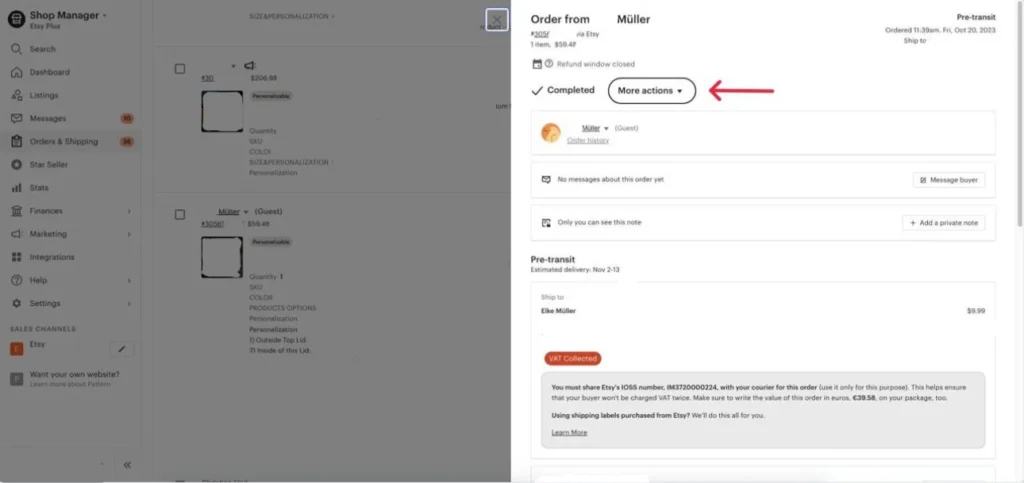
‍2. Click the desired order, then click “More actions” and “Print”.

A screenshot of an Etsy order detail page for a buyer named Müller. The interface shows the order status as "Completed" and "Pre-transit," with a red arrow pointing to the "More actions" dropdown menu. A highlighted informational box at the bottom provides Etsy's IOSS number (IM3720000224) and instructs the seller to share it with the courier and write the order value in euros (€39.58) on the package to avoid double VAT charging.
Order details window on Etsy

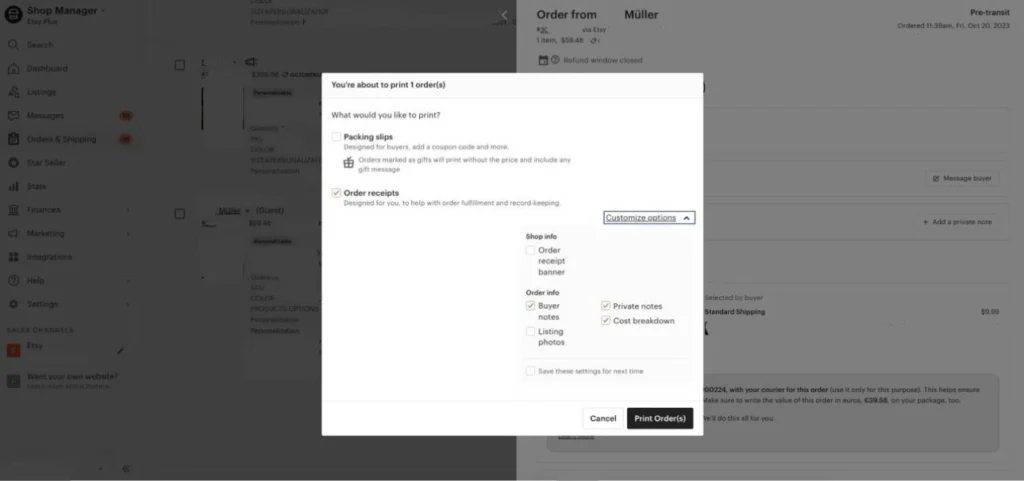
3. Mark “Order receipts” and in the dropdown menu, “Customize options”, mark the items:

  • Buyer notes;
  • Private notes;
  • Cost breakdown.
A screenshot of the "You're about to print 1 order(s)" modal window on Etsy. The seller can choose between printing "Packing slips" for buyers or "Order receipts" for record-keeping. The "Order receipts" option is checked, and a "Customize options" dropdown is open, showing settings for shop info (banner) and order info (buyer notes, private notes, cost breakdown). There are "Cancel" and "Print Order(s)" buttons at the bottom.
Printing settings for documents on Etsy

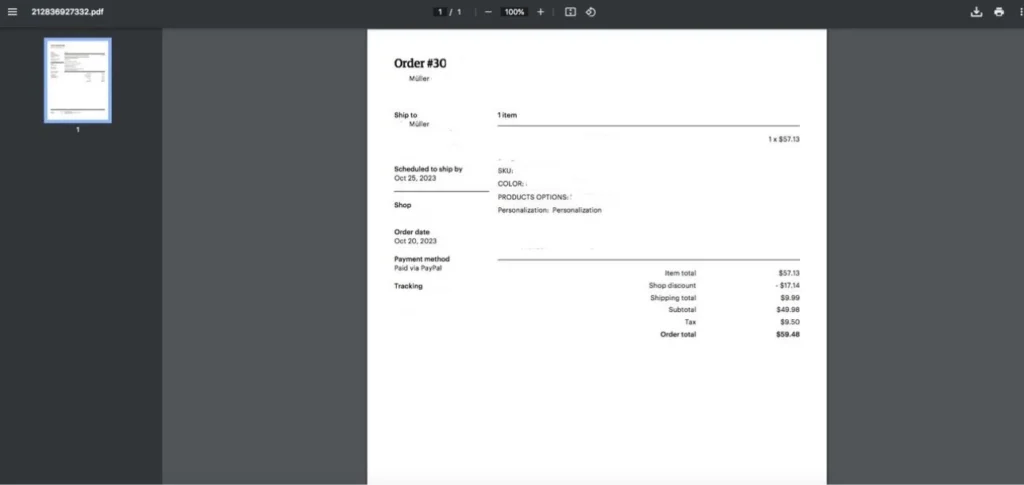
4. Click “Print Order(s)”. In the new window where the Order itself opens, there is an option to save it to your device for later uploading to your Western Bid account.

How to download an invoice from your eBay account

1. Open the order from which you need to generate an invoice.

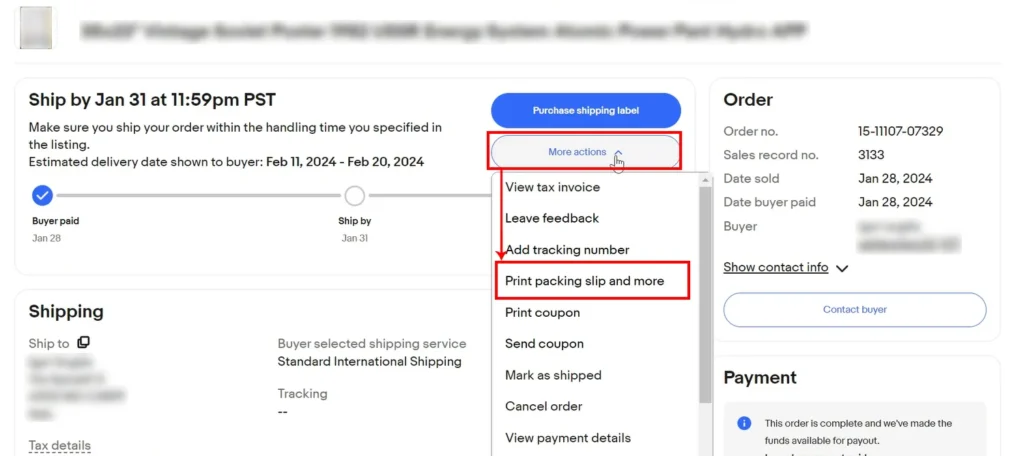
‍2. Click “More actions” and select the option “Print packing slip and more”

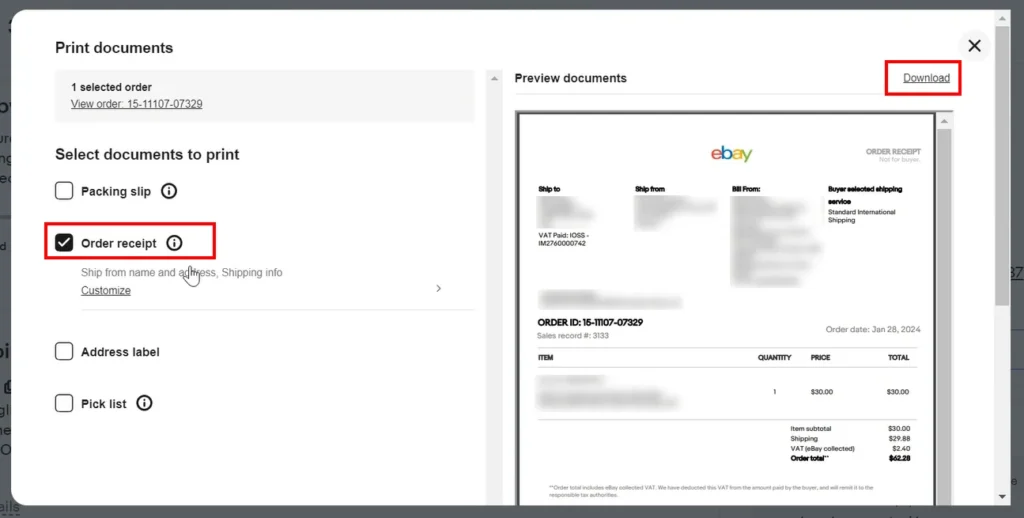
3. In the window that opened, select only the item “Order receipt”, after which, in the upper right, click “Download”.Then save the file, and you can use it when creating a shipment from your Western Bid personal account.

How to download an invoice from your Lavky.com account

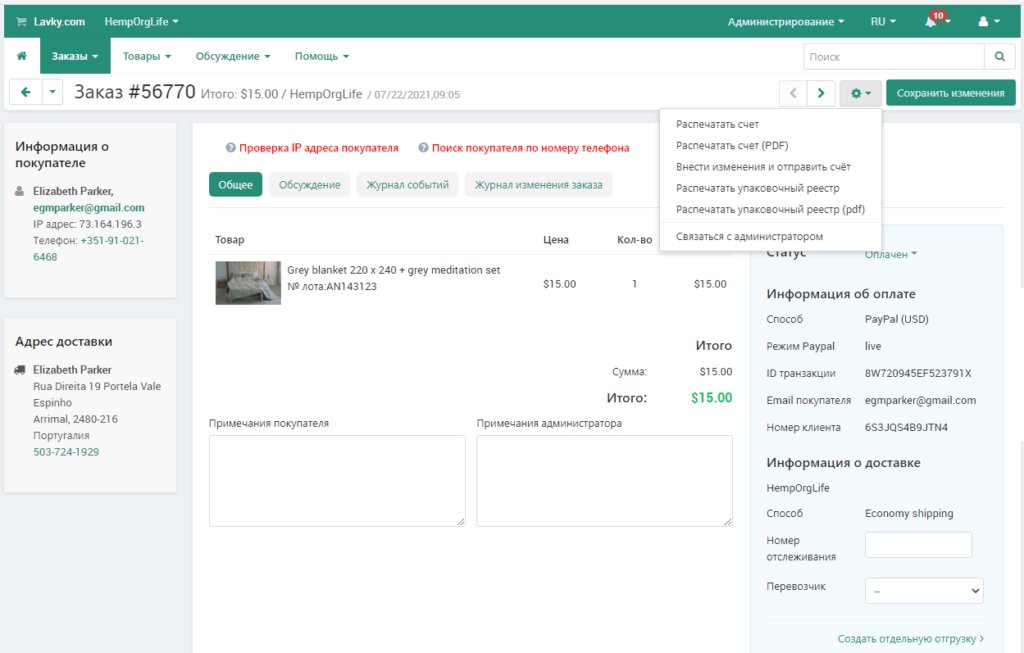
1. Open the order from which you need to generate the invoice.

‍2. Click on the gear icon and select the “Print invoice (PDF)”

Invoice for shipping to Europe: quick answers

Question Short answer
What is the purpose of an invoice? To confirm the item description, its value, and the VAT payment status for customs clearance.
Which courier services is this relevant for? For UPS, FedEx, and DPD when shipping to EU countries.
Where is the invoice attached in Western Bid? In the “Attachments” field during shipment creation.
From which platforms can you obtain an invoice using this instruction? From Etsy, eBay, and Lavky.com.
What should be visible on the invoice? Order description, the value of the goods, and VAT information.

Ensure proper customs clearance for your shipments to the EU

  1. For each shipment to EU countries via UPS, FedEx, or DPD, be sure to include an invoice from your marketplace.
  2. Make sure the invoice clearly shows the item description, its value, and VAT information.
  3. If needed, use the instructions for Etsy, eBay, or Lavky.com to properly prepare the file.

If you have any questions about the invoice or customs clearance, contact Western Bid support using the contact details at the bottom of the site.

✓ For sellers who ship parcels to the EU via UPS, FedEx, or DPD from the Western Bid account.

✓ For Etsy, eBay and Lavky.com users who want to properly prepare an invoice for customs.

✓ For those who have already faced or want to avoid problems with double taxation in EU countries.

✓ практичні рекомендації по запуску доставки

Learn about the 5 main barriers — based on 25 years of Western Bid’s experience in working with international e-commerce.


    A link to the video recording will be sent to your email.