
Payment via PayPal QR code— this is a modern contactless payment method, which allows transactions to be made instantly by simply scanning the code with a smartphone camera. This tool is indispensable for Ukrainian craftsmen and entrepreneurs who participate in international exhibitions, fairs, and sell their goods on the Lavky.com marketplace Lavky.com
Who this article is for
- Participants in international marketplaces: who need to quickly accept payments “in the field” without complicated equipment.
- Sellers with physical showrooms: to give customers the ability to pay contactlessly via PayPal.
- Customers: who want to learn how safe and convenient it is to pay for goods via QR code.
- Users of Western Bid: to understand how funds from offline sales are recorded and withdrawn.
QR code for PayPal payments when selling on Lavky.com
Generate a QR code and send it to customers for fast payment of the product!
Registered users know that on the Lavky marketplace you can list a product and generate a direct link to pay for it via PayPal.
A QR code is not a substitute for the link, but an alternative to it. That is, now you can send the customer a link or a QR code, by which they can immediately go to PayPal and pay for your product.
What is a QR code?
QR is the same link, but in graphical form. QR is an abbreviation for Quick Response, which means “quick response.” Despite its size, a QR code can contain a large amount of data. Scanning a QR code gives you instant access to this data – hence the name.
The purpose of using a QR code is to transfer information between different types of devices. A QR code can be sent to customers’ phones / email, which is very convenient for sales on social networks. A QR code can be used in any variation you can imagine. For example, you can include a business card in the product sold to the customer or add an image to a social network with a description of what is being sold.
The QR code on Lavky.com operates under the following rules.
- The QR code is present on the ‘Products’ page
- The QR code is present if the product is in stock
- The QR code is absent in the ‘Sold products’ section
- The QR code is absent if the products have not passed moderation
- The QR code is not time-limited
- The QR code can be copied an unlimited number of times
- The QR code is copied to the clipboard
How to send the QR code to the customer
In his own dashboard, the seller can see the QR code on the Products page.
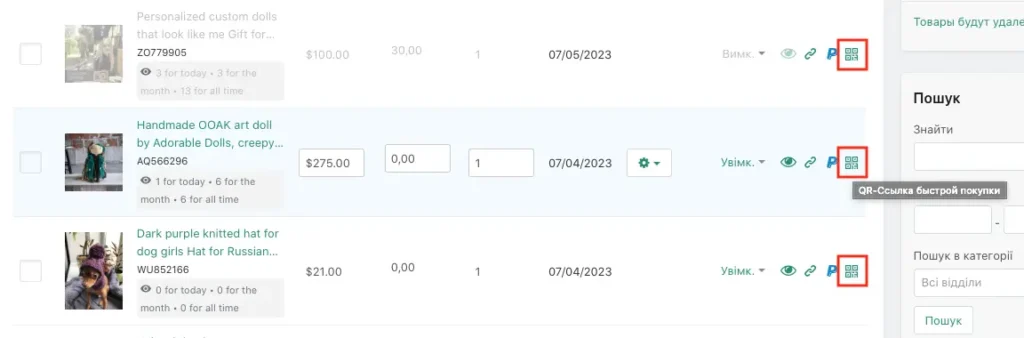
Clicking on the QR code icon opens a new window:
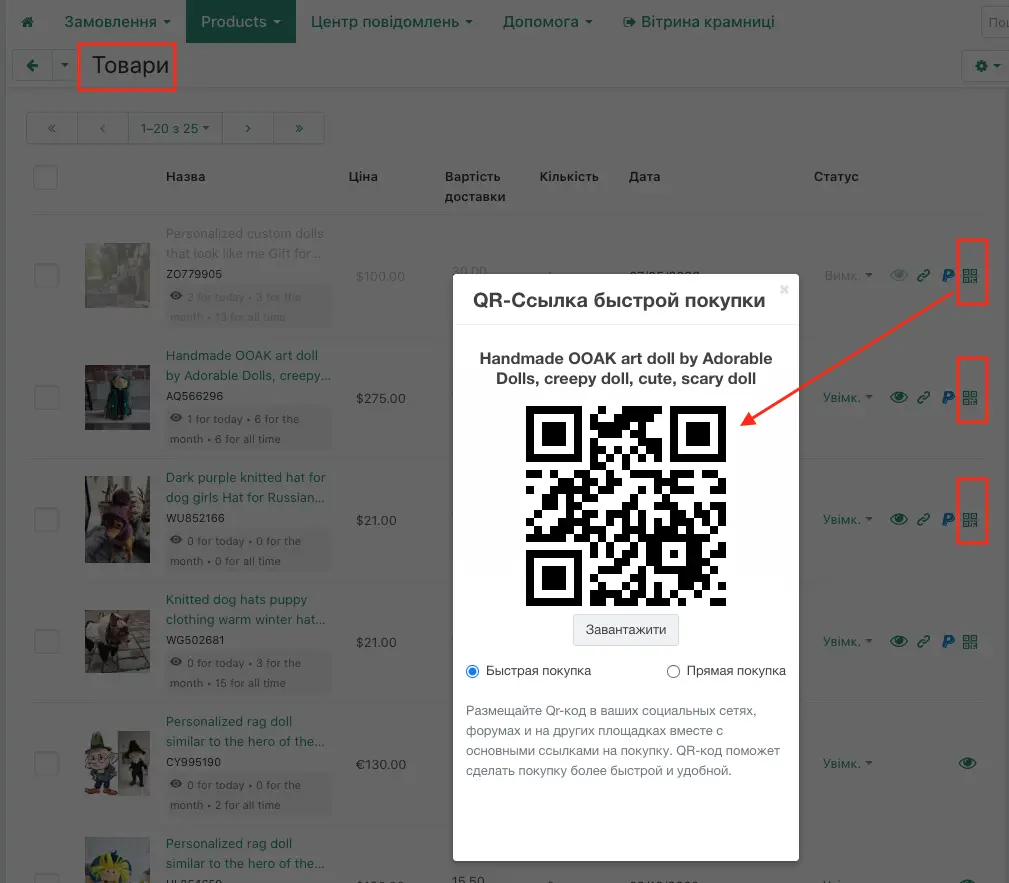
Choose which QR code link we will copy, and click the “Download” button:
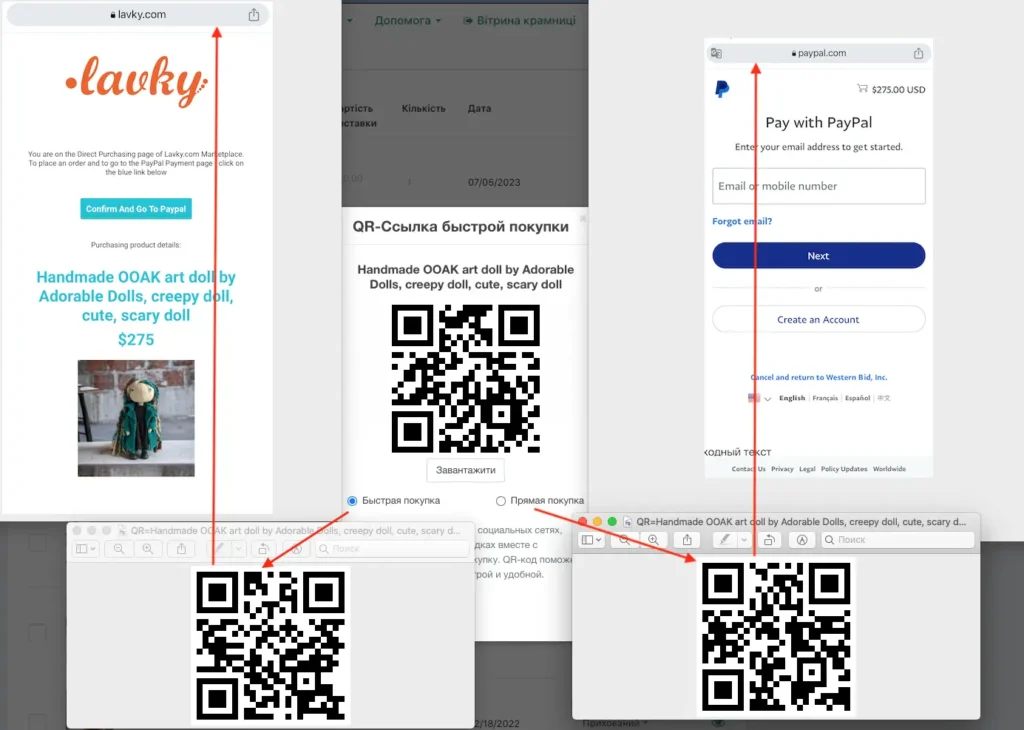
In the Save As window, choose which QR code to save.
- QR code “Quick Purchase” contains the QR code itself, which after scanning redirects to the product page of the store on Lavky.
- QR code “Direct Purchase” contains the QR code itself, which after scanning redirects to PayPal’s payment page.
How to scan a QR code using an iPhone, iPad, or an Android-based device?
It’s very simple. Most smartphones come with a built-in QR code scanner. In some latest-model smartphones, the QR scanner is built into the camera. Some tablets are also equipped with this feature. If the device doesn’t have a scanner, you can easily download and install one for free – from the app store.
How does the PayPal payment QR code work in practice?
The mechanics are very simple: the seller generates a unique or static QR code linked to their payment details in the Western Bid system. The buyer opens the PayPal app, scans the code, enters the amount (if it is not embedded in the code) and confirms the payment. Funds are instantly reserved and appear in your personal dashboard.
Is it safe to scan QR codes for payments?
Yes, because the QR code contains only a link to a secure payment page or a seller identifier within the PayPal ecosystem. All buyer data remains encrypted, and the transaction is protected by PayPal’s Buyer Protection programme.
Benefits of QR payments for Western Bid customers
We have integrated this method so that you can sell anywhere and anytime.
“Using PayPal QR codes via Western Bid helps avoid cash-handling issues at exhibitions and fairs. You receive a digital copy of every receipt, which greatly simplifies subsequent reporting and verification of the source of funds for your bank in Ukraine.”
Comparison: QR code and standard invoice
| Parameter | Payment via QR code | Payment via Email invoice |
|---|---|---|
| Speed of payment | Instant (a few seconds) | Takes time to check email |
| Offline convenience | Ideal (for exhibitions, markets) | Low (requires data entry) |
How to accept payment via QR code (How-To)
- Preparation: Log in to your Western Bid account and generate your personalized payment QR code.
- Display: Print the code or download it to a tablet/phone to show to customers.
- Scanning: The customer opens their camera or PayPal app and scans your code.
- Authorization: The client enters the order amount and taps “Pay Now” in their app.
- Confirmation: Check the real-time balance update in your Western Bid account — the order is successfully paid.
Frequently Asked Questions about PayPal QR codes
Do I need a special scanner for work?
No, any modern smartphone with a camera and the PayPal app installed or a standard QR code reader is enough.
Can a buyer pay with a card via a QR code if they don't have PayPal?
Yes, when scanning a QR code, the system often offers the guest checkout option (Guest Checkout) using a bank card through the smartphone browser.
What should you do if the customer's scan isn't working?
Make sure the code is printed clearly. As an alternative, you can always send a direct payment link via Messenger.
Expert tip
For successful sales at fairs abroad, place a QR code in a visible spot near the checkout or on the product’s price tag. This lowers the customer’s psychological barrier to reaching for their wallet and makes the purchasing process impulsive and pleasant.
Simplify payments for your customers
- Upload your personal QR code in your Western Bid account.
- Order a branded stand with a code for your next exhibition.
- Test a payment for the minimum amount to see how quickly funds appear on your balance.
- Contact our support for tips on scaling offline sales.