
You can obtain an invoice for the transfer amount from Western Bid yourself in your personal account without submitting a separate support request. To do this, go to the Withdrawals section and open the list of your requests.
Who this guide is for
- For Western Bid clients who have already submitted a withdrawal request.
- For sellers who need an invoice or a bill for the transfer amount.
- For accounting or those who collect supporting documents for payouts.
- For those who want to quickly understand, where exactly in the dashboard to find the withdrawal invoice.
How to obtain an invoice in the Western Bid account
You can obtain an invoice directly in your Western Bid Personal Cabinet in the section “Withdrawals” → “List of requests”.
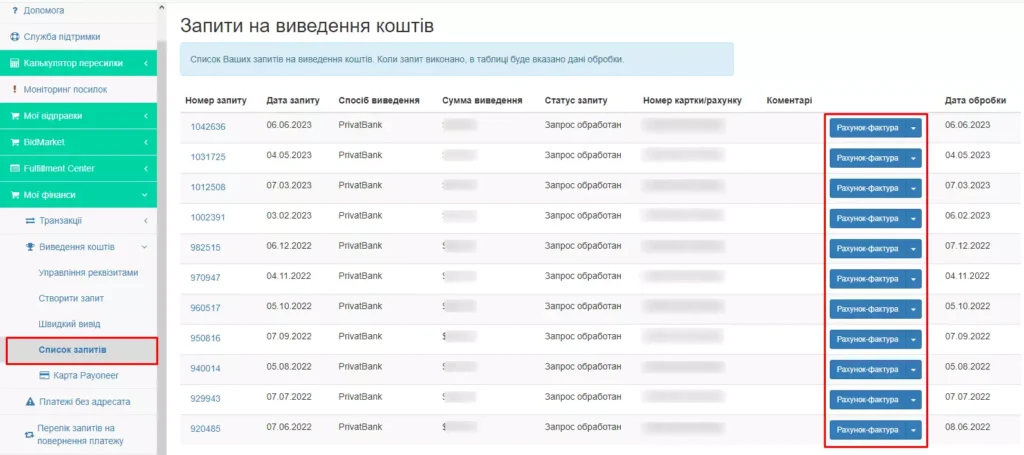
Where to find the invoice in your Western Bid account
| What is needed | Where it is located | What the result should be |
|---|---|---|
| Log in to your account | Authentication in the Western Bid system | Access to the account’s internal sections |
| Open the payouts section | “Funds withdrawal” | Proceed to the history of requests |
| View history | “List of requests” | Search for the required invoice by transfer amount |
| Check access | Only for registered clients | Ability to obtain the document |
Frequently Asked Questions
Where can I find the invoice (invoice) from Western Bid?
Where can I find the invoice (invoice) from Western Bid?
An invoice can be obtained in the Western Bid Personal Account in the section “Withdrawal of funds” → “List of requests”.
Do I need to contact support to obtain an invoice?
Do I need to contact support to obtain an invoice?
No, since the document is available directly in your personal account in the withdrawal requests history.
Who is eligible to receive an invoice?
Who is eligible to receive an invoice?
The service is available only for registered customers.
What do you need to have to view the invoice in your account?
What do you need to have to view the invoice in your account?
You must be a registered client, log in to your personal account, and have access to the “Funds withdrawal” section, where the list of requests is stored.