
Attention! Returns for payments received from sales on your Shopify site must be processed directly through the site; you can find detailed instructions at the link.
How to create a payment refund request to a customer
To process a payment refund to the customer, go to the section «My Finances» → «Transaction List».
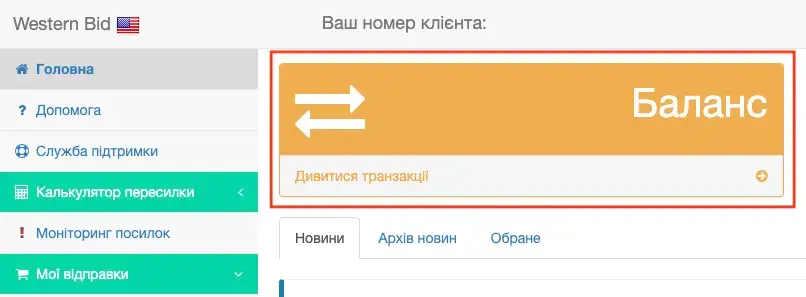
Find the required transaction and click on its number.

In the open block with the transaction details, scroll down the page and click the «Return payment» button.
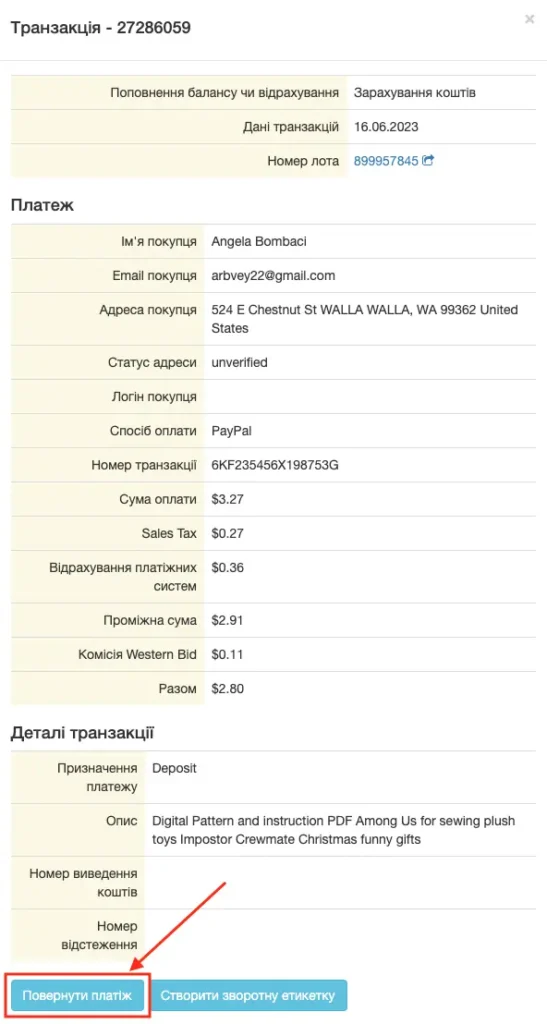
After this, the page for creating a refund request to the customer will open.
Before submitting the request, carefully verify that all fields are filled in correctly:
- transaction number;
- customer’s name;
- customer’s email;
- type of refund;
- refund currency;
- refund amount.
After checking all the data, submit the refund request.
Full and partial refunds
Returns can be full or partial.
Full refund means that the customer receives the full payment amount.
Partial refund means that only part of the amount paid is refunded to the customer. In this case, you need to specify the amount to be refunded to the customer.
Important about the refund currency
The refund will be issued in the same currency that the customer paid for the order.
For example, if the item was sold for 85 GBP, when processing a partial refund, in the field «Currency» you should select GBP, and in the field «Refund amount» specify the refund amount in GBP.
That is, the partial refund amount is always specified in the currency of the original payment.
When can a refund be issued
A refund can be issued if you need to:
- refund the full order amount to the customer;
- refund part of the order amount;
- refund funds for a canceled order;
- process a refund after agreeing with the customer;
- refund an overpayment or erroneously paid amount.
Before submitting the request, ensure that the refund should be performed for this transaction.
What to check before sending the request
Before sending the request, check:
- whether the transaction is correctly selected;
- whether the customer’s name matches;
- whether the customer’s email is correctly specified;
- whether the refund type is correctly selected;
- whether the refund currency is correctly selected;
- whether the refund amount is correctly specified.
If the request is submitted with an error, the refund may be processed incorrectly or you may have to create the request again.
Refund fees
Note: when issuing a refund, payment system fees may not be returned.
For example, when processing a refund through Authorize or Stripe, the fees of these payment systems are not returned regardless of the refund term. This also applies to situations where the payment and the refund were performed on the same day.
The Western Bid fee is refunded only in cases provided by the service rules.
Video tutorial: how to refund a payment to a customer
Watch a short video showing a real example of a payment refund from the Western Bid personal account:
Frequently asked questions about refunds to the customer
In what currency will the refund be issued?
The refund will be issued in the same currency in which the customer paid for the order.
If the customer paid for the order in GBP, the refund must also be issued in GBP. If the payment was in USD, the refund is issued in USD.
Is it possible to refund the customer only part of the amount?
Yes, a partial refund can be issued.
To do this, you need to select a partial refund and specify the amount that needs to be refunded to the customer, in the currency of the initial payment.
What should I do if I made a mistake with the refund amount?
If the request has already been submitted, contact Western Bid support as soon as possible and provide the transaction number under which the request was created.
Are payment system fees refunded?
Not always.
The fees charged by payment systems, in particular Authorize or Stripe, are not refunded when a refund is issued. This does not depend on when exactly the refund was issued.
When will the buyer receive the funds?
The time for crediting funds to the customer depends on the payment system and the customer’s bank.
After the refund is processed by Western Bid, further crediting of funds is handled by the payment system and the buyer’s bank.
Is it possible to cancel a return request?
If the request has already been sent, the ability to cancel it depends on whether it has already been processed.
If you notice an error or want to cancel the request, please contact Western Bid support as soon as possible.