Western Bid offers Fulfillment Center services in the USA. Your own warehouse in Miami significantly expands your capabilities: it allows you to store batches of goods directly in the USA, greatly shortens delivery times of goods to your customers around the world, improves your seller rating on marketplaces. You can manage the warehouse from your Personal Cabinet.
What is a fulfilment centre
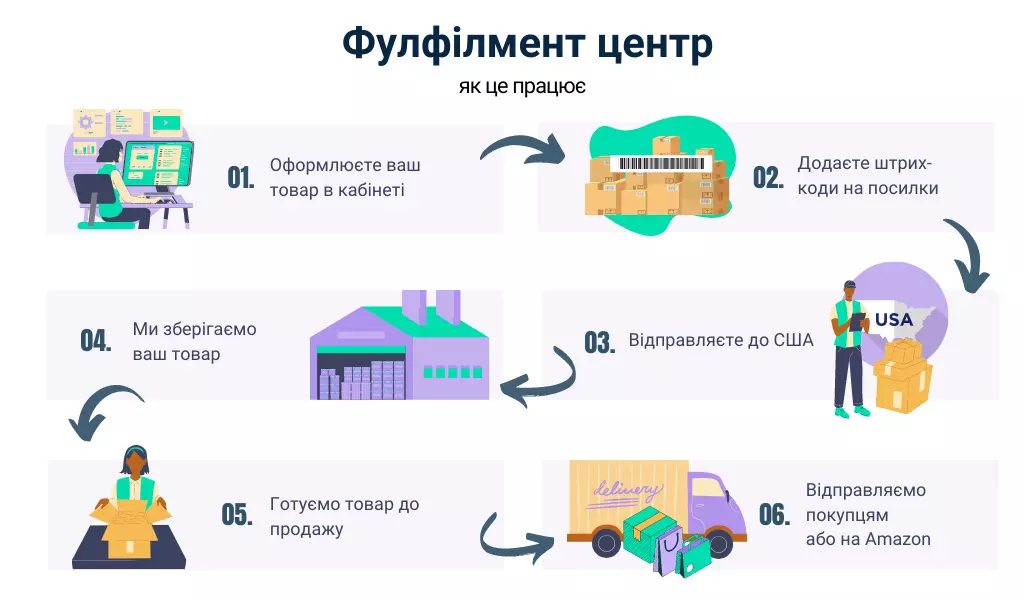
The fulfillment center offers you a full range of different services, including both essential and optional, i.e., services of your choice. The main services are the receipt of product batches from you or directly from your suppliers, storage of your goods in the warehouse, management of goods and shipping from the warehouse to the customer according to your orders. Optional services include choosing packaging, gift packaging, a greeting card, insurance of your parcels, additional product presentation, “live” photographs of the goods, or listing your goods in our own American stores.
All management of goods in fulfillment is performed by you in the Western Bid client account. A simple and intuitive interface allows you to quickly and without unnecessary effort enter data about the goods, about the batches of goods – this information is needed by warehouse staff for receiving the goods. In the client account, information about all parcels sent to the warehouse and product batches, the status in our system (received or expected) and details about the shipment is always available. The same is true for placing a request to send goods to your customers. Usually shipments from the warehouse are sent on the day of the order, sometimes this may be the next day.
Before choosing a shipping method within the USA, we recommend calculating the shipping cost. For this, the calculator provides an option to calculate from the Miami warehouse. The system will also show the cost of packaging of your choice and the warehouse commission.
Let’s review all the listed services in more detail.
For more details on how to send goods to the fulfillment warehouse or how to list shipped goods for sale, read at the links:
Storage, management and shipment of goods from the warehouse
Storage of goods in the warehouse
The number of units stored is charged for the storage duration every 30 days.
For example, a batch of 50 units arrived on January 1, 30 days have passed, on January 31 there remained 20 units in this batch, the rest were sold and shipped to customers, so the storage fee is charged based on 20 units. If 30 units arrived and all of them were sold within 30 days, then storage will be free.
Storage cost per unit per month, depending on weight:
| Weight of unit, kg | Charge for 30 days |
|---|---|
| up to 0.050 | $0.04 |
| 0.051–0.100 | $0.08 |
| 0.101–0.200 | $0.10 |
| 0.201–0.300 | $0.13 |
| 0.301–0.500 | $0.16 |
| 0.501–0.750 | $0.18 |
| 0.751–1.000 | $0.26 |
| 1.001–1.500 | $0.39 |
| 1.501–2.000 | $0.50 |
| 2.001–3.000 | $0.60 |
| 3.001–4.000 | $1.00 |
| 4.001–5.000 | $2.00 |
| 5.001–6.000 | $2.40 |
| 6.001–7.000 | $2.80 |
| 7.001–8.000 | $3.20 |
| 8.001–9.000 | $3.60 |
| 9.001–10.000 | $4.00 |
| 10.001–12.000 | $5.00 |
| 12.001–15.000 | $6.00 |
| 15.001–17.000 | $7.00 |
| 17.001–20.000 | $8.00 |
| 20.001–23.000 | $10.00 |
| 23.001–26.000 | $12.00 |
| 26.001–30.000 | $14.00 |
| 30.001–35.000 | $16.00 |
| 35.001–45.000 | $20.00 |
| over 45.001 | $45.00 |
Long-term storage of goods
From 1 September 2026, goods stored at Fulfillment Center Western Bid for more than 180 days are subject to increasing coefficients applied to the base storage cost:
- up to 180 days inclusive ×1;
- 181–365 days ×2;
- 366–549 days ×4;
- 550–731 days ×6;
- 732–915 days ×8;
- 916–1095 days ×12;
- from 1096 days ×15.
The cost of long-term storage is calculated using the formula: base storage cost × the applicable coefficient. The storage period is counted from the date the goods actually arrive at the warehouse, separately for each batch.
30 days before goods move to the next rate level, the client receives an automatic notification.
Warehouse fee for shipped parcels
Charged at the moment the shipment is created for dispatch.
For orders with up to 2 items (+$0.25 for each additional unit):
| Parcel weight | Warehouse fee (up to 2 items per order) |
|---|---|
| up to 0.453 kg | $2.00 |
| 0.453–0.907 kg | $2.50 |
| 0.908–1.810 kg | $3.00 |
| 1.820–4.530 kg | $4.00 |
| over 4.540 kg | $5.00 |
Prices shown are for the parcel excluding boxes and shipment cost (volumetric or actual weight – the calculation is based on the greater value).
The cost of forwarding from the Prep Center can be calculated using a convenient calculator. Go to calculator.
Packaging options for the order
Option I. Unpacked product. You can choose packaging from the options proposed by the warehouse. If our packaging does not meet the dimensions or for other reasons, you need to submit a request to the Customer Support for an individual packaging selection.
Option II. Product “with its own packaging”. This is a product that is packaged to your preference and ready for shipment to customers.
Option III. The product and your packaging for the product. For this, together with the product you need to send the packaging, for example, folded boxes, then warehouse staff will pack the product into your packaging before dispatch to the customer.
Important! For packaging material intended for the product, when processing in the personal account, you must create a separate batch. That is, in the shipment that arrives at the warehouse in this way, there may be the product and the packaging for it, issued in different batches. Later, when submitting a request to ship the product to the customer from the personal account, the product and the packaging from different batches are added to it.
If your packaging proves not to be reliable enough, the warehouse employee has the right to repack the parcel in order to deliver the product to the customer in proper condition. The packaging fee will be charged to your account. The calculator computes the cost of forwarding and the final price, including repacking and the warehouse’s commission.
Requirements for entering goods into the warehouse
The fulfillment center employee checks every batch of goods and counts its quantity. Therefore, do not wrap the product tightly with tape and film.
1. Mandatory labeling of every unit of product
Each unit of product sent to the Western Bid fulfillment center must be labeled.
Labeling must be carried out exclusively using Western Bid labeling labels, generated and printed by the client from their Western Bid account.
Labeling of a batch of goods, a box or a pallet does not replace labeling of each individual unit of goods.
2. Use only Western Bid labels
The use of any other methods of product identification is not permitted and is not considered proper labeling, including (but not limited to):
- third-party barcodes;
- internal SKUs;
- handwritten markings;
- QR codes;
- stickers from third-party systems;
- any other markings that are not Western Bid labels.
Goods that are not labeled with a Western Bid label are considered to be unlabeled goods.
3. Requirements for labeling quality
The labeling label must be:
- readable;
- clearly printed;
- without damage;
- without blur, smudging or distortion;
- suitable for unobstructed scanning by a standard warehouse barcode scanner.
Labels with low print quality, defects, damage or other deficiencies that hinder correct scanning are considered incorrect.
An unreadable or unscannable label is equivalent to the absence of labeling.
Re-striping and the cost of road markings
In the absence of correct labelling, the use of labels other than Western Bid or unreadable labels, Western Bid reserves the right to re-label the product at a charge WITHOUT PRIOR AGREEMENT with the customer:
- $0.20 per unit of product, if the marking label can be affixed directly to the product;
- $1.00 per unit of product, if prior to labeling the product needs to be additionally packaged in a bag or protective packaging.
Proper shipment processing and tracking numbers
The client is required to provide a valid tracking number for each shipment of goods to the Western Bid warehouse.
Invalid submissions include, in particular, the following situations:
- the provided tracking number does not match the package actually received;
- the tracking number cannot be found in the system;
- the contents of the package cannot be identified;
Processing of incorrectly documented shipments
In case of incorrect shipment processing, warehouse staff inform the customer and proceed with manual handling of the situation.
A fee is charged for this processing:
- $25.00 per shipment.
Bug fix timelines and parcel status
If the client does not fix the formatting error of the shipment within 7 calendar days from the moment of notification, such a parcel is treated as an unaddressed parcel.
After that the parcel becomes unavailable for standard processing and is moved to the corresponding section of the client’s personal account, where the client is obliged to independently locate and pick it up.
Storage of unaddressed parcels
Parcels prepared as unaddressed shipments are kept at the Western Bid warehouse for 3 months from the moment of status change.
If during this period the parcel is requested by the customer, the customer is charged the storage cost for the entire period of actual storage calculated as:
- $45,00 per month of storage (pro-rated to the full period of the parcel’s stay in the warehouse).
Product disposal
If the parcel has not been claimed by the customer within 3 months from the moment of its transition to the status of an unaddressed parcel, such a parcel is subject to disposal without return and without compensation.
Gift packaging
Upon request, we offer additional services that customers may request. One of these services is free gift wrapping – a polyethylene bag with a thematic design.
You can compose a greeting message for $0.50, and we’ll print it on thick paper in a nice font and include it in the package.
Shipping companies across the USA to the end customer
USPS, UPS – the customer’s choice. More details about delivery options here. Please track the movement of shipments after they are shipped from the Fulfillment Center – in case of a problem (for example, an incorrectly specified recipient address) a ticket must be created, and our Support Team will contact the carrier to resolve the situation.
Attention! Shipments sent via UPS SurePost or UPS Ground (usually weighing more than 450 g) must be at least 4 cm thick.
Goods receipt terms
Up to 2 working days.
Cost of receiving goods
Admission to parties is free.
Is it possible in a single consolidated shipment to send some of the parcels to customers and the rest to the warehouse?
That option is not available. It is necessary to send a batch of parcels to the warehouse separately (in a single consolidation shipment there may be goods from different batches, the batch barcode must be on each parcel), separate shipments for customers. If these shipments are sent together, an additional charge for their sorting will be $50.00 per hour (minimum 30 minutes).
Parcel insurance
Yes, when delivering from the Fulfillment Center there is door-to-door insurance, depending on the type of shipment you choose. Details.
Packages shipped via UPS Express and UPS Ground – can be insured only if the declared value is greater than $85. If the declared value is less than or equal to $85, regardless of the paid shipping cost, such shipments are automatically insured free of charge up to the amount of the declared value of the contents + the paid shipping cost, however compensation will not exceed $85. If the declared value exceeds $85 – 1% of the declared value.
Packages sent via FedEx – can be insured only if the declared value is greater than $100. If the declared value is less than or equal to $100, regardless of the paid shipping cost, such shipments are automatically insured free of charge up to the amount of the declared value of the contents + the paid shipping cost, however compensation will not exceed $100. If the declared value exceeds $100 – 1% of the declared value.
Details by shipment types:
- UPS Mail Innovations – the package is not insured by default, but you can opt for insurance – 1% of the declared value.
- UPS Surepost – shipments up to $100 are insured by default, when creating a shipment from the client, $0 is charged in a separate transaction to show that the insurance is free (insurance applies only if the shipment has not been handed over to USPS).
- USPS Priority – shipments up to $100 are insured by default, during creation a $0 charge is recorded in a separate transaction to show that the insurance is free.
- USPS Ground Advantage – shipments up to $100 are insured by default, during creation a $0 charge is recorded in a separate transaction to show that the insurance is free.
- UPS Ground Saver – shipments up to $100 are insured by default, during creation a $0 charge is recorded in a separate transaction to show that the insurance is free (insurance only applies if the shipment has not been handed over to USPS).
- UPS Economy DDU – the shipment is not insured by default, but you can choose insurance – 1% of the declared value. Insurance can be purchased only in those countries where it is tracked – Canada, China, Israel, Japan, Singapore and the United Kingdom. In other countries, insurance does not apply.
- 2 Day FedEx – shipments up to $100 are insured by default, during creation a $0 is charged in a separate transaction to show that the insurance is free.
- FedEx International Connect Plus – shipments up to $100 are insured by default, during creation a $0 is charged in a separate transaction to show that the insurance is free.
- Fedex International Priority, Fedex International Economy, FedEx Int One rate to Canada – shipments up to $100 are insured by default, during creation a $0 is charged in a separate transaction to show that the insurance is free.
- DHL eCommerce – shipments up to $100 are insured by default, during creation a $0 is charged in a separate transaction to show that the insurance is free.
Is insurance valid in all countries?
Please note that with UPS Economy DDU delivery, parcel tracking is usually available in only six countries (Canada, China, Israel, Japan, Singapore and the United Kingdom). In other countries, tracking is not available, so loss insurance for UPS Economy DDU delivery is not provided.
Shipment of goods to the warehouse from your suppliers
To do this you need to enter information about the product and batches in your My Account, and also provide your partners from China (or other countries) with barcodes to mark the batches. If the product arrives at the warehouse without barcodes, our staff will label it for an additional charge:
- $0,20 per unit of product, if the marking label can be affixed directly to the product;
- $1,00 per unit of product, if before labeling the product needs to be additionally packed in a bag or protective packaging.
Product photos for marketplaces
Each photo – $2.00.
Additional services
You can submit a request to perform any additional services related to labeling, packaging, and the presentation of your product. The cost of such work is $50.00 per hour, with a minimum of half an hour.
Delay in payment for storage of goods
If the User delays payment for storage services of goods at the Fulfillment warehouse for more than 30 days, Western Bid reserves the right to dispose of goods for which payment has not been made. The disposal of the goods will be carried out without further notice, and Western Bid shall not be liable for any losses that may arise from disposal.
Updates
Attention! We inform you that from March 25, 2023, UPS SurePost has introduced additional surcharges on oversized shipments.
- Additional surcharge for non-standard cubic size:
Any package with dimensions L x W x H that exceed 2 cubic feet (3456 cubic inches).
Note: 1 cubic foot equals approximately 0.0283 cubic meters. –$15.00 per box. - Additional charge for non-standard length:
Any package with the longest side greater than 76 cm and not exceeding 122 cm. – $5.00 per box - Non-machineable handling surcharge.
The following conditions apply to the additional charge per package:
– Any package with a single dimension measuring more than 27 inches (68.58 cm) and not exceeding 30 inches (76.2 cm).
– Any package with two dimensions, each measuring more than 17 inches (43.18 cm) and not exceeding 30 inches (76.2 cm).
– Any package weighing over 35 pounds (about 15.88 kg). – $4.20 per box - Additional surcharge for non-standard length:
Any package with the longest side measured more than 22 inches (55.88 cm) and not exceeding 27 inches (68.58 cm). – $2.00 per box
We are informing about price increases for shipments of some packages via Mail Innovations from our Fulfillment Center.
- Non-standard cubic surcharge:
Any package with dimensions L x W x H that exceed 56.6 cubic cm. – $4.00 per box. - Additional charge for non-standard length:
Any package with the longest side greater than 55.88 cm. – $4.00 per box
How to manage warehouse stock from your personal account
In your account dashboard there is a section “Fulfillment Center” where you can manage your products in the warehouse.
In the “Add Product” section you need to provide information about the unit (piece) of the product that you intend to ship to the Miami warehouse.
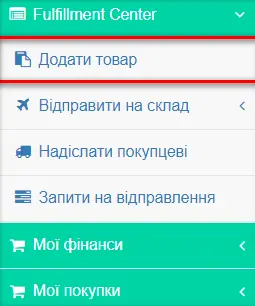
How to add a product
Fill in all the required fields in the menu’s “Add product” section for each unit of your product, and click the “Add product” button. Note: the information provided at this stage is intended only for internal use by warehouse staff, to correctly process the goods receipt at the warehouse. This information is not mentioned anywhere else and is not displayed.
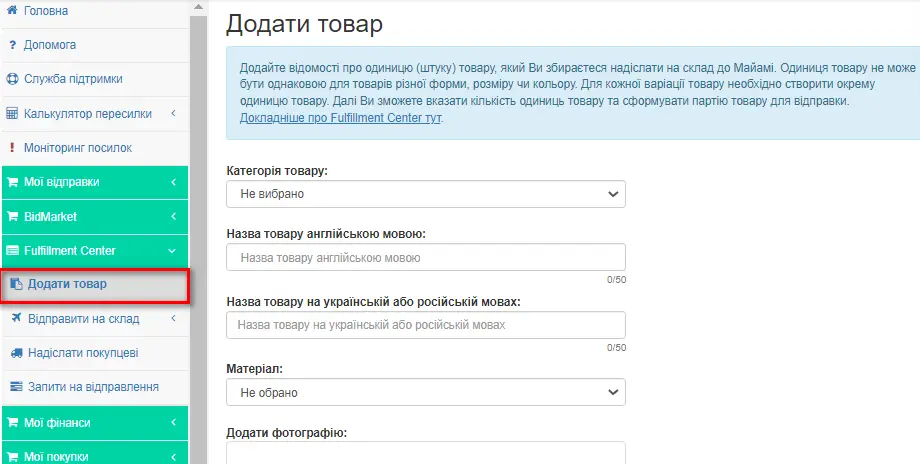
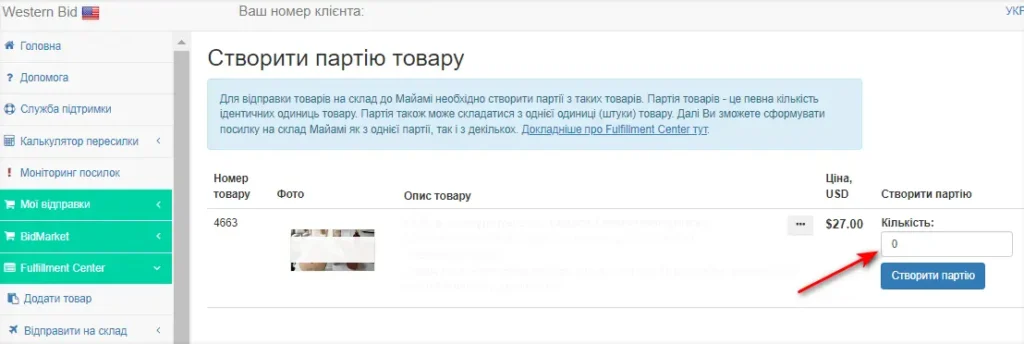
After this, the system will prompt you to proceed to create a batch. You can also create a product batch from the menu section “Create product batch”.
Enter the quantity of identical product units and press the “Create batch” button.
What is a batch of goods?
You create batches of products for sale yourself – it is important that a single batch contains only a completely identical product (for example, red phone cases and blue phone cases are different batches).
A product unit cannot be the same for products of different shapes, sizes, or colors. For each product variation, you need to create a separate product unit. Then you will be able to specify the quantity of product units, thereby forming a batch of products for shipment.
Note! You can ship several different batches in one box. If you have the same-type product, but it does not fit in one box, you need to create two batches; you cannot split batches across two boxes.
After this, the system will prompt you to proceed to arranging the shipment of a batch of goods to fulfillment. If you are including the product packaging, process it as a separate batch. Then after the sale, when you are forming the shipment to the customer, add it from your account. For this, during delivery processing, select in the menu “Send to warehouse” and generate the shipment to the Miami warehouse from a single batch as well as from multiple batches, by marking the list of items for delivery with checkmarks. In this case, the warehouse staff will understand which specific item to place in which box. As a result, there is no need to submit a request to merge the product to Customer Support, and therefore your item will be delivered to the customer faster.
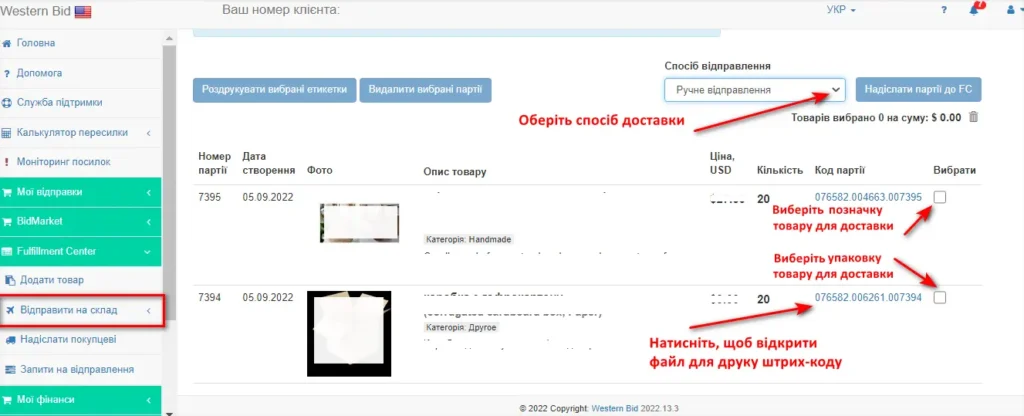
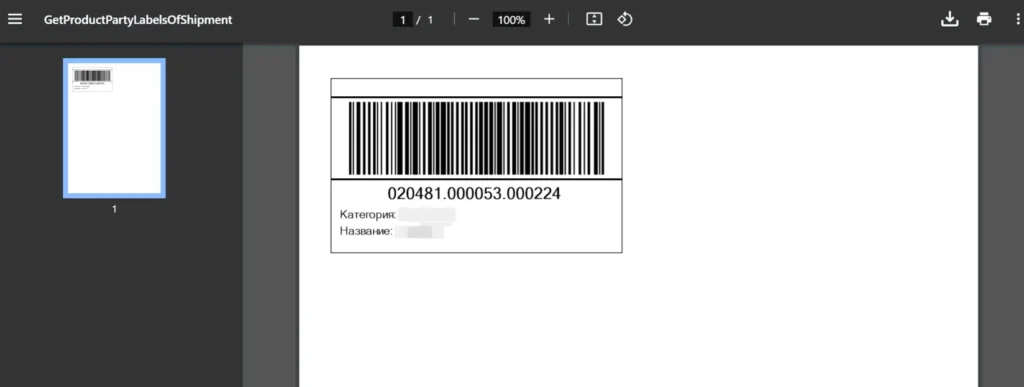
A barcode must be affixed to each unit of the product in the batch. In the ‘Send batches to warehouse’ menu section, the product code will be clickable. Clicking it will bring up a print file. After the batch arrives at the warehouse, an employee checks your goods and their quantity. If there are any issues with the batch, for example, the number of units does not match what you indicated, the employee will open a ticket, and you will receive a notification in your Personal Cabinet.
Preparation of goods for shipment
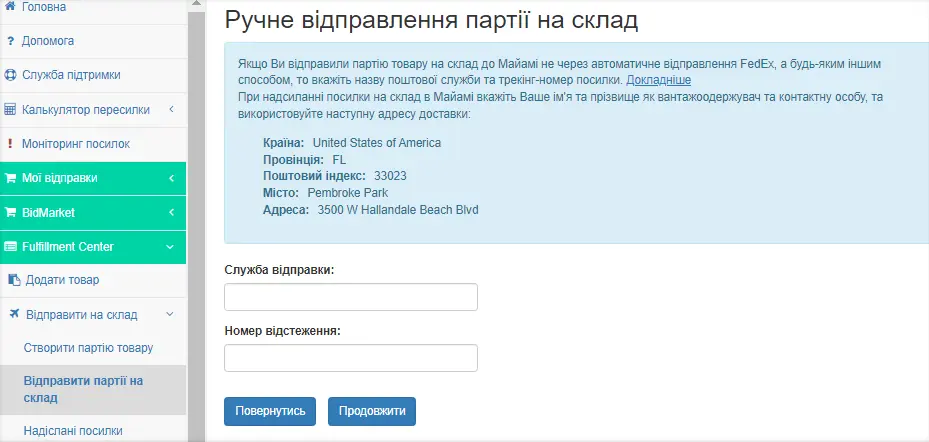
Also in the menu section “Send batch to warehouse” you can choose the forwarding method. Packages can also be delivered to the address of our warehouse by any other forwarding method we work with. Then you select in the section “Shipping method” – “Manual shipment” and specify the name of the postal service in Latin letters and the tracking number of the parcel.
The address of our warehouse in Miami:
Your Name
Your Last Name
IN CARE OF WB WAREHOUSE
3500 W Hallandale Beach Blvd,
Pembroke Park, FL, 33023, USA
Mail: info@westernbid.info
Phone: 3053070382
For example:
Ivan Ivanov IN CARE OF WB WAREHOUSE, 3500 W Hallandale Beach Blvd, Pembroke Park, FL, 33023, USA.
If necessary, you can shorten the first name, but not the last name and not the phrase “IN CARE OF WB WAREHOUSE”.
For manual sending to the fulfillment center, the corresponding fields must be filled in as follows:
| Field | Value |
|---|---|
| Country, region, territory | United States |
| Country code | US |
| State | FL |
| ZIP code | 33023 |
| City | Pembroke Park |
| Address | 3500 W Hallandale Beach Blvd |
| Apartment number | – |
| Contact person’s full name (first and last) | Your name and surname in English IN CARE OF WB WAREHOUSE |
| Consignee | Your name and surname in English IN CARE OF WB WAREHOUSE |
| info@westernbid.info | |
| Phone number | 3053070382 |
The process of shipping and tracking the product
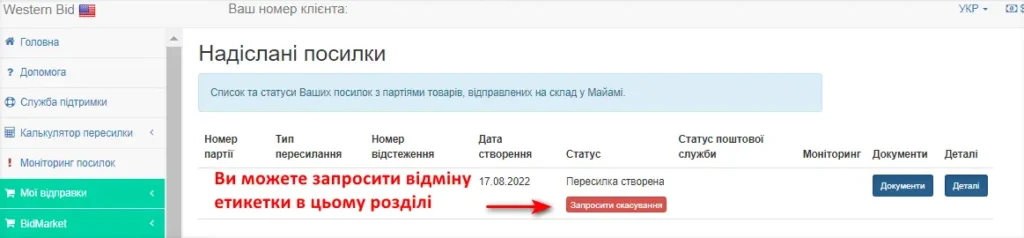
In the menu section “Sent shipments” you can view all information about your sent shipments:
- transaction number,
- the type of forwarding you chose for delivering the goods to our warehouse,
- parcel tracking number,
- creation date,
- status in our system, for example, “Accepted at the Fulfillment warehouse”,
- postal service status,
- monitoring, within which you can create a ticket and track the resolution of your issue regarding a specific shipment,
- documents for the shipment, if you created a FedEx label through our system (in other cases the field will be empty),
- view all details of your shipment.
Also, if you created a FedEx label through our system, you can request cancellation of the label within 10 days after its creation if the shipment has not yet been sent.
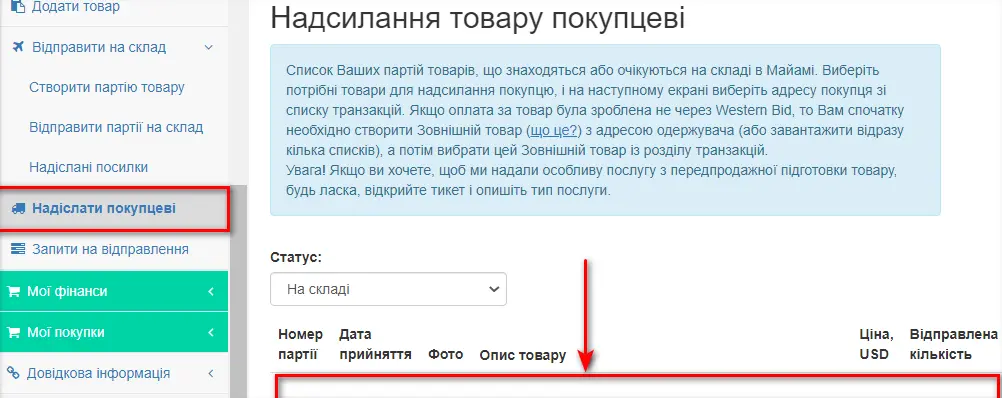
In the “Send to customer” menu section you will see a list of your batches of goods that are in stock in Miami or are expected there. Select the items you need to send to the customer, and in the next step select the customer’s address from the transactions list. If payment for the item was not processed through Western Bid, you first need to create an External item with the recipient’s address (or upload several at once as a list), and then select this External item from the transactions section.
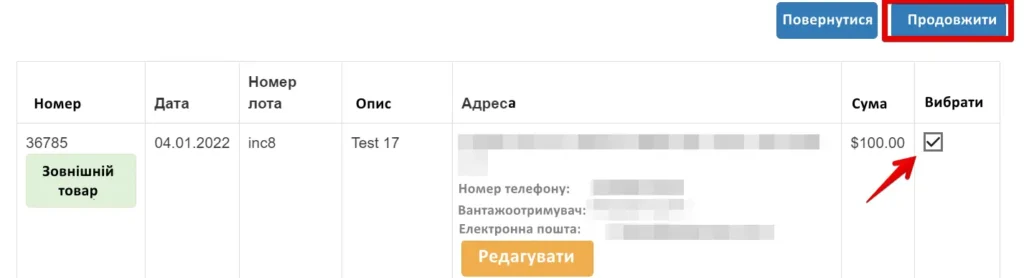
Select the number of items and click the “Send to customer” button. In the window that opened, select the transactions from the list and click “Continue”.
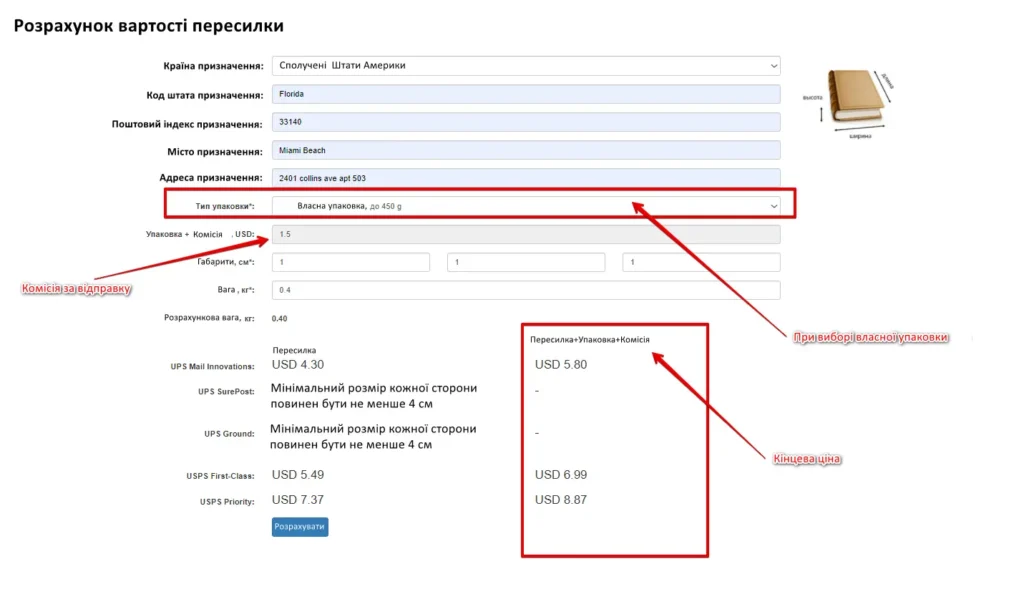
Next, select the shipping method for sending the parcel from the warehouse in Miami to your customer, and send the shipping request. Your item will be shipped within 1-2 business days from the moment the request is created (usually on the same day).
When you click the “Calculate” button, the system will conveniently show the delivery cost, as well as the packaging cost (if you want packaging for your product to be selected by us according to the type of your product) and the warehouse commission:
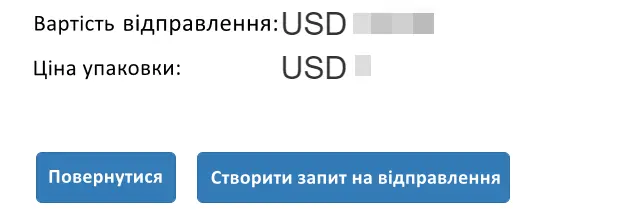
If the price is right for you, click “Create a shipping request”. The system will ask you to confirm all the details. If everything is correct, confirm the request. Our staff will pack your item, affix a label, and ship it to the buyer within 1-2 business days.
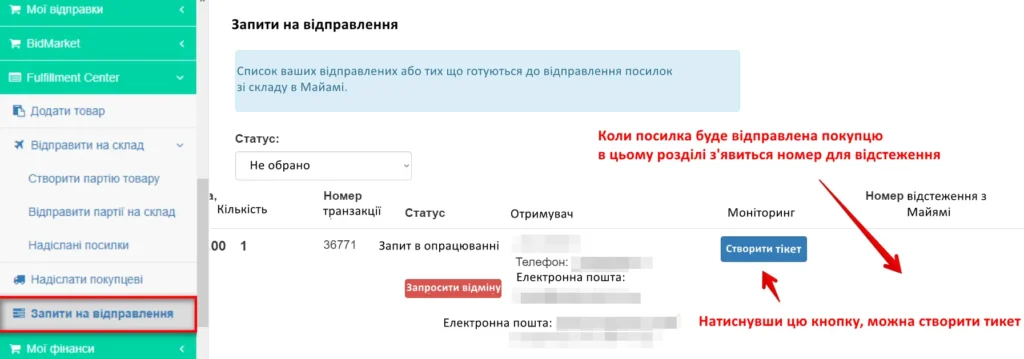
In the “Shipping Requests” section of the menu you will see a tracking number, which you can specify on the marketplace. The number will appear when the parcel has been shipped. Until dispatch, the field will remain empty.
If you have questions about any of the shipped parcels, in this section of the menu you can also create a ticket. There, in the “Monitoring” column, you will be able to track our staff’s responses to your ticket.
If you created a request to send by mistake, you can click the “Request cancellation” button. This feature will be available until the parcel has been dispatched from the warehouse to your customer.
Product display
We can list your product from our American accounts on the world’s most well-known marketplaces:
- Ebay, Facebook Marketplace, Walmart, Amazon, Mercari, Bonanza (whatever is allowed by marketplaces for selling),
- Poshmark (only for branded clothing, footwear, and accessories).
Listing is possible if you have produced or purchased (yourself or thanks to our buyout service) and have already shipped your product to our fulfillment warehouse in the USA. From this moment, the option to list the product from our accounts becomes available.
Payments for the sale of the product are made to your Western Bid account, from which the funds can be withdrawn in a manner convenient for you. The payout terms depend on the rules of the marketplaces where the product was sold.
If you sell this same product in your other stores, note that when listing the product on the same marketplace, the description and photos of the product must differ. Also, if you have sold out the product, please inform us that the product is no longer available for sale or indicate the remaining stock.
Product listing fee
The cost of a standard product listing, i.e., the price of one listing, is:
Ebay – $10.00
Mercari – $10.00
Walmart – $15.00
Amazon – $15.00
Listing is an advertisement for your product (photos, description, delivery terms, etc.). $10.00 is the fee for listing one listing (from 1 to 100 identical units) on all of the listed marketplaces (eBay, Poshmark, Facebook Marketplace, Mercari, Bonanza) that are suitable for your product.
For example, you are selling branded clothing. You have 1 unit. We can create a listing across 8 marketplaces at once, because they are suitable for this product category. This will cost $10.00.
Another example: you have cat houses – 10 identical pieces. We can list them on only 6 marketplaces, because on Poshmark you can sell only clothing. This will cost $10.00.
If you want to sell goods of different colors or designs, listing each type of product must be paid for separately.
If you want to advertise this listing, an advertising budget is additionally charged for it. To do this, in your account you need to create a ticket and indicate which listing you want to promote and what budget you have planned for it.
The funds for listing the product will be deducted from the balance of your personal cabinet.
Product photo and description requirements
The photo must be created by you, or manufacturer photos are allowed, provided that such photos are not covered by copyright. If manufacturer photos cannot be used, you can create the photo yourself or order such a service.
The cost of this service will be $2.00 per photo (minimum 3 pieces).
You can provide the product description in Ukrainian (we will translate it ourselves) or in English (if you wish). In the product description, be sure to indicate its key characteristics (for example, size, material, etc.) and features (whether the item is new or used, handmade or mass-produced, etc.).
Product Description. The headings in the product description should be no more than 80 characters, and the product description should be no more than 1000 characters.
Photo. The minimum permissible photo size is 500 pixels, but we strongly recommend taking photos with a resolution of 2000 pixels on the longest side, and a file size of up to 7 MB.
Since the photo frame for placing in the product gallery has a square shape – it is advisable to create and compose the products in the frame with 1:1 proportions (i.e., square).
On marketplaces, it is allowed to post 10 – 12 photos for free. Take the maximum number of photos allowed, but not less than 3 photos. Show the product from different angles and from different sides, take close-up photos of details. Do not leave too much space around the object, the product should occupy 80-90% of the frame. Take not one, but several close-up photos. Use macro mode for photographing important details.
Save the files in one of the acceptable file formats JPEG, PNG, GIF, TIFF, BMP, WEBP, HEIC.
Marketplaces' commissions for listing and selling goods from our accounts
The commission for listing and selling is deducted from the total cost of goods. The amount of these commissions depends on the marketplaces and categories.
PayPal fee for receiving payments in US dollars:
| Country | Fee |
|---|---|
| USA | 1.9% + $0.30 |
| Other countries | 2.9% + $0.30 |
Western Bid fee for accepting payments:
Western Bid 4%
Funds withdrawals can be made immediately in any method convenient for you. To learn about withdrawal options, as well as the commissions of marketplaces, you can in the Prices section Prices.
Price for the item on display
When listing a product on our accounts, you can set the price at which you want to sell your item. In order to establish a correct price, you need to perform market analysis and ensure that the price of the product is competitive. For more details on how to conduct a market analysis, read here.
On our eBay account we offer the option to list an item in two auction types: Auctions – a standard auction where buyers place bids, and Buy It Now – a fixed price.
When listing an item, you should discuss with our representative the possibility of offering discounts to buyers and the amount of those discounts.
When submitting a request to list a product, along with the desired price, also indicate the possibility of offering discounts to buyers. Sometimes buyers may haggle. So, if you have a minimum price you’re willing to accept, please indicate it as well.
How to apply for a product listing
If you want us to list your product on our American accounts eBay, Mercari, Facebook Marketplace, Bonanza, Poshmark, Walmart, Amazon, you need to select a product for sale.
Sales requests can only be created for items that are already at FC Miami.
In the Menu, in your Personal Account, in the “Sell via Western Bid” section, select the item for sale and indicate how many units of the product you want to list.
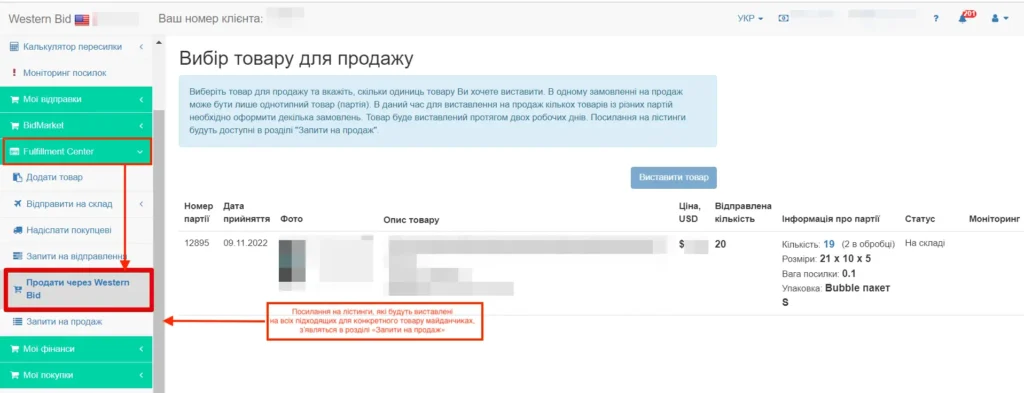
To list for sale several items from different batches, you need to place several orders.
Service cost to list one item (up to 100 identical units):
Standard Package – $10.00
The Standard Package includes listing your product (listing) on eBay, Mercari, Bonanza, Facebook MP, Poshmark. We will immediately list the product on all of the listed marketplaces that fit your niche.
Walmart – $15.00
Amazon – $15.00
The item will be listed within two business days from the moment the request is submitted on all marketplaces suitable for the specific product.
The decision on the possibility of listing the product on a specific marketplace, taking into account the product category and marketplace restrictions, is made by Western Bid. Links to the listings will be available in the “Sales Inquiries” section.
Product returns
In online trading there is a certain percentage of returns for various reasons. This aspect must also be taken into account in your work. If, for example, a complaint is filed about the product, the product did not fit, or for another reason the buyer requests a refund, then the funds are deducted from the seller’s account.
In the case of returns of parcels sent via Fedex, SurePost, DDU, DHL eCommerce, for the return delivery to the Fulfillment Center, the carrier charges a fee. The funds will be deducted from your account. Storage of returned parcels in the warehouse for 30 days is free. More information about handling returns here.
Detailed information about convenient and fast delivery from the Fulfillment Center to the USA as well as to other countries can be found by watching the video:
Fulfillment Center Checklist
- Add items and batches in the Fulfillment Center section, generate and apply Western Bid labels to each unit.
- Ship the batches to the Miami warehouse (via carrier services with an address template) and monitor the status ‘Accepted at Fulfillment Warehouse’ in the ‘Shipped Packages’ section.
- After the goods arrive, use ‘Ship to Customer’ to create shipments and ‘Shipping Requests’ to track tracking numbers and monitor.
- If needed, list items from Western Bid accounts via ‘Sell via Western Bid’ and top up the balance to pay for services.
- Regularly monitor storage fees to prevent the disposal of goods due to overdue storage.
Frequently Asked Questions about the Western Bid Fulfillment Center
How much does storing goods in a warehouse in Miami cost?
The first 30 days of storage for new batches are free, after that the price depends on the weight per unit and starts at $0.04 for 30 days for items up to 0.050 kg.
What is the warehouse fee for sent parcels?
The warehouse fee depends on the weight of the package and ranges from $2.00 to $5.00 per shipment (for two units in the order) plus $0.25 for each additional unit.
Is labeling of each unit of the product mandatory?
Yes, every unit of the product must have a Western Bid label; labeling by batch or box only is not allowed, otherwise the warehouse will relabel the product for an additional fee.
What happens if the shipment to the warehouse is documented with errors?
Incorrectly prepared shipments are processed manually for $25.00; if the errors are not corrected within 7 days, the parcel is moved to the status «no recipient» with subsequent paid storage and possible disposal.
Is it possible to send part of the consolidated shipment to the warehouse, and part to customers?
No, batches for storage and shipping to customers must be sent separately; mixed shipments are charged an additional fee of $50.00/hour (minimum 30 minutes).
How does insurance for packages from a fulfillment center work?
In most UPS, USPS, FedEx, and DHL eCommerce rates, shipments up to $100 (or $85 for UPS, $100 for FedEx) are automatically insured; beyond this limit, insurance costs 1% of the value of the shipment, with nuances for UPS Economy DDU.
How to list a product from a fulfillment warehouse on Western Bid marketplaces?
In the “Sell through Western Bid” section, select the item that is already in stock in Miami, specify the quantity and desired price, pay the listing fee, after which the item will be placed on suitable platforms within two business days.
