Exclusive for our clients: receive 10% off delivery via Nova Poshta Ukraine when sending international shipments to our consolidation centre in Kyiv.
Delivery by Nova Poshta
We are pleased to offer our clients a unique advantage. From now on, when you send international shipments to our consolidation center in Kyiv, you can use the convenient delivery service from Nova Poshta Ukraine, and at the same time receive an exclusive 10% discount.
The process is simple and convenient. You can pay and print the label directly in your account. This discount will allow you to save on shipping and provide your customers with more favorable terms.
To obtain the discount, you need to generate a consignment note for parcels in your personal account Western Bid or West Parcel.
1. Pack your parcels and create labels for your international shipments using your chosen methods: UPS, FedEx, DPD, Direct Consolidation, Plus, etc. Detailed instructions for each type of shipment can be viewed at the links:
– UPS Express and UPS Ground Delivery
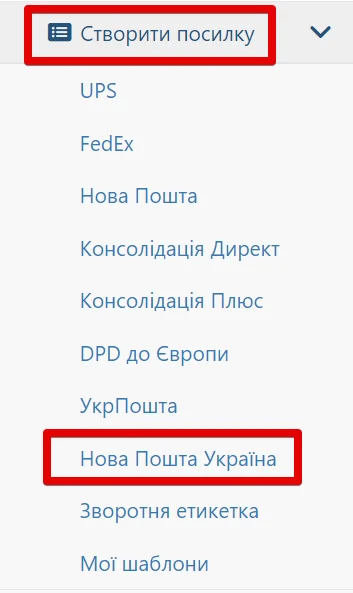
2. Go to the menu section “My Shipments” – “Create a shipment” – “Nova Poshta Ukraine”
3. Next, specify your town or city and the Nova Poshta branch number from which you will send the parcel. In the ‘Recipient’ field, our consolidation center address has already been automatically added.
To save the settings and continue using them as default, click the ‘Save’ button.
After you have entered all the data, click the ‘Continue’.
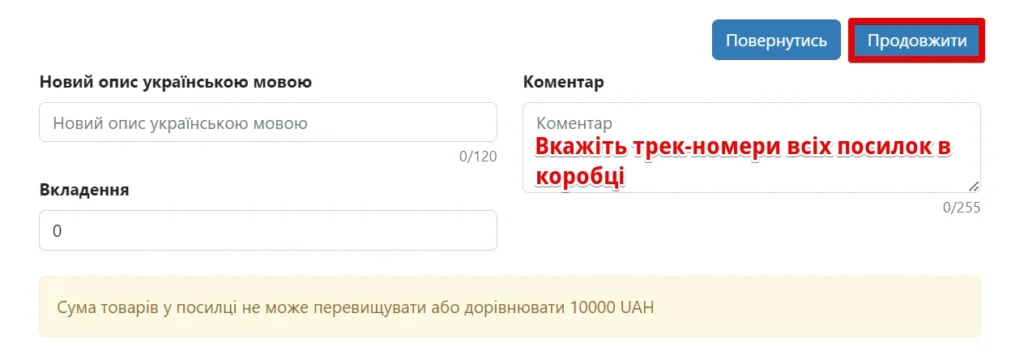
4. In the next window, provide a description of the product or products in Ukrainian. It is also necessary to indicate the total value of all goods in hryvnias. Please note that the total value of goods in the shipment cannot exceed or be equal to 10,000 UAH. In the ‘Comment’ field, separate with commas the international tracking numbers of all parcels contained in the overall box.
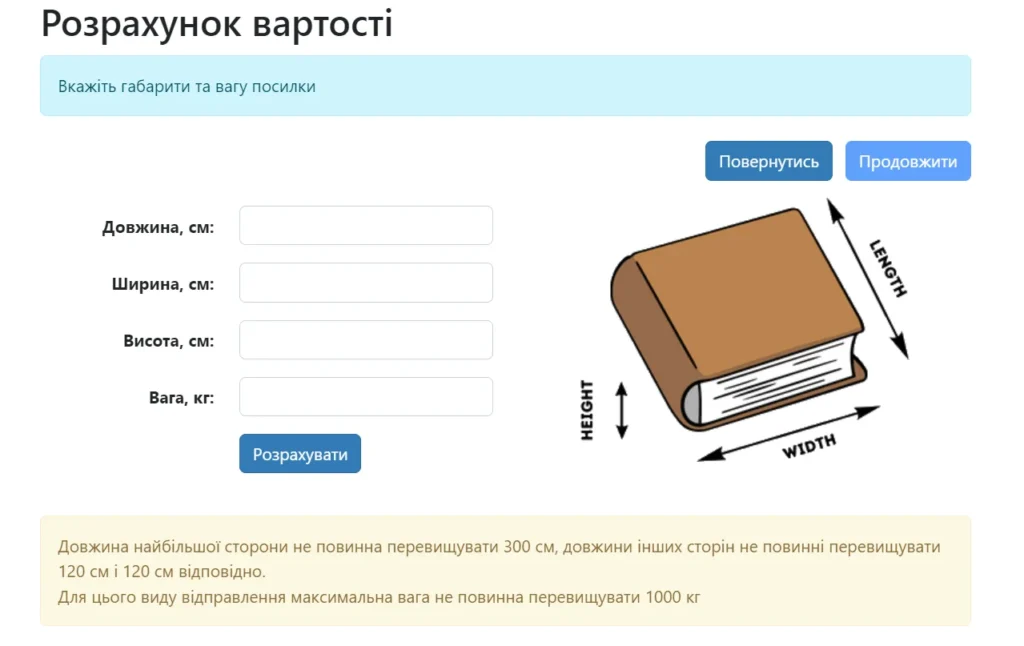
Specify the overall package dimensions and calculate the delivery cost to our consolidation center in Kyiv. The length of the longest side must not exceed 300 cm; the lengths of the other sides must not exceed 120 cm and 120 cm respectively. The maximum weight must not exceed 1000 kg. The delivery cost will be shown in dollars (deducted from your personal account at PrivatBank’s commercial rate) already with a 10% discount.
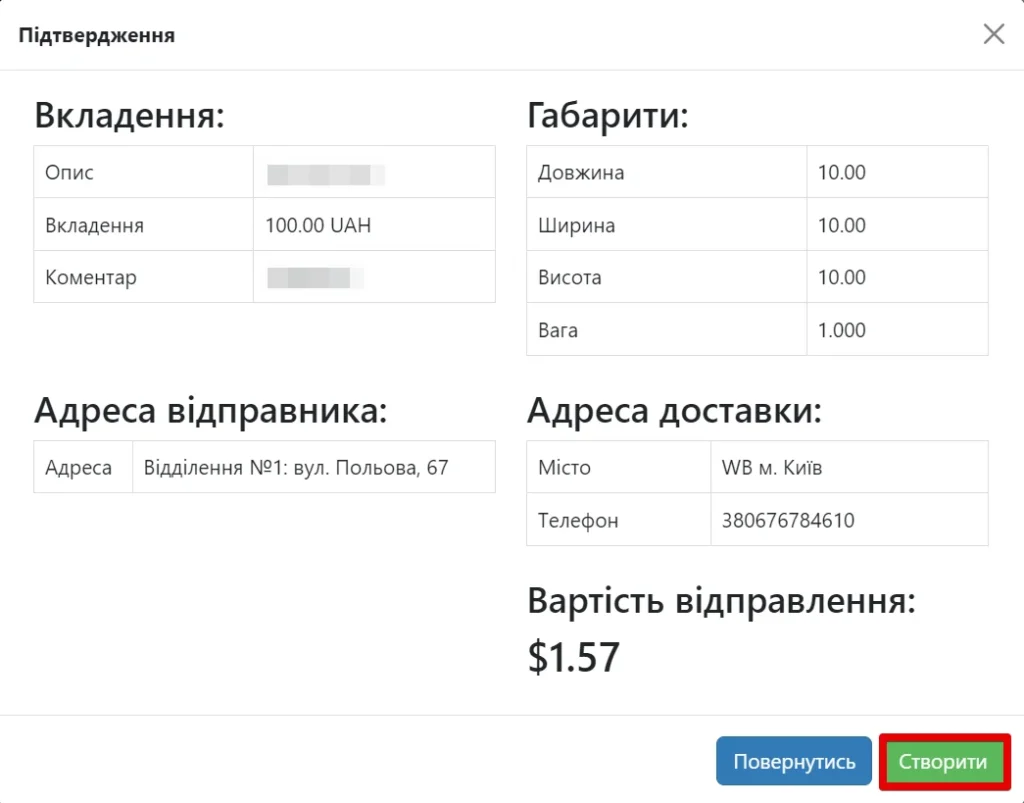
6. Check the information provided and, if everything is correct, click “Create”. If you need to correct the information, go back and edit it.
7. After everything is completed, the documents will be generated for you, which you can print.
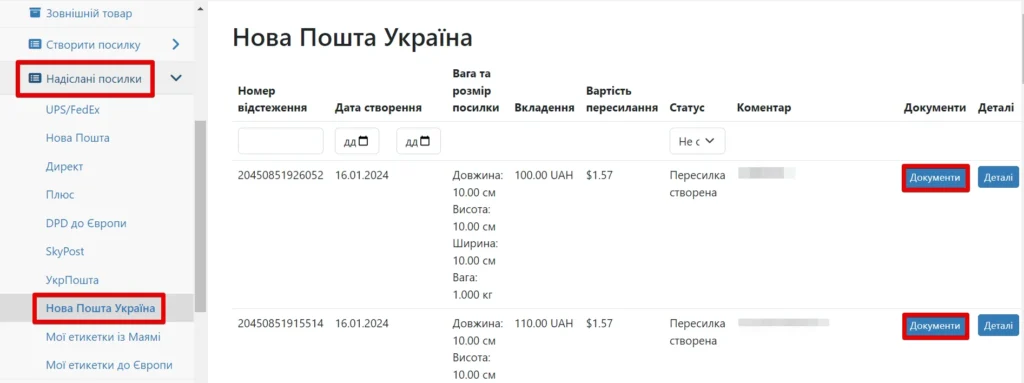
8. Your documents are stored in the menu section “My Shipments” – “Sent Parcels” – “Nova Poshta Ukraine”. You can always find them there and print them.
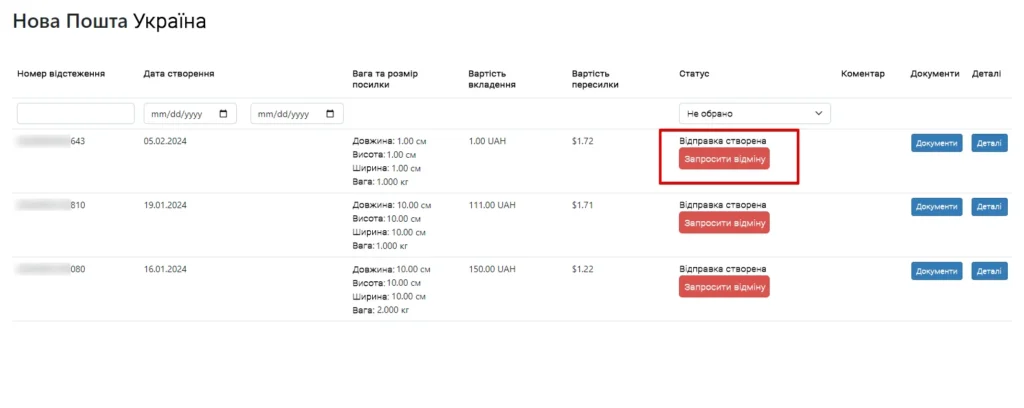
To cancel a created label, you need to go to the menu item “Sent Parcels” – “Nova Poshta Ukraine” and click “Request cancellation”.
If you are unable to print the documents, you can show them to the operator at the Nova Poshta branch on your phone. The operator at the branch will scan the barcode (from the printed documents or from your phone) and generate a shipping label.
You can also simply dictate the tracking number to the operator or do it yourself at any Nova Poshta branch at the self-service counter, by scanning the barcode, prepare and affix the labels. The system will provide you with 2 copies of the documents; you only need to print one.
If you are unable to visit the Nova Poshta branch you selected when placing the order, you can visit any other branch (within the chosen city) that will be convenient for you.
For detailed information on other questions, you can contact our Support Service or find information on the site.
Frequently Asked Questions about discounted shipping with Nova Poshta
What discount do I get on Nova Poshta delivery?
Western Bid customers receive a 10% discount on Nova Poshta delivery across Ukraine to the consolidation center in Kyiv, if the waybill is created in your account.
Why is the shipping cost displayed in dollars?
The system converts the Nova Poshta delivery price into US dollars at PrivatBank’s commercial rate and shows the amount already discounted by 10%, which will be debited from your balance.
What is the maximum value of goods per box?
The total value of all goods in the overall box must not exceed or be equal to 10000 hryvnias, otherwise it will be impossible to issue a discounted delivery note.
What are the maximum dimensions and weight of the box?
The length of the box’s longest side must not exceed 300 cm, the other two — 120 cm each, the maximum weight — 1000 kg.
Is it possible to cancel a created label?
Yes, go to “My Shipments → Sent Parcels → Nova Poshta Ukraine” and click “Request Cancellation” to cancel the waybill.
What should be entered in the 'Comment' field?
In the “Comment” field, you should list, separated by commas, all international tracking numbers of the parcels that are placed in the shared box for shipment to the consolidation center.
