You will learn how to ship a PLUS-consolidated item that the buyer paid more than $100 for, using the ‘External Product’ function, and what restrictions apply to the declared value.
How to ship a PLUS consolidated product for which more than $100 has been received?
For Plus Consolidation shipments we have a restriction: your package containing the goods must not have a declared value higher than $100.
If your item was purchased for more than $100, but you still want to send it using Plus Consolidation, we have the “External item” function. Using it you can change the declared value of the shipment, adjust the value of the contents.
Please note the new packaging rules for Plus and Direct Consolidations. In order for your shipments to scan faster and not require manual handling by postal staff (and thus reach your customers faster and not incur extra charges for their handling), please follow the simple packaging requirements of the postal service to packaging:
- Do not wrap consolidation shipments with film, stretch wrap (you may wrap the protective film only around the item inside the parcel).
- Do not completely seal the package with tape.
- Replace tubes with square or triangular packaging.
The postal service rules allow:
- to send a courier package and seal it with tape in several places (but not completely!);
- wrap the package with tape in only a few places to keep it in shape;
- wrap the contents inside a cardboard box with film / a bag;
- place the cardboard boxes into the courier bag.
How to use the 'External product' function?
1. When arranging delivery, you need to click on the black square under the transaction number and create an “External item”.
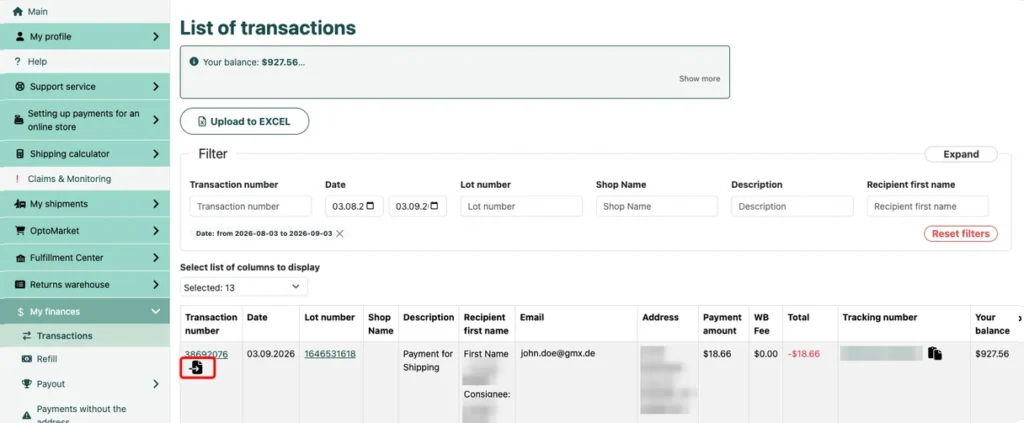
2. During the creation process there will be an option to specify an estimated value of the product less than $ 100.
Please note: if you lower the declared value of the parcel contents, the insurance will cover only the stated amount.
3. Such “External item” will then appear in the list of available items for shipment by PLUS Consolidation.
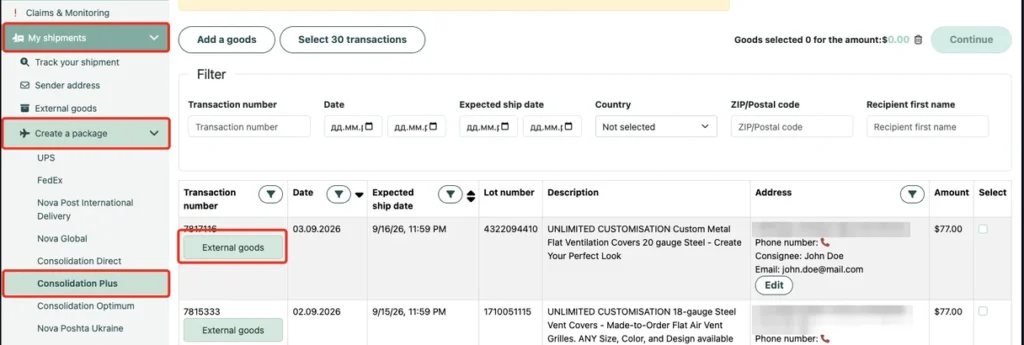
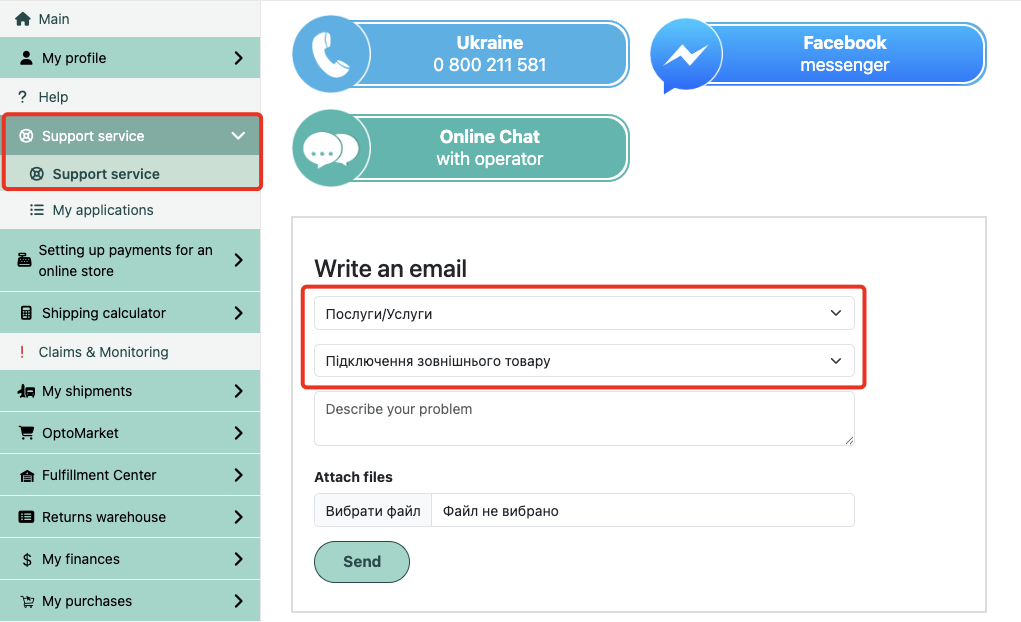
To enable the “External product” feature, you need to request its activation in the Western Bid Personal Account in the “Support” section.
For this, select “Services”, in the field “Subject” choose “External product activation” and click “Submit”.
What to do if the item costs more than $100
| Situation | What is allowed | Recommended action |
|---|---|---|
| Declared value of the item up to $100 | Can be sent using Plus consolidation without any additional actions | Process the parcel as a regular item in a Plus shipment. |
| The item was sold for more than $100, but you want to use Plus | Allowed to change the declared value to $100 via ‘External item’ | Create an ‘External item’ and specify an estimated value less than $100. |
| You do not want to reduce the declared value | Plus consolidation is not suitable for such shipments | Choose another shipping method without the $100 limit on the declared value. |
Important: if you do not use the ‘External Item’ function or select an inappropriate delivery method, a parcel with a declared value over $100 may not be shipped under the PLUS consolidation rules, or may not be accepted for shipment at all.
Frequently Asked Questions about Shipping High-Value Goods with PLUS Consolidation
Why is there a $100 limit on the declared value?
Why is there a $100 limit on the declared value?
For PLUS consolidation shipments, there are internal limits on the declared value of parcels. The limit of up to $100 helps maintain an optimal delivery cost and the insurance and handling requirements for shipments.
Is it legal to reduce the declared value to $100?
Is it legal to reduce the declared value to $100?
The declared value is used for declaration and insurance purposes. It must correspond to your agreements with the buyer and the requirements of customs legislation. Before changing the declared value you should consider the possible tax and insurance consequences.
Please note: if you lower the declared value of the parcel contents, the insurance will cover only the stated amount.
What will happen if I declare a value greater than $100?
What will happen if I declare a value greater than $100?
Parcel with a declared value over 100 $ will not meet PLUS consolidation terms. In this case you will have to choose another shipping method that allows a higher declared value.
How does an 'External product' differ from a regular one?
How does an 'External product' differ from a regular one?
«External item» — this is a separate entry in your Personal Account, created not from automatically pulled transaction data, but manually. In it you independently set the estimated value of the package, which matches the PLUS consolidation rules.
