The “My Employees” feature allows you to grant your employee restricted access to the Western Bid Personal Account. He will be able to perform operational actions (for example, create shipments), but will not see the balance and will not be able to receive settlement — these actions remain available only to the account owner.
Thanks to the “My Employees” feature you can grant restricted access to Western Bid’s personal account to your employee.
He will be able to perform all necessary actions there, for example, create shipments. But he will not be able to see the balance or receive settlement. This will remain accessible only to you.
How to enable the "My Employees" feature?
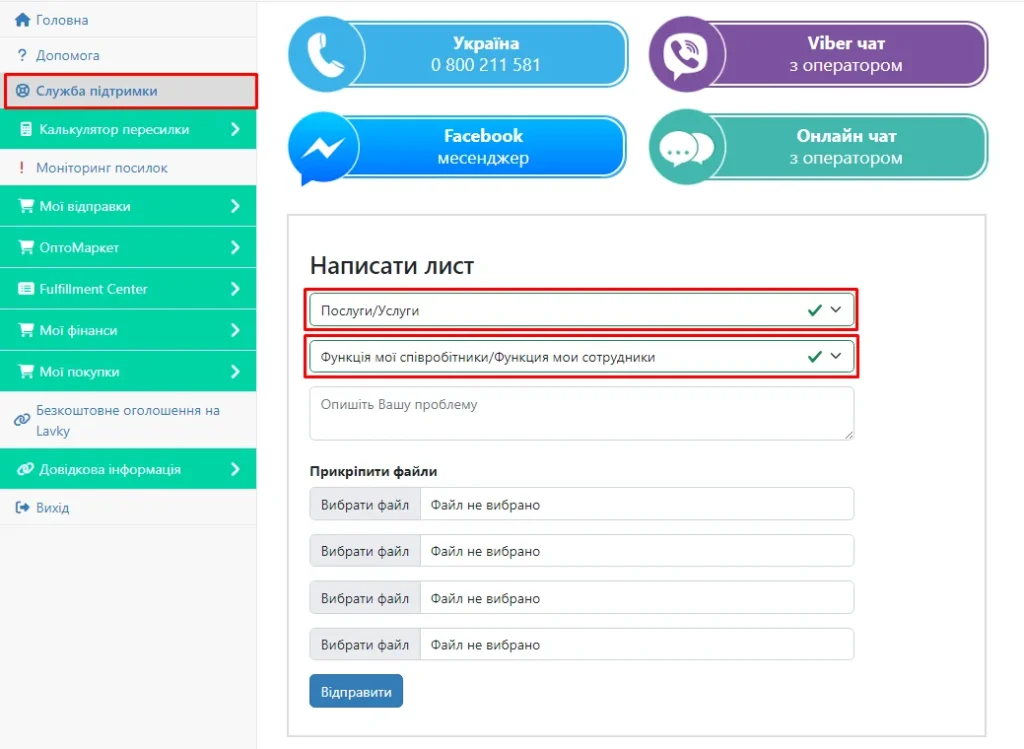
To enable the “My Employees” feature, you need to access your Western Bid personal account, in the sidebar go to the “Support” section and in the “Subject” field select “Services/Услуги”; in the window below choose the item “My Employees feature.” Submit the request, and soon you will have the option to add your employees.
What does the “My Staff” feature provide?
- The employee gains access to the Personal Cabinet under their own login and can perform the necessary operational actions, for example, creating shipments.
- They do not see the balance on the account and cannot receive settlement — these actions remain only with the account owner.
- Thus, you retain control over finances while delegating routine processes.
Frequently asked questions about the 'My Employees' feature
What can an employee do in my personal account?
What can an employee do in my personal account?
An employee can perform all necessary operational actions, for example creating parcels and working with shipments, in accordance with the access rights granted to him.
Can an employee see my balance and receive settlement?
Can an employee see my balance and receive settlement?
No. The employee cannot see the account balance and does not have the ability to receive settlement. These actions remain available only to the account owner.
How to enable the "My Employees" feature?
How to enable the "My Employees" feature?
Log in to your Western Bid account, open ‘Support Service’, in the ‘Subject’ field select ‘Services’, and in the field below — the ‘My employees’ function. Send the request and wait for activation.
