The Western Bid personal account now offers the ability to import orders from eBay. The feature allows pulling transactions from Managed Payments directly into the “External product” section, and then immediately arranging shipping through Western Bid.
How to import an order from eBay into your Western Bid personal account
The ability to import orders from eBay is useful for those who have switched to Managed Payments and are arranging delivery using Western Bid.
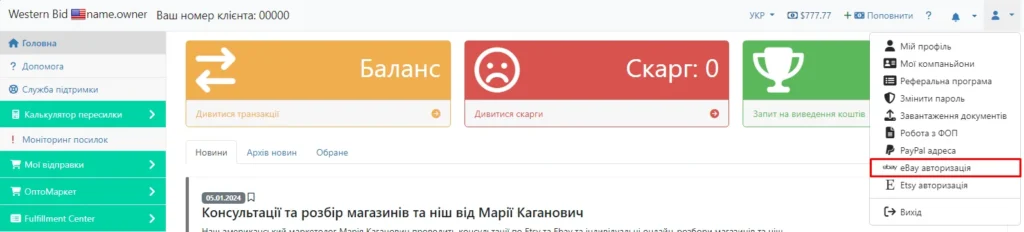
Before you start importing orders, you need to authorize. To do this, click the user icon in the top right corner of your Personal Cabinet and select “eBay authorization”.
The system will redirect you to your eBay account; you will need to provide the current username and password, after which the authentication process will be successfully completed.
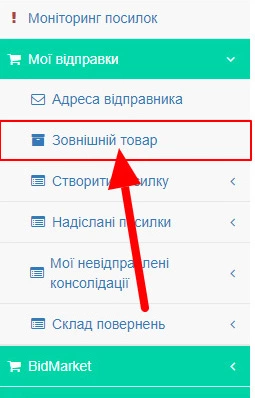
Next, during checkout, you need to select ‘External product’.
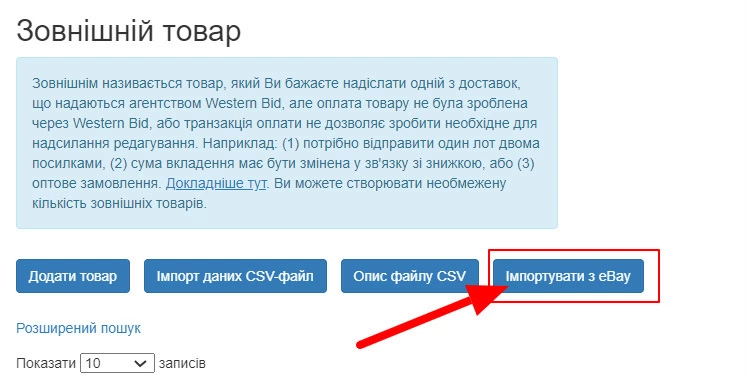
In the ‘External product’ section of the menu, click the ‘Import from eBay’ button. This way, you will be able to import the list of transactions from eBay.
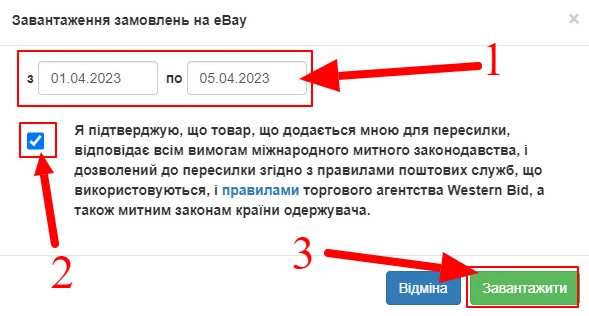
Select the date range within which you want to download the transactions. And also confirm your agreement to the rules.
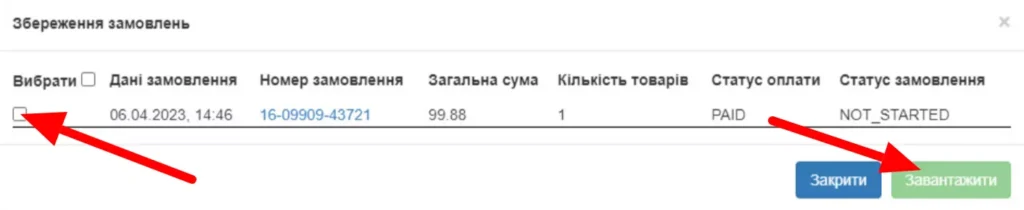
Then the system will offer you to select the required transactions to add.
Please note that if you have sold multiple units of the product, each of them will have a separate transaction.
After adding the transactions, you can arrange the delivery of your product.
Frequently asked questions about importing orders from eBay
Who needs to import orders from eBay into the Western Bid Personal Account?
The feature is especially useful for sellers who have switched to eBay Managed Payments and process shipments through Western Bid: they no longer need to manually transfer order data — transactions are imported automatically.
Where in My Account can I find the import from eBay?
After authorizing eBay, go to the «External product» section and click the «Import from eBay» button. Then select the date range and the transactions you want.
Executive Director of Western Bid in Ukraine.
eBay sales expert at Western Bid since 2019;
Western Bid client since 2014.
Who is this article for?
✓ Sellers who have switched to eBay Managed Payments and arrange delivery using Western Bid.
✓ Users who sell many items on eBay and want to avoid manually transferring data to their personal account.
✓ Sellers who need to quickly generate shipments for a large number of transactions over a certain period.
What is still stopping your sales abroad?
Learn about the 5 main barriers — based on 25 years of Western Bid’s experience in working with international e-commerce.
A link to the video recording will be sent to your email.
Request for feedback
Please provide your contact information. Our manager will contact you shortly and advise you on your questions. Expect a call from 10:00 to 18:00 on business days.