In the ‘Fulfillment Center’ section of the Western Bid personal account you add products, form batches, send them to the warehouse in Miami, and then manage shipments to customers and monitor statuses.
For more details about the fulfillment warehouse and how to list a product for sale from the fulfillment warehouse, read at the links:
In your Personal Account there is a section “Fulfillment Center”, where you can manage your products in the warehouse.
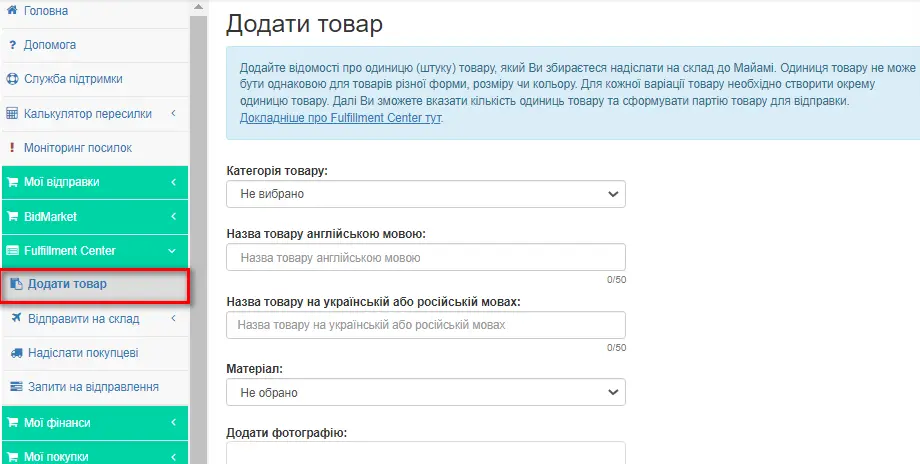
In the “Add Product” section you need to add information about the unit (piece) of the product you intend to send to the Miami warehouse.
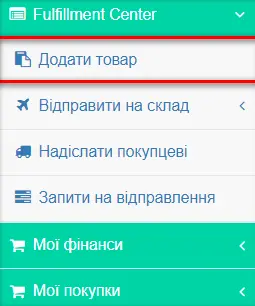
How to add a product?
Fill in all the required fields in the menu section “Add product” under each unit of your product and click the “Add product” button. Please note: the information provided at this stage is intended only for internal use by warehouse staff, so that when receiving goods the warehouse receipt is carried out correctly. This information will not appear anywhere else and will not be displayed.
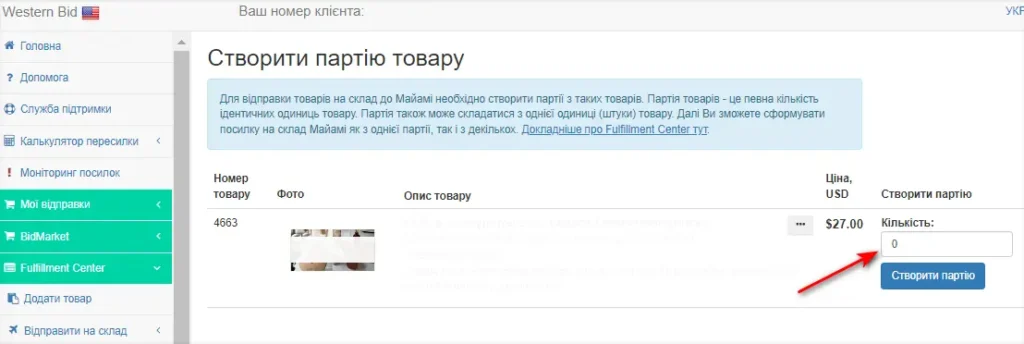
After this, the system will prompt you to proceed with creating a batch. You can also create a product batch from the menu section “Create product batch”.
Enter the quantity of identical units of the product and click the “Create batch” button.
What is a product batch?
You create batches of goods for sale yourself – it is very important that a given batch contains only completely identical items (for example, red phone cases and blue phone cases are different batches).
A product unit cannot be the same for items of different shapes, sizes, or colors. For each variation of the product, you must create a separate product unit.
Next you will be able to specify the quantity of product units, thereby forming a batch of goods for shipment.
Note! You can ship several different batches in one box. If you have the same-type product, but it won’t fit into one box, you must create two batches; you cannot split batches across two boxes.
The system will then prompt you to proceed with arranging the delivery of batches of goods to fulfillment. If you include product packaging, process it as a separate batch. Then after the sale, when you prepare the shipment to the customer, add it from your account. For this, when arranging the delivery, choose in the menu “Send to warehouse” and form the shipment to the Miami warehouse from a single batch as well as from several batches, by marking the list of items for delivery with checkmarks. In this case, the warehouse staff understands which specific item to place in which particular box. As a result, you won’t need to contact Customer Support to merge the product, and therefore your item will be delivered to the customer faster.
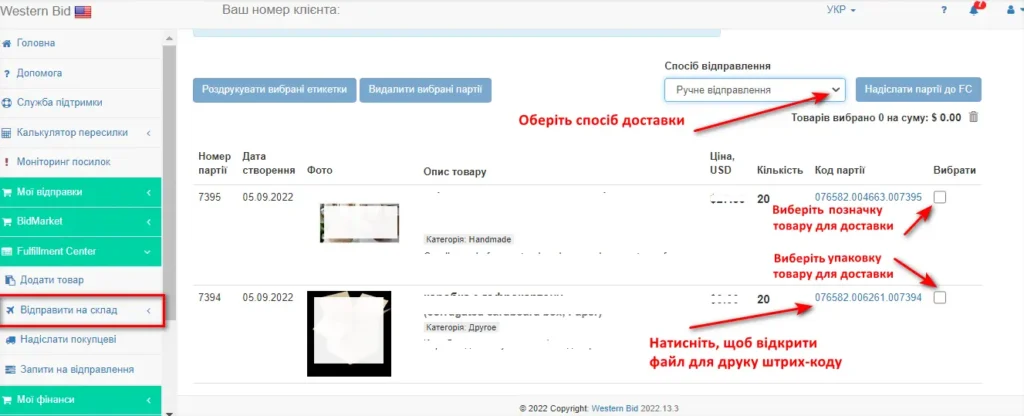
A barcode must be affixed to each batch. In the menu section “Send batches to warehouse” the product code will be clickable. By clicking on it, you will receive a file for printing. After the batch arrives at the warehouse, a staff member checks your goods and their quantity. If there are any questions about the batch, for example if the number of units does not match what you specified, the staff member will open a ticket, about which you will receive a notification in your personal account.
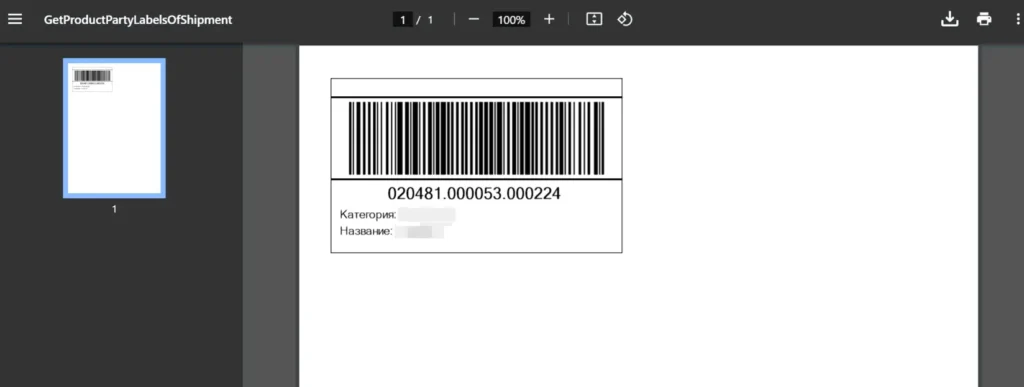
Packaging of the product for shipment
In the “Send batch to warehouse” section of the menu, you can choose the shipping method. Also, shipments can be delivered to our warehouse address by any other shipping method we work with. Then you select in the “Shipping Method” section – “Manual shipment” and specify the name of the postal service in Latin letters and the tracking number of the shipment.
The address of our warehouse in Miami:
Your First Name
Your Last Name
IN CARE OF WB WAREHOUSE
3500 W Hallandale Beach Blvd,
Pembroke Park, FL, 33023, USA
Mail: info@westernbid.info
Phone: 3053070382
If necessary, you can shorten the first name, but not the last name or the phrase “IN CARE OF WB WAREHOUSE”.
For manual shipment to the fulfillment center the corresponding fields must be filled out as follows:
| Country, region, territory | United States |
| Country code | US |
| State | FL |
| ZIP code | 33023 |
| City | Pembroke Park |
| Address | 3500 W Hallandale Beach Blvd |
| Apartment number | – |
| Contact person’s last name and first name |
Your name and surname in English IN CARE OF WB WAREHOUSE |
| Consignee |
Your name and surname in English IN CARE OF WB WAREHOUSE |
| info@westernbid.info | |
| Phone number | 3053070382 |
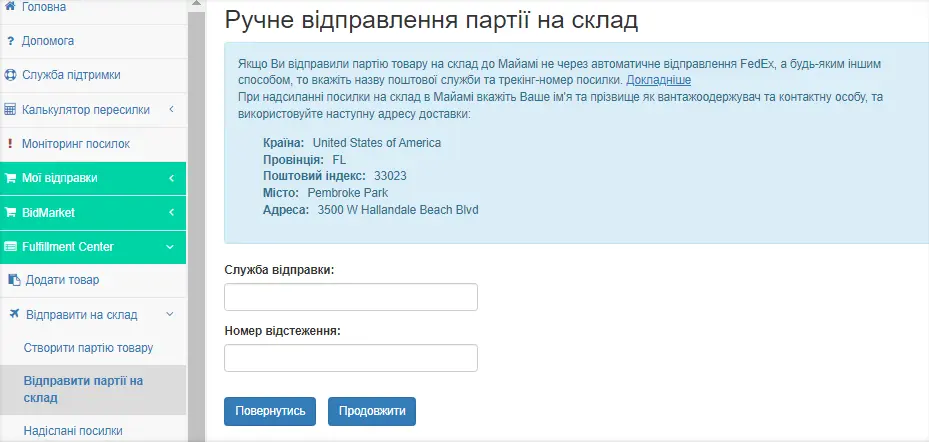
Shipping and tracking process
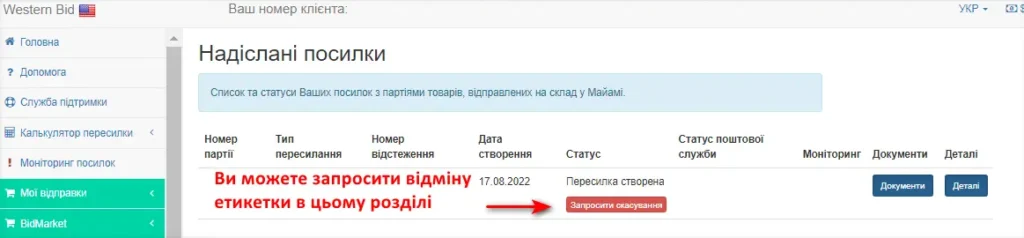
In the menu section “Sent shipments” you can view all information about your sent shipments:
– transaction number,
– shipping method you chose to deliver the goods to our warehouse,
– tracking number of the shipment,
– creation date,
– status in our system, for example, “Accepted at the Fulfillment warehouse”,
– status of the postal service,
– monitoring, within which you can create a ticket and track the resolution of your issue regarding a specific shipment,
– documents for the shipment, if you created a FedEx label through our system (in other cases the field will be empty),
– view all details of your shipment.
In the ‘Send to customer’ section of the menu you will see a list of your product batches that are in stock at the Miami warehouse or are expected there. Select the items you want to send to the customer, and in the next step choose the customer’s address from the transactions list. If the payment for the item was not made through Western Bid, you first need to create External item with the recipient’s address (or upload several at once as a list), and then select this External item from the Transactions section.
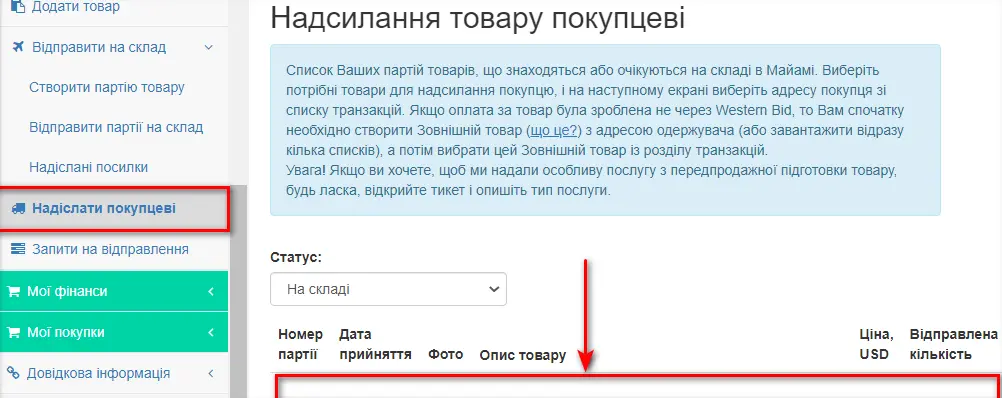
Select the quantity of items and click the “Send to customer” button. In the window that opened, select the transactions from the list and click “Continue”.
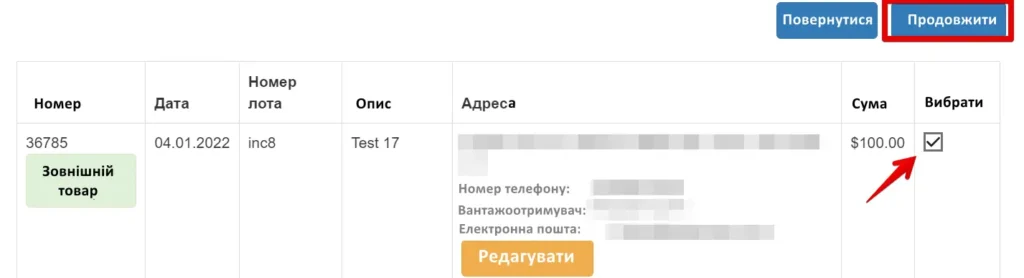
Next, select the method of shipping the parcel from the Miami warehouse to your customer, and submit the shipping request. Your product will be shipped within 1-2 business days from the moment the request is created (usually – the same day).
When you click the “Calculate” button, the system will conveniently show the delivery cost, as well as the packaging cost (if you want us to select packaging for your product according to its type) and the warehouse commission:
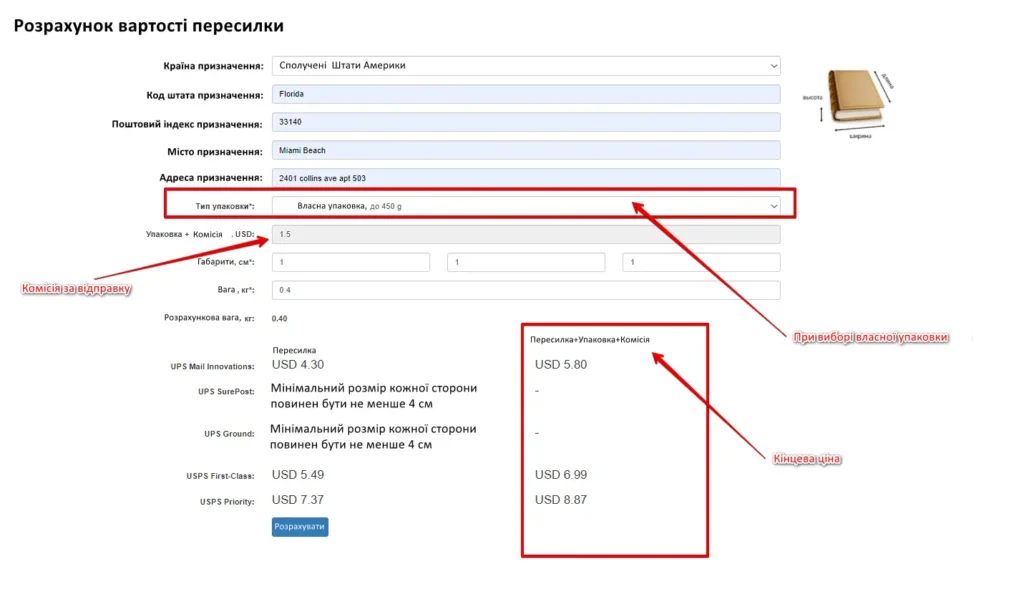
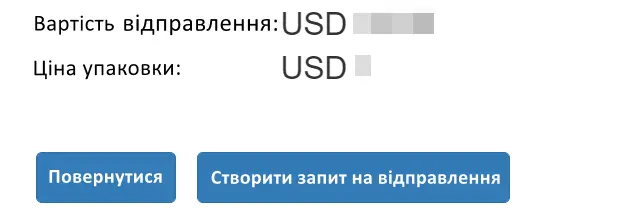
If the price suits you, click “Create a shipping request”. The system will ask you to confirm all the details. If everything is entered correctly, confirm the request. Our staff will pack your item, attach a label, and ship it to the buyer within 1-2 business days.
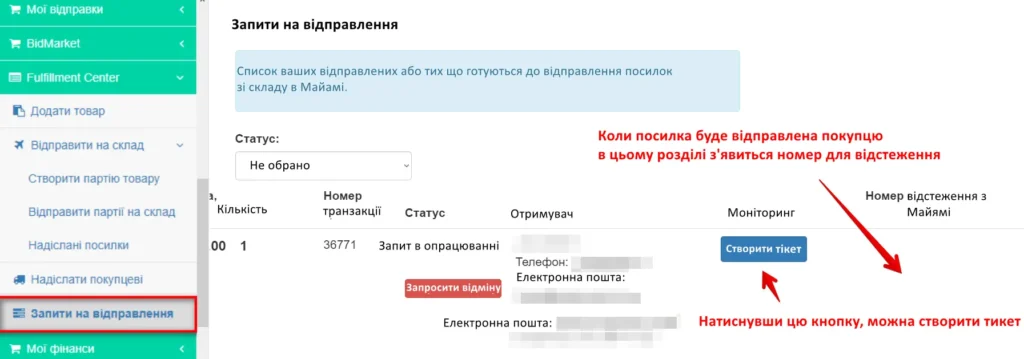
In the menu section “Shipping requests” you will see the tracking number, which you can enter on the marketplace. The number will appear when the parcel has been shipped. Until shipment, the field will remain empty.
If you have any questions about any of the shipped parcels, in this section of the menu you can also create a ticket. There, in the “Monitoring” column, you will be able to track our staff’s responses to your ticket.
If you created a sending request by mistake, you can click the “Request Cancellation” button. This feature will be available until the parcel has been shipped from the warehouse to your customer.
You can learn more about convenient and fast delivery from the fulfillment center to the USA as well as to other countries by watching the video:
Main sections of the Fulfillment Center and their purposes
| Menu section | What it’s used for |
|---|---|
| Add product | Creating product units that you plan to send to the Miami warehouse. |
| Create a product batch | Combining identical units into a batch for shipment to the warehouse. |
| Ship batches to the warehouse | Arranging the delivery of batches to the fulfillment warehouse, selecting the shipping method and printing barcodes. |
| Shipped parcels | View all parcels shipped to the warehouse, their statuses and tracking numbers. |
| Ship to customer | Forming shipments to customers from available batches of goods at the Miami warehouse. |
| Shipping requests | List of shipping requests to customers, tracking numbers, monitoring and the option to request cancellation. |
Frequently Asked Questions about managing goods in a fulfillment warehouse.
What is a product batch and why is it needed?
A batch is a group of completely identical units of product (one model, color, size). Batches are used for receiving into stock and subsequent shipments to customers.
Is it possible to mix different products in one batch?
No. Each batch must contain only completely identical items. Different colors, sizes, or models are created as separate batches.
What should I do if the product doesn't fit into one box?
We need to create several batches for the same type of product. It is not allowed to split one batch into several boxes.
How should I correctly specify the warehouse address in Miami when shipping manually?
Use the address: 3500 W Hallandale Beach Blvd, Pembroke Park, FL, 33023, USA with the note IN CARE OF WB WAREHOUSE and your first name and last name in English.
How can I find out that the batch has been received into stock?
In the “Shipped parcels” section, the status will change to “Accepted at the Fulfillment warehouse”; there you can also open a ticket if you have any questions about the quantity or the condition of the goods.
