Fulfillment center in Poland for international sellers | Delivery across Europe with Western Bid

Fulfillment and warehouses
February 14, 2026
13 Minutes

Content

The Western Bid fulfillment center in Poland allows you to store goods in the EU, ship orders across Europe via DPD, FedEx, and UPS in a few days, and significantly reduce shipping costs.

You can ship batches from your warehouse or personally bring the goods to Kraków, manage stock and orders through your account, and all operations — storage, picking, and shipping — are handled by the fulfillment center team.

Fulfillment center in Poland from Western Bid — this is a new warehouse and order processing service in Europe.

You can store your goods closer to European customers and significantly reduce delivery time and cost.

Key advantages of fulfillment in Poland:

  • Faster delivery across Europe. Goods are shipped from a warehouse in Poland via DPD, FedEx, UPS, allowing delivery to customers within a few days, without additional customs clearance.
  • Lower shipping costs. Being closer to the end customer means lower shipping rates to EU countries.
  • Access to the EU market. Having a warehouse in Poland helps you access major European markets more easily, such as Germany, France, Italy.
  • Improved service levels. Thanks to faster delivery, you increase customer satisfaction and your ratings on international platforms — Etsy, eBay, Shopify.
  • Logistics optimization. You can combine storage of goods in the USA and Poland for even greater flexibility and speed of international sales.

Fulfillment in Poland is ideally suited for sellers who want to reduce transit time, lower shipping costs, and scale their business in Europe. Western Bid helps make international trade simpler, more reliable, and more profitable.

Fulfillment in Poland: What is available right now

We now accept your batches of goods for storage and dispatch from the Fulfillment Center in Poland.

Right now you can deliver or send us a batch of your goods to Poland, by first completing everything through your personal account, just as you did for shipments to the USA. Instructions below.

Note, that in case customs duties are charged upon receipt of the batch, their amount will be debited from your account. You can also personally deliver the parcel to our warehouse in Poland – personally or by handing it over to a trusted person.

Who is fulfilment in Poland for?

  • For sellers who actively sell to EU countries via Etsy, Shopify, eBay, their own sites, and want to shorten delivery times.
  • For businesses with steady demand in Europe and want to reduce the cost per shipment thanks to a warehouse inside the EU.
  • For sellers who already use fulfilment in the USA from Western Bid and want to add a ‘European hub’ for more flexible logistics.

How can I send goods to a warehouse in Poland?

You can deliver a batch of goods to our warehouse in Poland in two ways:

  1. Via the Western Bid personal account – select the courier service and specify the shipment tracking number.
  2. In person or through an authorized representative – indicate in the personal account:
  • in the field “service name” – own delivery,
  • in the field “tracking number” – the date and time of arrival.

Please, in the case of self-delivery, contact us in advance by phone or email listed on the site in the “Contacts” section.

In the event of customs charges when receiving the batch, their amount will be automatically deducted from your account.

To ensure that the duty payment request goes directly to you and to avoid delays at customs, we recommend entering in the recipient’s email field your own address. This will allow you to promptly receive notices from the customs and pay the duty on time, avoiding delays.

Tariffs and delivery across Europe

Storage rates for warehousing in Poland

The quantity of product units is charged every 30 days at the time of withdrawal.

For example, a batch of 50 units of goods arrived on January 1, 30 days have passed, on January 31 this batch had 20 units remaining, the rest were sold and shipped to customers, then the storage fee is calculated based on 20 units. If 30 units arrived and all of them were sold within 30 days, then storage will be free.

Storage cost, depending on weight:

Weight of a single unitStorage cost for 30 days
up to 0.050 kg$0.02
0.051 – 0.100 kg$0.04
0.101 – 0.500 kg$0.06
0.501 – 0.750 kg$0.10
0.750 – 1.000 kg$0.15
1.001 – 1.500 kg$0.20
1.501 – 2.000 kg$0.30
2.001 – 3.000 kg$0.40
3.001 – 4.000 kg$1.00
4.001 – 5.000 kg$2.00
5.001 – 6.000 kg$2.40
6.001 – 7.000 kg$2.80
7.001 – 8.000 kg$3.20
8.001 – 9.000 kg$3.60
9.001 – 10.000 kg$4.00
10.001 – 12.000 kg$5.00
12.001 – 15.000 kg$6.00
15.001 – 17.000 kg$7.00
17.001 – 20.000 kg$8.00
20.001 – 23.000 kg$10.00
23.001 – 26.000 kg$12.00
26.001 – 30.000 kg$14.00
30.001 – 35.000 kg$16.00
35.001 – 45.000 kg$20.00
over 45.001 kg$45.00

Warehouse handling fee for dispatched parcels

The fee is charged at the time the parcel is created, for orders with up to 2 items (each additional unit +$0.25).

Prices shown are per parcel excluding boxes and shipping cost (volumetric weight or actual weight — the calculation is based on the greater value).

Parcel weightWarehouse handling fee
up to 0.453 kg$1.00
0.453 – 0.907 kg$1.00
0.908 – 1.810 kg$1.80
1.820 – 4.530 kg$2.00
over 4.540 kg$2.50

Delivery across Europe from a fulfilment centre

Order shipments across Europe will be carried out by:

  • DPD (only within the EU),
  • FedEx Regional Economy,
  • UPS and UPS Ground.

You can already view current delivery prices in our calculator on the website — simply select Poland as the country of departure.

How to add a product and a batch for shipment

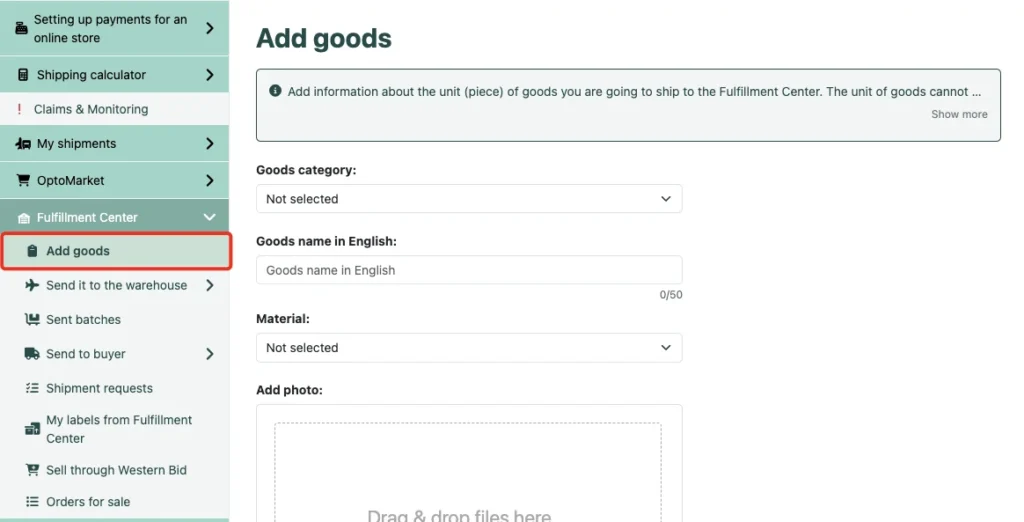
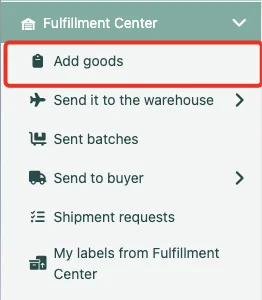
In the Personal Cabinet there is a section “Fulfillment Center”, where you can manage your products in stock.

In the “Add product” section you need to add information about the unit (piece) of the product that you are going to send to the warehouse in Poland.

Screenshot of a side navigation menu in a fulfillment center dashboard with the "Add Product" option highlighted by a red box.
Personal account navigation panel with the highlighted menu item "Add Product" in the Fulfillment Center section

How to add a product

Fill in all the required fields in the ‘Add product’ section of the menu under each unit of your product, and click the ‘Add product’ button. Please note: the information provided at this stage is for internal use by warehouse staff only, so that when receiving the product, the warehouse acceptance is performed correctly. This information does not appear anywhere else and is not displayed.

Interface of the "Add Product" form in a fulfillment dashboard, showing fields for category, English name, local language name, and material, with the "Add Product" menu item highlighted on the left.
The process of filling in product information: selecting a category, names in two languages, and material in the "Add product" section.

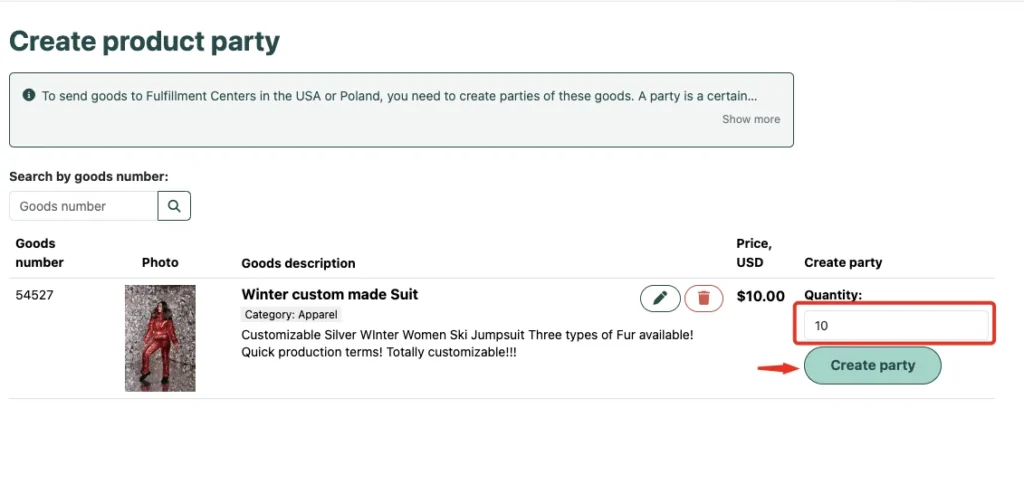
After this, the system will prompt you to proceed to creating a batch. You can also create a product batch from the ‘Create product batch’ section of the menu.

  1. Specify the quantity of identical product units.
  2. Click “Create batch”.
Dashboard interface for adding a product, featuring text fields for English and local language names, a category dropdown, and a blue information box with instructions for shipping to Miami.
Page for adding product information, where names, category, and material are specified to form a unit of the product before shipment to the warehouse.

What is a batch of goods?

You create batches of goods for sale yourself – it is very important that a separate batch contains only a completely identical product (for example, red phone cases and blue phone cases – these are different batches).

The product unit cannot be the same for items of different form, size, or color. For each variation of the product you need to create a separate product unit.
Next, you will be able to specify the quantity of product units, thereby forming a batch of products for shipment.

Note! You can send several different batches in one box. If you have an identical item, but it does not fit in one box, you need to make two batches, you cannot split batches into two boxes.

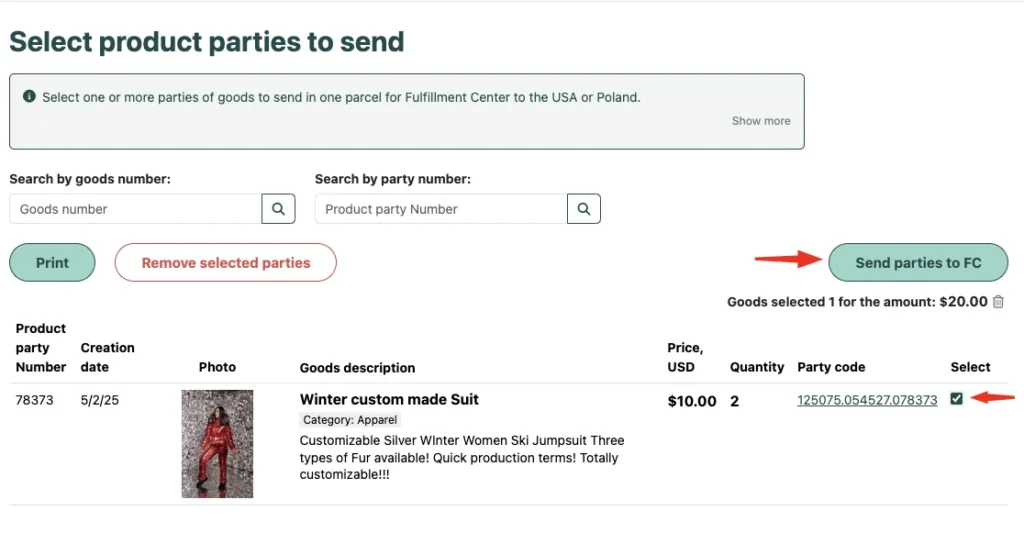
After that the system will offer to proceed with the delivery of the batch of goods to fulfillment. If you are packaging the product packaging, process it as a separate batch. Then after the sale, when you form the shipment to the customer, add it from your personal cabinet. For this, when arranging delivery, select in the menu “Ship to warehouse” and form the shipment to the warehouse in Poland from either a single batch or several, by marking the list of items to be delivered with checkmarks. In this case, the warehouse staff understands which specific item to place in which box. As a result, you do not need to write a request to merge the product to the Support Service, and therefore your product will be delivered to the customer faster.

Dashboard interface for selecting product batches to ship, showing a list with a selected "Winter custom made Suit" batch, a "Send batches to FC" button, and options to print or delete selected items.
Final stage of preparation: selection of created batches of goods and initiation of their shipment to the selected Fulfillment Center (in the USA or Poland)

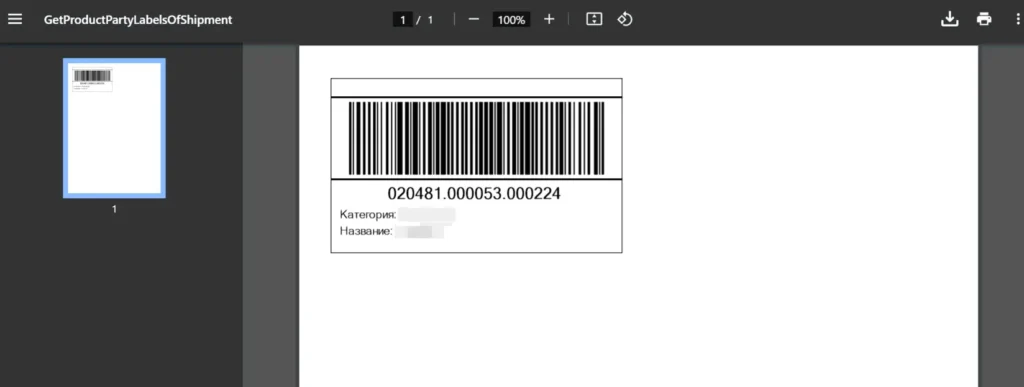
For every unit of the batch, a barcode must be affixed. In the menu section “Send batches to warehouse” the product code will be clickable. After following the link, a file for printing will appear on the screen. After the batch arrives at the warehouse, the employee checks your item and its quantity. If there are any questions about the batch, for example if the number of units does not match what you specified, the employee will open a ticket, about which you will receive a notification in your Personal Cabinet.

A PDF viewer interface displaying a product label with a large barcode, a unique identification number (020481.000053.000224), and placeholders for category and product name.
A generated file with a product label that contains a barcode and a unique identifier for scanning at the Fulfillment Center warehouse

Preparation of goods for dispatch

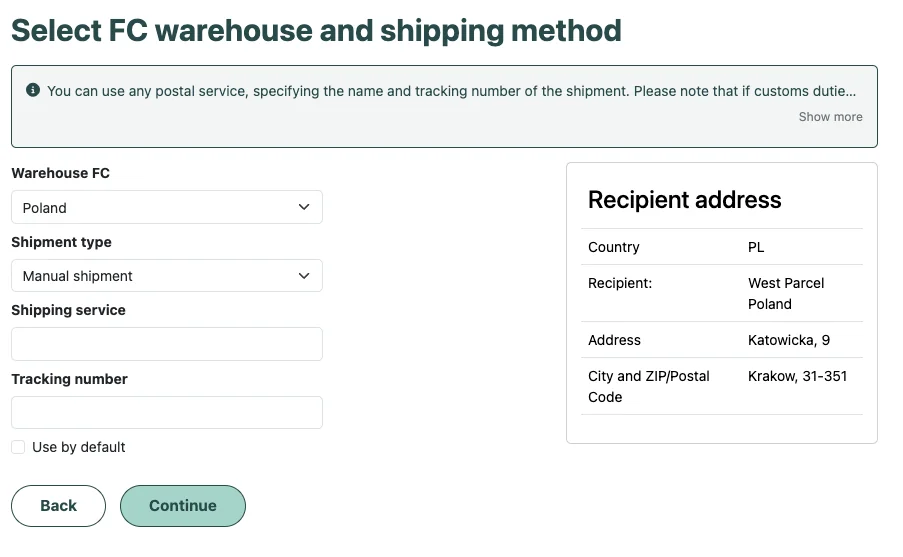
In the ‘Send batch to warehouse’ section of the menu, you can choose a shipping method. Simply select the created product batch and choose the FC Poland warehouse.

Interface for choosing a fulfillment center and shipping method, showing a form to select "FC Poland," delivery service type, and tracking number, with the recipient's address in Krakow displayed on the right.
Logistics parameters selection page: selection of warehouse (Poland or USA), entering the delivery service name and the tracking number for tracking the shipment in the system

Shipping and Tracking Process

In the “Sent shipments” section of the menu you can view all information about your sent shipments:

– Transaction number,
– the type of shipment you selected for delivering the goods to our warehouse,
– parcel tracking number,
– creation date,
– status in our system, for example, “Accepted at Fulfillment warehouse”,

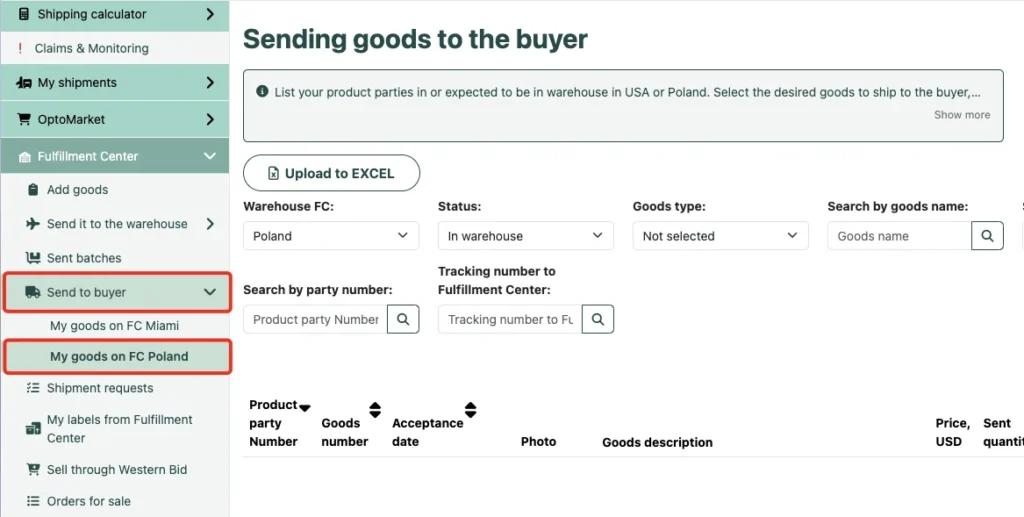
In the “Send to customer” section of the menu, you will see a list of your batches of goods that are located in the warehouse in Poland or are awaiting there. Select the items you want to send to the customer, and on the next step select the customer’s address from the transaction list. If payment for the item was made not through Western Bid, then you first need to create External item with the recipient’s address (or upload several at once as a list), and then select this External item from the Transactions section.

Dashboard interface for shipping items to customers from the Miami warehouse, featuring instructions for internal and external orders, a status filter set to "In stock," and a red box highlighting the product list
Section for final delivery to the customer from the warehouse: selection of available stock and the option to order additional pre-sale preparation services

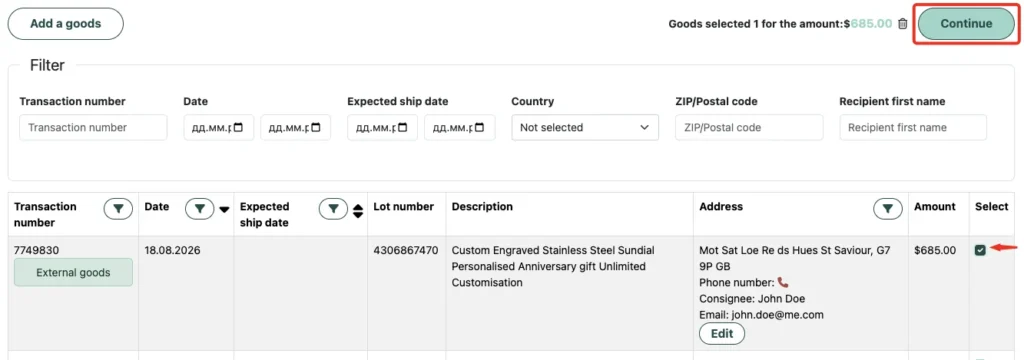
Choose the number of items and click the button “Send to customer”. In the window that opened, select the transactions from the list and click “Continue”.

Interface for selecting an external product transaction, displaying details such as order number, date, address, and total amount ($100.00), with a checkbox selected and a "Continue" button highlighted
Stage of selecting a specific transaction for the 'External product': confirmation of the recipient's address and the order total before final shipment from the warehouse

When creating a shipment request from Fulfillment in Poland for your client, choose the shipping method that best fits your price and click “Create a shipment request”

Our staff will arrange the delivery, charge the required amount and add the shipment’s tracking number.

Fulfillment launch checklist in Poland

  1. Register or log in to your Western Bid account.
  2. In the «Fulfillment Center» section, add products by filling in all required fields for each unit.
  3. Create product lots by combining only fully identical items.
  4. Generate and print barcodes for each lot and affix them to the boxes.
  5. Process shipments of the lots to the warehouse in Poland via your account or plan a personal delivery.
  6. Make sure that in the recipient’s e-mail field your address is specified, so that any possible customs duties can be paid on time.
  7. After the arrival of the lots, track the status in the «Dispatched parcels» section and create shipments to customers from the «Send to customer» menu.

Contacts for the Western Bid Center in Poland

Office hours: 09:00 – 17:00 Mon–Fri Kyiv Time

Address: Katowicka 9, Kraków 31-351

Contact information: pl@westparcel.com

Phone: +48459567606

We appreciate your support and trust. Western Bid is working to expand its services and improve offerings for your convenient and successful business!

Start using fulfillment in Poland

  1. Assess demand for your products in the EU and add popular items to the fulfillment center in Poland.
  2. Set up shipment creation through your Western Bid account to quickly send orders to customers across Europe.
  3. Compare costs and delivery speeds with your current options and scale to EU markets with better terms.

If you need a consultation on fulfillment in Poland, contact Western Bid support — the team will help select the optimal shipping scheme and calculate rates for your business.

Frequently Asked Questions about Fulfilment in Poland
Where is the Western Bid fulfillment center located in Poland?

The warehouse is located in Kraków at Katowicka 9, Kraków 31-351

There are two options: to send the parcel via a delivery service by processing the batch in your Western Bid personal account, or to bring the goods in person / through an authorized representative, specifying the date and time of arrival.

If customs charges are assessed, the amount is debited from your account in the Western Bid system, so it is important to fill in the details correctly and provide the recipient’s e-mail for prompt payment.

Storage is charged every 30 days based on the number of units remaining in the batch on the date of withdrawal, and depends on the weight category of each unit of product.

Orders from the Polish warehouse are shipped via DPD (within the EU), FedEx Regional Economy, UPS and UPS Ground.

✓ For sellers who actively sell to EU countries through Etsy, Shopify, eBay, and their own websites, and want to shorten delivery times.

✓ For businesses with stable demand in Europe and looking to reduce the cost of each shipment through an EU-based warehouse.

✓ For sellers who already use fulfillment in the USA from Western Bid and want to add a "European hub" for more flexible logistics.

✓ практичні рекомендації по запуску доставки

Get access to free lessons on calculating shipping costs, customs rules, and important nuances of international shipments.


    A link to the educational chatbot will be sent to your email.