You can change the recipient’s name, the shipping address (except the country), and add a phone number in your Western Bid account, but the system limits the number of address changes and instant changes for expensive items.
For items up to $500, up to 20 instant address changes are available per month, and for items over $500, after reaching the limit, each change request is reviewed by an administrator within 24 hours.
How to change the recipient's address
Sometimes changing the recipient’s address is necessary taking into account that the UPS (courier delivery) system does not accept the address provided by the recipient. In such case you should contact the buyer by email or in the marketplace chat, and ask them to provide the address in the correct format, and then change the address in the Personal Cabinet when processing the shipment.
You can change:
- the recipient’s name and surname,
- the delivery address (excluding the destination country),
- add the recipient’s phone number if it is not provided in the buyer’s details.
To prevent the use of our exclusive delivery services for third-party purposes, we have introduced a limit on the number of address changes, and also limited the possibility of instant address changes for items valued over $ 500 USD. Therefore, for items valued less than $ 500 USD you can instantly change up to 20 addresses per month. Upon reaching the limit, as well as for items over $ 500 USD, the request is reviewed by an administrator within 24 hours, although usually this takes much less time.
Of course, if you ship a lot and you find the established limit inconvenient, we are ready to increase it. To do this, send a request to the Personal Cabinet in the ‘Support’ menu.
Is it possible to change the delivery address for a UPS Express shipment that has already been sent to the customer?
Only the recipient of the package can change the delivery address and delivery time.
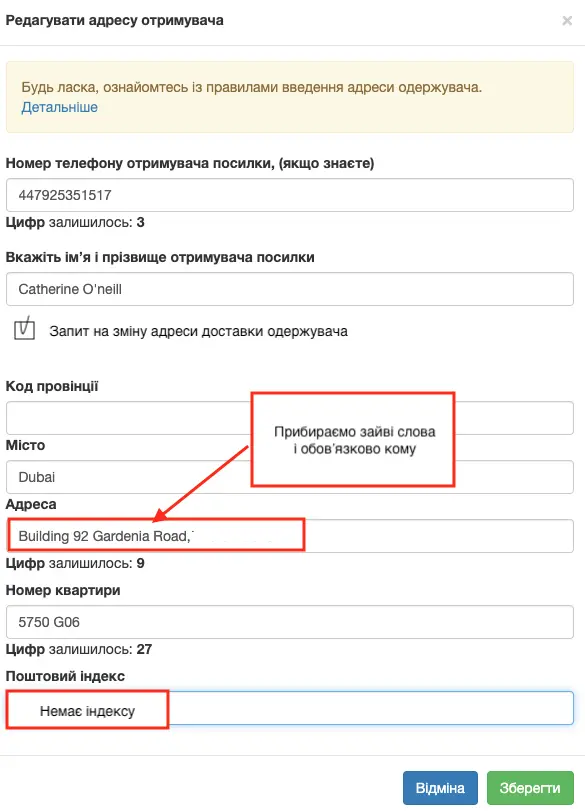
Basic rules for editing the address when sending UPS Express in your Western Bid account:
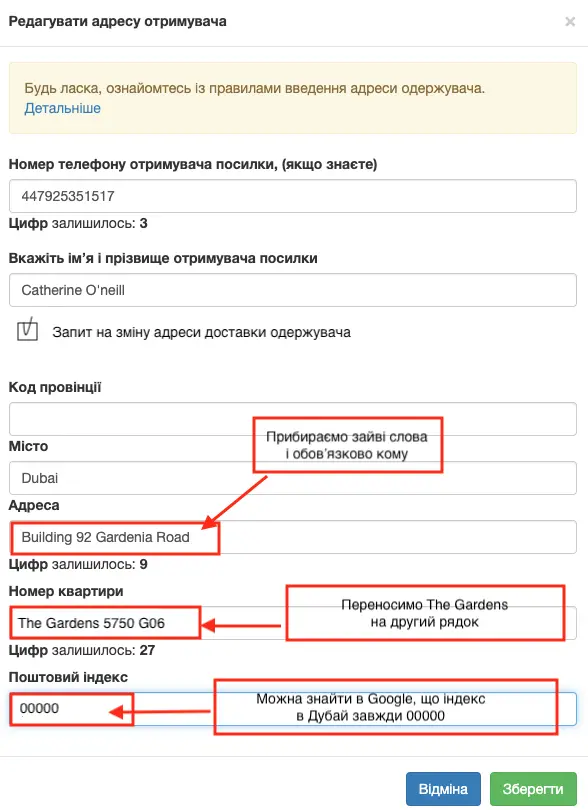
- The “Address” line must contain only the street name and house number, without a comma. Maximum 35 characters.
- The “Apartment number” line may contain not only the apartment number itself but also the floor, company name, or hotel name. Maximum 35 characters, commas are allowed.
- The “State/Province Code” line must be filled only for the following countries: United States, Canada, Australia. In the United States and Canada there are only two-letter state codes, for example for Florida we enter FL. However in Canada there can be both two-letter and three-letter codes. For all other countries, state (province) codes are not considered by UPS at all, and filling them in may cause an error when creating the shipment. Even if the state/province field is filled, simply remove all information from this field (except for the United States, Canada and Australia).
- The “Postal/ZIP Code” field must always be filled and must not contain spaces. Postcodes in the UK and Canada consist of letters and digits. Most often in these countries postcodes are written with spaces, but UPS does not allow spaces in the postcode, so they need to be removed.
- US ZIP codes are written in two ways: either five digits (for example: 35040) or like this: 35040-5054. Usually both formats pass the check, but if by any chance such a ZIP code does not pass, remove the hyphen and the digits after the hyphen.
- The “Recipient’s name” field must be filled and must contain only the first and last name. If during checkout the buyer provided additional information in the name field (for example, the company name), then all extra information should be removed or moved to the second address line – the Apartment number field.
- It is very good if the “Recipient’s phone number” field is filled. In this case UPS will always be able to contact the recipient in case of any problems arise. Here is an example of editing a non-standard address. Country – United Arab Emirates.
And here’s how to do it correctly:
Which recipient data can be changed
| Element | Can be changed | Comment |
|---|---|---|
| Recipient’s first and last name | Yes | Can be changed in My Account during shipment creation or via a request to change the address. |
| Delivery address (street, building, apartment) | Yes | Format can be adjusted for UPS, but the destination country cannot be changed. |
| Recipient’s phone number | Yes | It is strongly recommended to include the recipient’s phone number for UPS and consolidated shipments. |
| Destination country | No | The destination country cannot be changed; for another country a new shipment is required. |
Frequently Asked Questions about changing the recipient's address
Is it possible to change the delivery address for a UPS package that has already been shipped to the customer?
Is it possible to change the delivery address for a UPS package that has already been shipped to the customer?
No, only the recipient themselves can change the address and delivery time of an already shipped UPS parcel via UPS tools; the seller cannot change the address after dispatch.
How many times can I change the recipient's address per month?
How many times can I change the recipient's address per month?
For items up to 500 $ you can instantly change up to 20 addresses per month; after that, and for items over 500 $, each request will require manual approval by an administrator.
Can the destination country be changed in the address?
Can the destination country be changed in the address?
No, you cannot change the destination country; if the buyer indicated a different country, you need to arrange a new shipment to the correct country.
What should you do if UPS does not accept the address entered by the customer?
What should you do if UPS does not accept the address entered by the customer?
Contact the buyer via email or the marketplace chat, ask for a properly formatted address, then edit it in the Western Bid Personal Cabinet and save the changes before sending the package.
