Brief Summary
To list a product on Etsy, you need to go to Shop Manager, navigate to the Listings section, create a new listing, and fill in all the product card fields step by step. It is important not only to add photos, descriptions, and prices, but also to correctly calculate shipping, packaging, and product options right away.
This article provides a basic guide: what products can be sold on Etsy, where exactly to create the listing, which fields need to be filled out, and what to do after publishing to sync sales with the Western Bid system.
Who this article is for
- For beginners who are listing products on Etsy for the first time.
- For sellers who have restored an old shop or operate through a partner shop.
- For those who still don’t understand where exactly a new listing is created on Etsy.
- For those who want to quickly understand how to fill out the product card, how to correctly add shipping, and how to synchronize orders with Western Bid.
The main points
Listing a product on Etsy is technically simple: Shop Manager → Listings → Add a listing → fill out the card → publish. The main mistake is not in the publish button itself, but in incomplete or weak listing details.
Most important before publishing — check that the product complies with Etsy rules, add photos, description, price, options, delivery, and packaging, and after publishing, ensure that the store is synchronized with the shipping system.
What to do before publishing a product on Etsy
| Step | What to do | Common mistake | What to check |
|---|---|---|---|
| 1. Log into the store | Enter your Etsy account and open Shop Manager | Working outside the store’s admin area | Are you in the store’s admin panel |
| 2. Creating a listing | Open Listings and click Add a listing | Searching for creating a product not in the correct menu | Has a new product tab opened |
| 3. Filling out the listing | Add photos, description, details, price, options | Publishing a listing with incomplete data | Are all key fields filled out |
| 4. Shipping | Calculate shipping, packaging, and local costs | Not accounting for packaging or shipping within Ukraine | Does the final price not lead to a loss |
| 5. Publishing | Click “Publish” | Not checking the listing before launching | Is the listing visible in Listings and in the store |

To work with products (their publication, editing, etc.), you need to go to the Listings section. To create a new product card (listing), click on the Add a listing button in the top right corner.
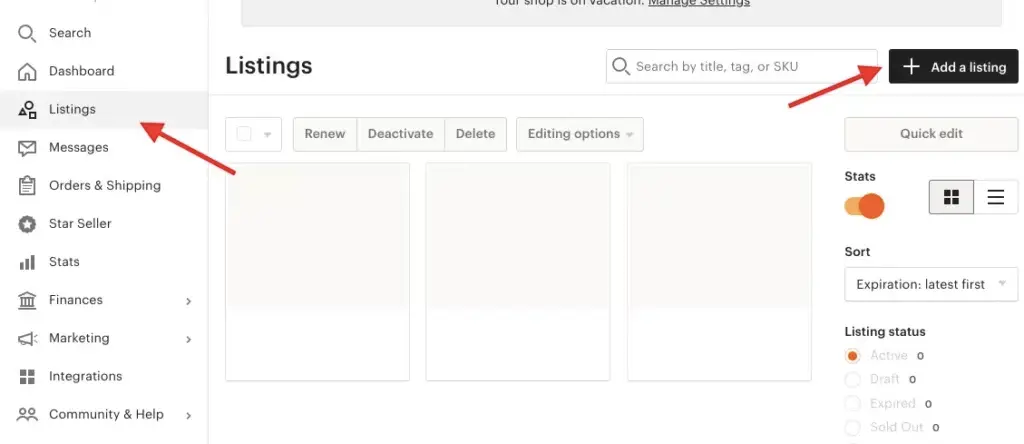
Product Publication Checklist on Etsy
- Make sure your product complies with Etsy policies.
- Go to Shop Manager and open Listings.
- Create a new listing via Add a listing.
- Add photos, description, details, and all mandatory fields.
- Calculate shipping, packaging, and additional costs.
- Check the product price and options, if available.
- Publish the product and verify it appears in the shop.
- If needed, synchronize the shop with Western Bid or upload transactions via CSV file.
Expert Opinion
Publishing a product on Etsy is technically simple, but a strong listing begins not with the “Publish” button, but with a correctly filled-out card, accurately calculated shipping, and readiness for further order processing.
Editorial summary based on Western Bid article materials
Frequently Asked Questions
What products can be listed on Etsy?
What products can be listed on Etsy?
The page explicitly states that Etsy allows selling handmade items, vintage goods over 20 years old, as well as party supplies or craft materials.
Where exactly on Etsy is the new product created?
Where exactly on Etsy is the new product created?
You need to log in to your Etsy account, go to Shop Manager, then open the Listings section and click the Add a listing button in the top right corner.
What needs to be filled in the product card before publishing?
What needs to be filled in the product card before publishing?
The article explicitly states that all fields need to be filled out in detail: photo, description, details, product price, delivery, and product options as needed.
How to calculate shipping for an Etsy listing?
How to calculate shipping for an Etsy listing?
The page recommends using the Western Bid calculator. It is also separately noted that the cost of packaging and, if necessary, shipping across Ukraine with Nova Poshta should be added to the delivery cost or to the product price.
How to publish a product after filling out the card?
How to publish a product after filling out the card?
After filling in all the fields, you need to click the black “Publish” button at the bottom right of the screen.
What to do next
Start with a properly created listing: check if the product is allowed on Etsy, fill out the card completely, calculate shipping, and only after that publish. This approach reduces errors right from the start.
